When the system restarts after a blackout (an improper shutdown), I am no longer able to access the Plex app on either PC or mobile.
To get the Plex Server working again, I have to go to the AppCenter on my QNAP, stop the Plex app (which appears to be running), and restart it. Only then can I access Plex on PC and mobile.
TS-264 - Version QTS 5.2.7.3297 (2025/10/24)
Plex Media Server V1.42.2
Thanks for any idea on how to correct this behaviour.
If your NAS is still running after a power outage, you’re in luck. It’s quite possible that your NAS won’t boot after a power outage. If you want to be prepared, buy a small UPS (Uninterruptible Power Supply). This will ensure your NAS shuts down properly during a power outage.
I’d like to follow up and ask if everything returned to normal after you restarting the device?
Or does the same situation occur every single time? If the issue persists, you might want to consider reinstalling the software to see if that resolves the problem. Thank you for your feedback!
When I experience a power outage, and then the power comes back, the Qnap restarts on its own. I do not need to restart anything, everything goes back to the way it was before (except for a synchronization job I handle manually).
PLEX server restarts too, but it appears unavailable when I try to access it on my PC or smartphone.
I only need to restart it manually (that is, stop it and restart it) to be able to access it from a PC or a smartphone.
I also have a ROON server on Qnap, and I do not need to do anything, it works when the power comes back to my Qnap.
As you point out, it might be an issue with the app itself. I will try to uninstall it and see what happens. Or maybe see if somebody over at Plex is experiencing somthing similar.
Could just be a timing issue. You may need to delay the startup of plex, the system may not be “ready” for it to run.
Also, since you had a power outage, it could be rebuild / checking your drive and file system after such an event, further delaying the startup process.
So far, I have not been keen on spending money on a UPS since here (I am from Italy), power outages are extremely rare… however, lately something is sucking up too much electricity at home, causing the outages.
Oh, and my Qnap restarted on its own every single time there has been an outage!
I do have to post a warning though, that even if rare, power outages are not good for electronics. This could easily cause disk corruption, disk failure, or complete NAS failure. If your data is of value to you, and you don’t want a bad surprise one day, I hope that you have an appropriate backup strategy in place. Not just for power outages, but for accidental deletion, malware, etc as well.
You should also check the integrity of the data after an outage. The admin UI should be prompting you to perform system a file system check after these type of events. While this is guaranteed to recover any lost data or find all the potential issues, it would verify some integrity of the volume and would be a really good idea to run. You may also want to closely monitor the drives for SMART errors and the like to see if they show any negative trends.
Ideally of course, a UPS would allow for an orderly shutdown on these rare events.
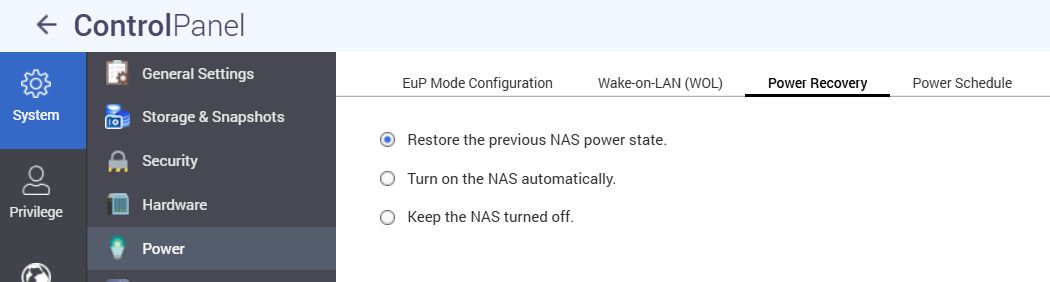
I was not aware of that setting, which is exactly how it appears on your screenshot.
I used to own a WD NAS, which was easier to manage because of its very few settings. Unfortunately, I did not have the time to dive deep into all Qnap setting. I will take some time to look into the basic settings.
I will definitely buy a UPS. Important data has actually its own backup online, and the rest is just media (music, video, and few pics). Still, I prefer to play safe.
THe admin is not prompting me to perform a file system check after outage… is there a setting also for that?
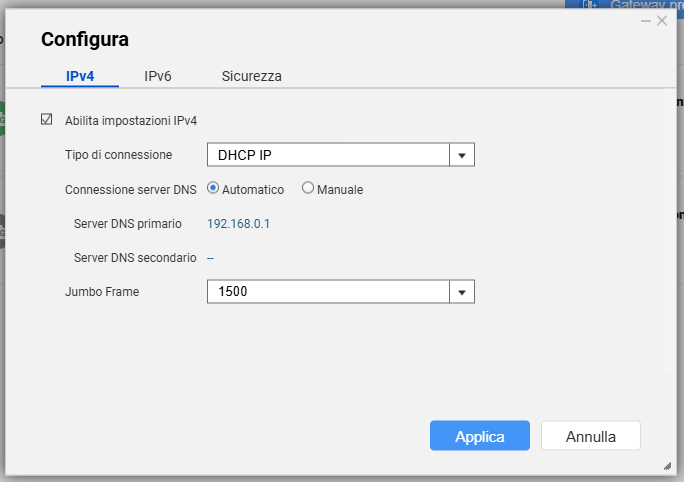
I would not use DHCP on a NAS. You should set it to a static address outside of your DHCP range on your router. Or assign a static lease on your router to the NAS.
You always want to make sure the NAS IP does not change.