Applicable products
- QNAP NAS running Plex Media Server 1.43.2 or earlier.
Overview
Plex2Shell refers to four vulnerabilities in the third-party application Plex Media Server, affecting version 1.43.2 and earlier: CVE-2026-96652, CVE-2026-96654, CVE-2026-96655, and CVE-2026-96656. Each presents limited risk on its own, but chained together they allow an unauthenticated remote attacker to execute arbitrary code with the privileges of the Plex Media Server process.
According to Plex, a public proof of concept was released on October 16, and internet-facing servers that have not been updated have since been subject to widespread attacks. Compromised servers have been used to run cryptocurrency miners and proxy software.
The fixed release, Plex Media Server 1.43.3 (build 1.43.3.10861 and later), is available in the QNAP App Center. The vulnerabilities reside in Plex Media Server only; QNAP operating systems such as QTS and QuTS hero are not themselves affected.
Important: If Plex on your NAS was reachable from the Internet while running 1.43.2 or earlier, updating alone is not enough. Treat the NAS as potentially compromised and complete the clean reinstall, compromise check, and credential reset described below.
Q1. Is my NAS affected?
Only a NAS with Plex Media Server 1.43.2 or earlier installed is affected. QNAP operating systems are not themselves affected, and a NAS without Plex needs no action.
To check the version:
- App Center > My Apps shows 1.43.3 for the patched release.
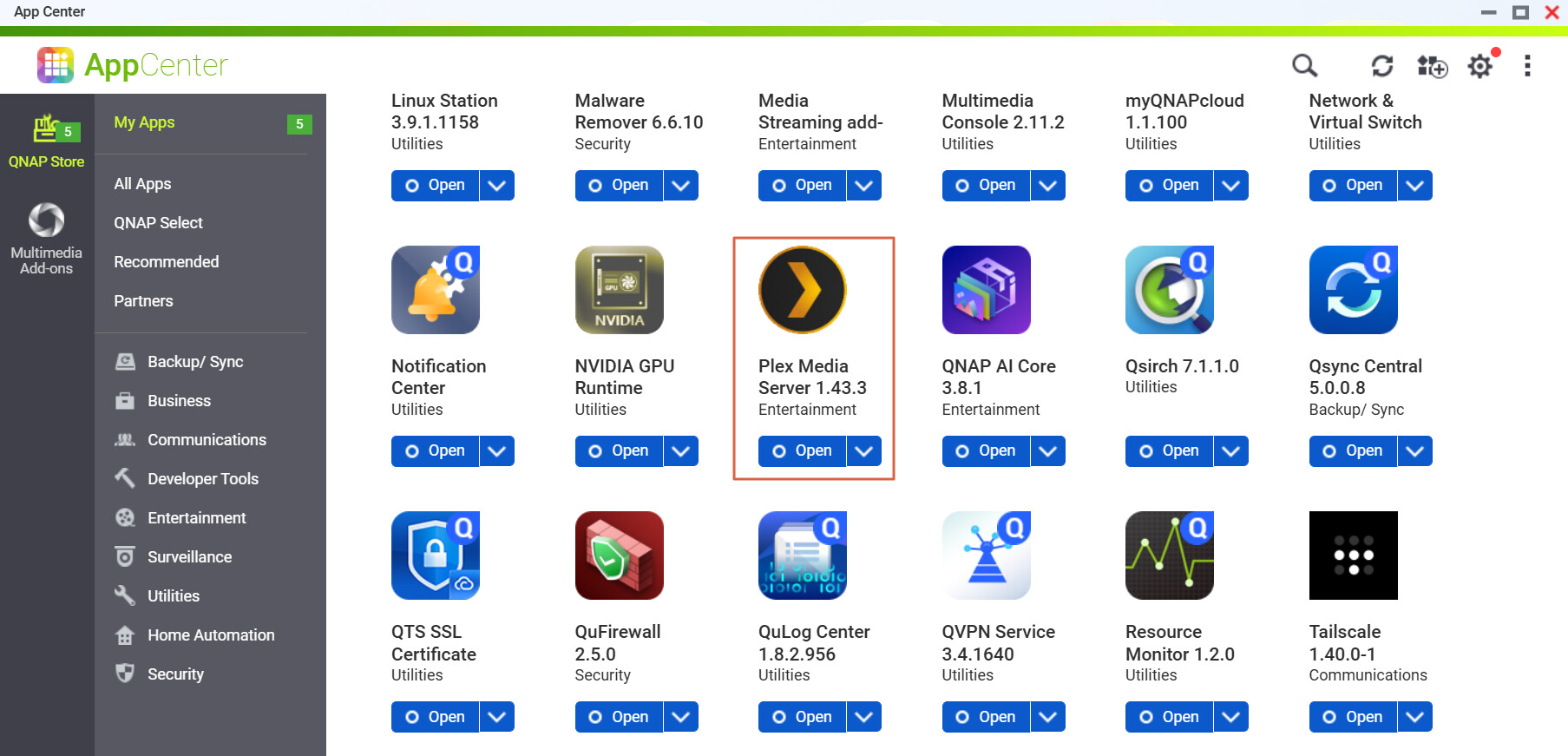
Q2. How do I know whether my Plex was reachable from the Internet?
If any of the following applied while you were running 1.43.2 or earlier, treat the NAS as potentially compromised and complete Q4 to Q8:
- Remote Access was enabled in Plex Web > Settings > Remote Access;
- your router forwards port 32400;
- UPnP is enabled on your router and Plex Remote Access was enabled (Plex opens the port automatically);
- Plex was exposed through myQNAPcloud auto router configuration or any other means.
Q3. How do I update?
- Go to App Center > My Apps > Plex Media Server > Update.
- Confirm that the version is 1.43.3. or later.
If no update is shown, refresh App Center and make sure the NAS can reach the Internet.
Later Plex releases (with other security fixes) will also be published once verified; update again when they appear, but do not wait for them – update now.
Q4. I have updated. Is there anything else to do?
- If Plex was never reachable from the Internet: updating is enough; we still recommend the exposure-reduction settings in Q7.
- If it was reachable: updating only closes the entry point and does not remove anything already installed. Complete Q5 (clean reinstall), Q6 (indicators of compromise), and Q8 (credential reset), in that order.
Q5. How do I perform a clean reinstall?
- If you would like QNAP to help confirm a compromise, first copy the Plex Logs folder (under “Plex Media Server” in the PlexData shared folder) to another location.
- Go to App Center > My Apps > Plex Media Server and select Remove.
- Use File Station to check whether a “Plex Media Server” folder still exists in the PlexData shared folder. If it does, do not reuse it: at minimum delete everything in the Codecs folder and review Preferences.xml for transcoder-related options you did not set.
- Reinstall 1.43.3 or later from App Center.
- After reinstalling, do not restore the previous contents of the Codecs folder. Plex will download the components it needs.
Q6. How do I check for indicators of compromise?
Look for any of the following:
- Unknown processes started by Plex Media Server, in particular names such as
myawesomeproxy,mylovelyminer, orx12345; - unfamiliar
.soor.dllfiles in the Codecs folder; - outbound connections to
proxystream.st; - sustained high CPU usage while nothing is playing (see Resource Monitor);
- a Malware Remover detection (for example, detection code MR2104).
If you find any of these, do not just remove the suspicious program; other components or persistence mechanisms may remain. Complete the clean reinstall in Q5 and the credential reset in Q8. If you need QNAP’s help, preserve the Logs folder first and open a case with Technical Support.
Q7. How do I reduce exposure?
- Disable Remote Access in Plex Web > Settings > Remote Access if you do not need it;
- remove the port 32400 forwarding rule on your router and disable UPnP; remove any myQNAPcloud auto router configuration for Plex;
- use a VPN (for example, QVPN Service on the NAS) when you need remote access;
- keep QTS or QuTS hero and all apps up to date, and enable Malware Remover scheduled scans and QuFirewall;
- if your device is beyond its software support period and cannot run the latest operating system, review its overall security posture as well.
Q8. Which credentials should I reset?
- Plex account: sign out all devices in your Plex account settings first, then change your Plex password. Because the administrator token may have been exposed, changing the password alone is not enough.
- NAS accounts: shared folders that Plex Media Server could access, and credentials stored on the NAS, should be treated as potentially exposed. Change the NAS administrator and user passwords, enable two-step verification, and rotate passwords or access keys stored by other services on the NAS (for example, backup jobs and cloud connections).
Q9. Will later Plex versions be published? Should I wait?
Later Plex releases will be published in App Center once verified; they contain other security fixes. Version 1.43.3 already fixes Plex2Shell, so do not wait.
Q10. How do I get help from QNAP?
Open a case with QNAP Technical Support and include your Plex version, whether Plex was reachable from the Internet, and any indicators you found. If you want QNAP to help confirm a compromise, preserve the Logs folder before removing Plex.