Hello,
QuTS hero h5.2.9.3492
80GB RAM
The main pool uses two NVMe disks, which host most applications
The issue I am having is:
The system starts slowing down randomly after a day or two.
Most apps start freezing, or don’t load at all, during this time.
My virtualization station would not load when the top issue start’s occurring.
I tried a few troubleshooting steps.
I tried moving my application to a different pool. didn’t work
When I reboot, it works temporarily, then after a few days, it occurs again. not a permanent fix
Does anyone have this issue or know where I can start troubleshooting it?
What does the rest of the disk config look like?
What disk models?
Any cache besides ARC active?
Hello,
how is the setting for the ARC RAM Usage ?
Storage global settings | QuTS hero h5.2.x
The rest of the disk is this:
Pool 2 - 4 x 4TB HDD - raid 5
Being cached by PCIe 1x m.2 NVME
Pool 3 - 4 x 10TB HDD - raid 5
Being cached by PCIe 1x m.2 NVME
pool 4 - 4 x 512 SSD - Raid 10 - used for VMs
ARC RAM usage set to 60%
I have not seen the memory usage past 55% global usage.
Would ARC cause this issue?
Could it be a corruption in the main file system?
I would remove the cache and try again.
We thought QuTS was safe from cache issues, but issues with system slowdowns (and RAID re-silvering) have crept up
I will try.
How do I enable system debug modeso that when this happens, I can get some logs?
I don’t think there is logs for slowdowns.
dmesg and top would be candidates for errors and RAM/CPU usage (via CLI)
caching seems to be broken in quts hero. I had similar experience and just stop using it all together.
Did you just open a new topic @Blaze7810 ?
Why ? (I removed the duplicate topic)
This one had two problems I was separating them. But I can keep it here.
I cleared the cache, but I still see the problem, especially with the virtualization station app.
Not sure what else I can do
They seem to be connected though (when the storage slows down, your VMStation also does not load).
Just want to make sure we do not fracture resources towards a solution
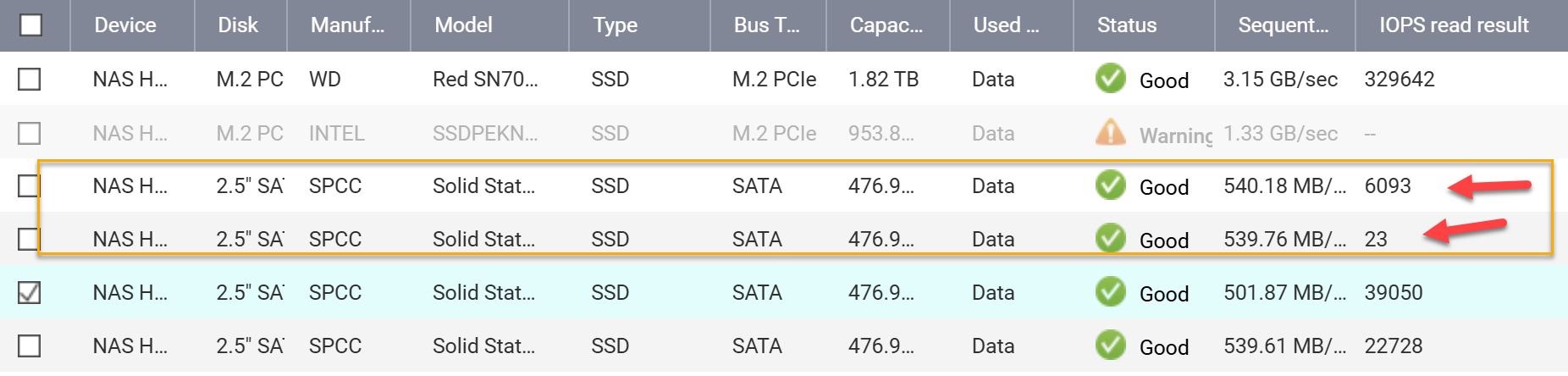
I am not sure, but after running some performance tests. I think 2 of my ssd’s are not working properly.
The M.2 I will be changing soon. But the two ssd’s are not running at proper speeds. check screenshot. this might be the problem
NA9D
May 26, 2026, 1:12pm
14
Uh, you have an SSD with a Warning on it. What is the warning. Could that be causing your additional issues? When flash gets worn, the erase/write cycles start to get long.
That one (m.2) is for the main os. I’m replacing that soon. But when I moved the VMs to the other pool, everything worked properly. The two I highlighted, I RMA’ed and am getting replacements.
IT seems like it was a disk issue.
The OS is on all disks (spanning RAID1), unless you mean the system pool. The system pool should always be redundant, as you will lose all apps if you swap/fail that drive.
The IOPS on both drives you mentioned look quite abnormal, especially the one showing “32”. We recommend backing up your data as soon as possible and replacing the drives, then we can see if the issue you mentioned persists afterwards. Thanks!