QNAP NAS detects DNS server cannot resolve hosts

I’m getting an error popup on my TS-453 Pro that says

The system has detected that your DNS server cannot resolve
hosts, and some applications might not work properly.

Please go to "Control Panel > Network > Network & Virtual
Switch > Interfaces " and check if the DNS server and default
gateway is correct. You may contact your ISP (Internet Service
Provider) for the DNS server information.

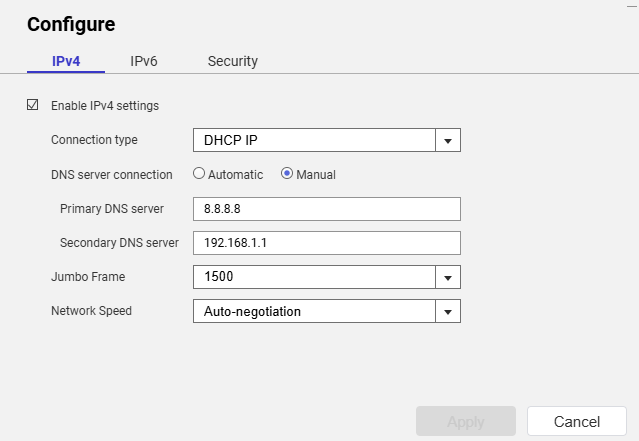
The config settings for the network connection on the NAS specify connection type as DHCP and the DNS server connection as Automatic, my OPNSense router provides an IP address and shows the DNS server address as 192.168.1.1 which is my router’s address.

I’ve checked the logs for the Unbound DNS service that’s configured in OPNSense and the entries for anything received from the NAS show that everything seems fine:

2026-08-14T13:06:32Informationalunbound[35157:2] info: 192.168.1.70 auth.myqnapcloud.io. A IN NOERROR 0.000000 0 234
2026-08-14T13:06:32Informationalunbound[35157:2] info: 192.168.1.70 auth.myqnapcloud.io. A IN

From an SSH session I’ve tried pinging a known domain (theregister.com) but I get a “bad address” error. If I check the file /etc/resolve.conf it contains one entry “nameserver 127.0.1.1” and not the 192.168.1.1 that I would expect.

Anyway, can someone explain why I’m seeing the aforementioned DNS warning from my QNAP NAS?

Tried a manual IP setting (outside of DHCP scope) to test?

[quote=“dolbyman, post:2, topic:6670, full:true”]
Tried a manual IP setting (outside of DHCP scope) to test?
[/quote]Not yet but I have set DNS manually:


I’ll see if that makes a difference but tbh It shouldn’t make any difference. Other devices on my home LAN work just fine with DNS.

Hmmmm it does seem that my NAS cannot access the internet, is there any diagnostic tool in QTS to test that? I can ping public IP address from an ssh session on the NAS…

Disabled or removed QuFirewall?

I’ve removed QuFirewall

You could try this

Tried that, got a bunch of errors:

[John@NASI ~]$ sudo /mnt/ext/opt/netmgr/netmgr.sh reset_all_settings_to_default
Password:
None
[John@NASI ~]$ sudo /etc/init.d/network.sh reset_network_config_to_default

[16:19:57] cmd: /usr/local/bin/nacli reset_config
[16:19:58] cmd: /usr/local/bin/nacli reset_wifi_phy_status_conf
[16:19:58] cmd: /usr/local/bin/nacli reset_wired_eap_conf
[16:19:59] cmd: /usr/sbin/nmcli ddns resetcfg
[16:19:59] cmd: /usr/local/bin/nacli reset_dhcpserver_conf
[16:19:59] cmd: /usr/local/bin/nacli migrate_dhcpserver_conf
[16:19:59] cmd: /usr/local/bin/nacli reset_radvd_conf{"data":"","error":0}

[16:19:59] cmd: /usr/local/bin/nacli migrate_nat{"data":"","error":0}
{"data":"","error":0}

[16:19:59] cmd: /usr/local/bin/nacli bootup_static_route
[16:19:59] cmd: /usr/local/bin/nacli reset_vlan_driver_conf[John@NASI ~]$ sudo /                             etc/init.d/network.sh clean-restart

[16:20:17] cmd: /usr/local/sbin/qsh NetworkService.ncaas.write_back path=all
[16:20:17] cmd: /sbin/daemon_mgr nmd ignore /usr/sbin/nmd.sh
[16:20:18] ERROR: cmd(/sbin/daemon_mgr nmd ignore /usr/sbin/nmd.sh) failed, ret=                             1
[16:20:18] cmd: nmcli nmd stop_all
[16:20:23] cmd: kill 11365
[16:20:23] cmd: /sbin/daemon_mgr ifd ignore /usr/local/bin/ifd
[16:20:23] ERROR: cmd(/sbin/daemon_mgr ifd ignore /usr/local/bin/ifd) failed, re                             t=1
[16:20:23] cmd: kill 11317
[16:20:23] cmd: /usr/local/bin/nacli stop
[16:20:37] cmd: kill 11304
[16:20:37] cmd: kill 11498
[16:20:37] cmd: /usr/local/bin/nacli write_hostsmodprobe: module x_tables not fo                             und in modules.dep
modprobe: module nf_conntrack not found in modules.dep
modprobe: module nf_defrag_ipv4 not found in modules.dep
modprobe: module ip_tables not found in modules.dep
modprobe: module xt_tcpudp not found in modules.dep
modprobe: module nf_nat_ipv4 not found in modules.dep
modprobe: module nf_nat_masquerade_ipv4 not found in modules.dep
modprobe: module nf_conntrack_ipv4 not found in modules.dep
modprobe: module iptable_filter not found in modules.dep
modprobe: module iptable_mangle not found in modules.dep
RTNETLINK answers: No such file or directory
iptables: Chain already exists.

[16:20:39] cmd: /sbin/ifconfig eth0 0.0.0.0 up &
[16:20:39] cmd: /sbin/ifconfig eth1 0.0.0.0 up &
[16:20:39] cmd: /sbin/ifconfig eth2 0.0.0.0 up &
[16:20:39] cmd: /sbin/ifconfig eth3 0.0.0.0 up &
[16:20:39] cmd: /sbin/hal_event --net_scan
[16:20:40] cmd: /sbin/daemon_mgr ifd start /usr/local/bin/ifd
[16:20:40] ERROR: cmd(/sbin/daemon_mgr ifd start /usr/local/bin/ifd) failed, ret                             =1
[16:20:40] cmd: /usr/local/bin/nacli start
[16:20:45] cmd: /sbin/daemon_mgr nmd start /usr/sbin/nmd.sh
[16:20:45] ERROR: cmd(/sbin/daemon_mgr nmd start /usr/sbin/nmd.sh) failed, ret=1
[16:20:45] cmd: /usr/local/bin/sbgw
[16:20:46] cmd: /usr/local/bin/nacli do_wifi_pcie_autoconnectmodprobe: module x_                             tables not found in modules.dep
modprobe: module nf_conntrack not found in modules.dep
modprobe: module nf_defrag_ipv4 not found in modules.dep
modprobe: module ip_tables not found in modules.dep
modprobe: module xt_tcpudp not found in modules.dep
modprobe: module nf_nat_ipv4 not found in modules.dep
modprobe: module nf_nat_masquerade_ipv4 not found in modules.dep
modprobe: module nf_conntrack_ipv4 not found in modules.dep
modprobe: module iptable_filter not found in modules.dep
modprobe: module iptable_mangle not found in modules.dep
boot_setup_mangle_prerouting has been setup before.
start ip_monitor
pidfile /var/run/network/netmgr/ip_monitor.pid already exist. Daemon already running?
/bin/bash: /etc/config/nm_script/*.sh: No such file or directory

I’m fairly sure I’ve tried those commands previously to no avail.

Could my uninstalling QuFirewall have caused the loss of connectivity? I can browse my QNAP’s file shares from other machines in the network and the fact that I can connect to the web UI indicates that the LAN is fine.

re-enable the original ‘admin’ account and use that and try again

I ran those commands using an alternative administration account that has the same rights as ‘admin’

I understand (saw that and sudo in the command output), but some functions just don’t work on alternative accounts, so try it via ‘admin’.

As check to ensure you have a “default gateway” configured.

One of those things the vswitch resets does reset as well
We’d suggest running traceroute 8.8.8.8 from the NAS SSH console first, to see where the connection to Google (8.8.8.8) is breaking down. Could you share the results with us? Thanks!

Logged in as admin and ran the following commands:

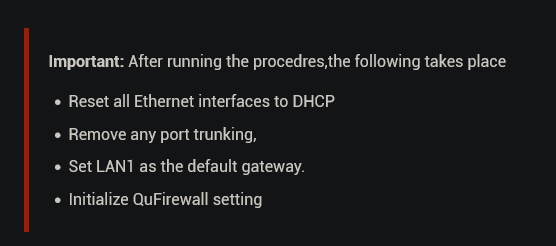
sudo /mnt/ext/opt/netmgr/netmgr.sh reset_all_settings_to_default
sudo /etc/init.d/network.sh reset_network_config_to_default
sudo /etc/init.d/network.sh clean-restart

Output is as follows

[~] # sudo /mnt/ext/opt/netmgr/netmgr.sh reset_all_settings_to_default
None
[~] # sudo /etc/init.d/network.sh reset_network_config_to_default

[11:00:11] cmd: /usr/local/bin/nacli reset_config
[11:00:12] cmd: /usr/local/bin/nacli reset_wifi_phy_status_conf
[11:00:12] cmd: /usr/local/bin/nacli reset_wired_eap_conf
[11:00:12] cmd: /usr/sbin/nmcli ddns resetcfg
[11:00:13] cmd: /usr/local/bin/nacli reset_dhcpserver_conf
[11:00:13] cmd: /usr/local/bin/nacli migrate_dhcpserver_conf
[11:00:13] cmd: /usr/local/bin/nacli reset_radvd_conf{"data":"","error":0}

[11:00:13] cmd: /usr/local/bin/nacli migrate_nat{"data":"","error":0}
{"data":"","error":0}

[11:00:13] cmd: /usr/local/bin/nacli bootup_static_route
[11:00:13] cmd: /usr/local/bin/nacli reset_vlan_driver_conf[~] #
[~] #
[~] # sudo /etc/init.d/network.sh clean-restart

[11:00:35] cmd: /usr/local/sbin/qsh NetworkService.ncaas.write_back path=all
[11:00:35] cmd: /sbin/daemon_mgr nmd ignore /usr/sbin/nmd.sh
[11:00:35] ERROR: cmd(/sbin/daemon_mgr nmd ignore /usr/sbin/nmd.sh) failed, ret=1
[11:00:35] cmd: nmcli nmd stop_all
[11:00:41] cmd: kill 11278
[11:00:41] cmd: /sbin/daemon_mgr ifd ignore /usr/local/bin/ifd
[11:00:41] ERROR: cmd(/sbin/daemon_mgr ifd ignore /usr/local/bin/ifd) failed, ret=1
[11:00:41] cmd: kill 11228
[11:00:41] cmd: /usr/local/bin/nacli stop
[11:00:56] cmd: kill 11215
[11:00:56] cmd: kill 11405
[11:00:56] cmd: /usr/local/bin/nacli write_hostsmodprobe: module x_tables not found in modules.dep
modprobe: module nf_conntrack not found in modules.dep
modprobe: module nf_defrag_ipv4 not found in modules.dep
modprobe: module ip_tables not found in modules.dep
modprobe: module xt_tcpudp not found in modules.dep
modprobe: module nf_nat_ipv4 not found in modules.dep
modprobe: module nf_nat_masquerade_ipv4 not found in modules.dep
modprobe: module nf_conntrack_ipv4 not found in modules.dep
modprobe: module iptable_filter not found in modules.dep
modprobe: module iptable_mangle not found in modules.dep
RTNETLINK answers: No such file or directory
iptables: Chain already exists.

[11:00:59] cmd: /sbin/ifconfig eth0 0.0.0.0 up &
[11:00:59] cmd: /sbin/ifconfig eth1 0.0.0.0 up &
[11:00:59] cmd: /sbin/ifconfig eth2 0.0.0.0 up &
[11:00:59] cmd: /sbin/ifconfig eth3 0.0.0.0 up &
[11:00:59] cmd: /sbin/hal_event --net_scan
[11:00:59] cmd: /sbin/daemon_mgr ifd start /usr/local/bin/ifd
[11:00:59] ERROR: cmd(/sbin/daemon_mgr ifd start /usr/local/bin/ifd) failed, ret=1
[11:00:59] cmd: /usr/local/bin/nacli start
[11:01:04] cmd: /sbin/daemon_mgr nmd start /usr/sbin/nmd.sh
[11:01:04] ERROR: cmd(/sbin/daemon_mgr nmd start /usr/sbin/nmd.sh) failed, ret=1
[11:01:04] cmd: /usr/local/bin/sbgw
[11:01:05] cmd: /usr/local/bin/nacli do_wifi_pcie_autoconnectmodprobe: module x_tables not found in modules.dep
modprobe: module nf_conntrack not found in modules.dep
modprobe: module nf_defrag_ipv4 not found in modules.dep
modprobe: module ip_tables not found in modules.dep
modprobe: module xt_tcpudp not found in modules.dep
modprobe: module nf_nat_ipv4 not found in modules.dep
modprobe: module nf_nat_masquerade_ipv4 not found in modules.dep
modprobe: module nf_conntrack_ipv4 not found in modules.dep
modprobe: module iptable_filter not found in modules.dep
modprobe: module iptable_mangle not found in modules.dep
boot_setup_mangle_prerouting has been setup before.
start ip_monitor
pidfile /var/run/network/netmgr/ip_monitor.pid already exist. Daemon already running?
/bin/bash: /etc/config/nm_script/*.sh: No such file or directory

[11:01:32] cmd: /sbin/qpkg_cli --disable container-station[~] #
[~] #
[~] #
[~] #
[~] # [~] # sudo /mnt/ext/opt/netmgr/netmgr.sh reset_all_settings_to_default
-sh: [~]: command not found
modprobe: module nf_defrag_ipv4 not found in modules.dep
modprobe: module ip_tables not found in modules.dep
[~] # None
-sh: None: command not found
modprobe: module nf_nat_ipv4 not found in modules.dep
modprobe: module nf_nat_masquerade_ipv4 not found in modules.dep
modprobe: module nf_conntrack_ipv4 not found in modules.dep
modprobe: module iptable_filter not found in modules.dep
modprobe: module iptable_mangle not found in modules.dep
boot_setup_mangle_prerouting has been setup before.
start ip_monitor
pidfile /var/run/network/netmgr/ip_monitor.pid already exist. Daemon already running?
/bin/bash: /etc/config/nm_script/*.sh: No such file or directory

[11:01:32] cmd: /sbin/qpkg_cli --disable container-station[~] #[~] # [~] # sudo /etc/init.d/network.sh reset_network_config_to_default
-sh: [~]: command not found
[~] #
[~] # [11:00:11] cmd: /usr/local/bin/nacli reset_config
-sh: [11:00:11]: command not found
[~] # [11:00:12] cmd: /usr/local/bin/nacli reset_wifi_phy_status_conf
-sh: [11:00:12]: command not found
[~] # [11:00:12] cmd: /usr/local/bin/nacli reset_wired_eap_conf
-sh: [11:00:12]: command not found
[~] # [11:00:12] cmd: /usr/sbin/nmcli ddns resetcfg
-sh: [11:00:12]: command not found
[~] # [11:00:13] cmd: /usr/local/bin/nacli reset_dhcpserver_conf
-sh: [11:00:13]: command not found
[~] # [11:00:13] cmd: /usr/local/bin/nacli migrate_dhcpserver_conf
-sh: [11:00:13]: command not found
[~] # [11:00:13] cmd: /usr/local/bin/nacli reset_radvd_conf{"data":"","error":0}
-sh: [11:00:13]: command not found
[~] #
[~] # [11:00:13] cmd: /usr/local/bin/nacli migrate_nat{"data":"","error":0}
-sh: [11:00:13]: command not found
[~] # {"data":"","error":0}
-sh: data:: command not found
[~] #
[~] # [11:00:13] cmd: /usr/local/bin/nacli bootup_static_route
-sh: [11:00:13]: command not found
[~] # [11:00:13] cmd: /usr/local/bin/nacli reset_vlan_driver_conf[~] #
-sh: [11:00:13]: command not found
[~] # [~] #
-sh: [~]: command not found
[~] # [~] # sudo /etc/init.d/network.sh clean-restart
-sh: [~]: command not found
[~] #
[~] # [11:00:35] cmd: /usr/local/sbin/qsh NetworkService.ncaas.write_back path=all
-sh: [11:00:35]: command not found
[~] # [11:00:35] cmd: /sbin/daemon_mgr nmd ignore /usr/sbin/nmd.sh
-sh: [11:00:35]: command not found
[~] # [11:00:35] ERROR: cmd(/sbin/daemon_mgr nmd ignore /usr/sbin/nmd.sh) failed, ret=1
-sh: syntax error near unexpected token `('
[~] # [11:00:35] cmd: nmcli nmd stop_all
-sh: [11:00:35]: command not found
[~] # [11:00:41] cmd: kill 11278
-sh: [11:00:41]: command not found
[~] # [11:00:41] cmd: /sbin/daemon_mgr ifd ignore /usr/local/bin/ifd
-sh: [11:00:41]: command not found
[~] # [11:00:41] ERROR: cmd(/sbin/daemon_mgr ifd ignore /usr/local/bin/ifd) failed, ret=1
-sh: syntax error near unexpected token `('
[~] # [11:00:41] cmd: kill 11228
-sh: [11:00:41]: command not found
[~] # [11:00:41] cmd: /usr/local/bin/nacli stop
-sh: [11:00:41]: command not found
[~] # [11:00:56] cmd: kill 11215
-sh: [11:00:56]: command not found
[~] # [11:00:56] cmd: kill 11405
-sh: [11:00:56]: command not found
[~] # [11:00:56] cmd: /usr/local/bin/nacli write_hostsmodprobe: module x_tables not found in modules.dep
-sh: [11:00:56]: command not found
[~] # modprobe: module nf_conntrack not found in modules.dep
-sh: modprobe:: command not found
[~] # modprobe: module nf_defrag_ipv4 not found in modules.dep
-sh: modprobe:: command not found
[~] # modprobe: module ip_tables not found in modules.dep
-sh: modprobe:: command not found
[~] # modprobe: module xt_tcpudp not found in modules.dep
-sh: modprobe:: command not found
[~] # modprobe: module nf_nat_ipv4 not found in modules.dep
-sh: modprobe:: command not found
[~] # modprobe: module nf_nat_masquerade_ipv4 not found in modules.dep
-sh: modprobe:: command not found
[~] # modprobe: module nf_conntrack_ipv4 not found in modules.dep
-sh: modprobe:: command not found
[~] # modprobe: module iptable_filter not found in modules.dep
-sh: modprobe:: command not found
[~] # modprobe: module iptable_mangle not found in modules.dep
-sh: modprobe:: command not found
[~] # RTNETLINK answers: No such file or directory
-sh: RTNETLINK: command not found
[~] # iptables: Chain already exists.
-sh: iptables:: command not found
[~] # iptables: Chain already exists.
-sh: iptables:: command not found
[~] #
[~] # [11:00:59] cmd: /sbin/ifconfig eth0 0.0.0.0 up &
[1] 29863
[~] # [11:00:5-sh: [11:00:59]: command not found
9] cmd: /sbin/ifconfig eth1 0.0.0.0 up &
[2] 29864
[1]   Done(127)               [11:00:59] cmd: /sbin/ifconfig eth0 0.0.0.0 up
[~] # [11:0-sh: [11:00:59]: command not found
0:59] cmd: /sbin/ifconfig eth2 0.0.0.0 up &
[3] 29865
[2]   Done(127)               [11:00:59] cmd: /sbin/ifconfig eth1 0.0.0.0 up
[~] # [11:0-sh: [11:00:59]: command not found
0:59] cmd: /sbin/ifconfig eth3 0.0.0.0 up &
[4] 29866
[3]   Done(127)               [11:00:59] cmd: /sbin/ifconfig eth2 0.0.0.0 up
[~] # [11:0-sh: [11:00:59]: command not found
0:59] cmd: /sbin/hal_event --net_scan
-sh: [11:00:59]: command not found
[4]+  Done(127)               [11:00:59] cmd: /sbin/ifconfig eth3 0.0.0.0 up
[~] # [11:00:59] cmd: /sbin/daemon_mgr ifd start /usr/local/bin/ifd
-sh: [11:00:59]: command not found
[~] # [11:00:59] ERROR: cmd(/sbin/daemon_mgr ifd start /usr/local/bin/ifd) failed, ret=1
-sh: syntax error near unexpected token `('
[~] # [11:00:59] cmd: /usr/local/bin/nacli start
-sh: [11:00:59]: command not found
[~] # [11:01:04] cmd: /sbin/daemon_mgr nmd start /usr/sbin/nmd.sh
-sh: [11:01:04]: command not found
[~] # [11:01:04] ERROR: cmd(/sbin/daemon_mgr nmd start /usr/sbin/nmd.sh) failed, ret=1
-sh: syntax error near unexpected token `('
[~] # [11:01:04] cmd: /usr/local/bin/sbgw
-sh: [11:01:04]: command not found
[~] # [11:01:05] cmd: /usr/local/bin/nacli do_wifi_pcie_autoconnectmodprobe: module x_tables not found in modules.dep
-sh: [11:01:05]: command not found
[~] # modprobe: module nf_conntrack not found in modules.dep
-sh: modprobe:: command not found
[~] # modprobe: module nf_defrag_ipv4 not found in modules.dep
-sh: modprobe:: command not found
[~] # modprobe: module ip_tables not found in modules.dep
-sh: modprobe:: command not found
[~] # modprobe: module xt_tcpudp not found in modules.dep
-sh: modprobe:: command not found
[~] # modprobe: module nf_nat_ipv4 not found in modules.dep
-sh: modprobe:: command not found
[~] # modprobe: module nf_nat_masquerade_ipv4 not found in modules.dep
-sh: modprobe:: command not found
[~] # modprobe: module nf_conntrack_ipv4 not found in modules.dep
-sh: modprobe:: command not found
[~] # modprobe: module iptable_filter not found in modules.dep
-sh: modprobe:: command not found
[~] # modprobe: module iptable_mangle not found in modules.dep
-sh: modprobe:: command not found
[~] # boot_setup_mangle_prerouting has been setup before.
-sh: boot_setup_mangle_prerouting: command not found
[~] # start ip_monitor
-sh: start: command not found
[~] # pidfile /var/run/network/netmgr/ip_monitor.pid already exist. Daemon already running?
-sh: pidfile: command not found
[~] # /bin/bash: /etc/config/nm_script/*.sh: No such file or directory
-sh: /bin/bash:: No such file or directory
[~] #
[~] # [11:01:32] cmd: /sbin/qpkg_cli --disable container-station[~] #
-sh: [11:01:32]: command not found

I’ll reboot to see what happens…

If you’re logged in as ‘admin’ (and I can see that you are), you don’t need to use sudo. :nerd_face:

Here’s the result from traceroute 8.8.8.8

traceroute to 8.8.8.8 (8.8.8.8), 30 hops max, 46 byte packets
 1  192.168.1.1 (192.168.1.1)  0.451 ms  8.8.8.8 (8.8.8.8)  0.387 ms  192.168.1.1 (192.168.1.1)  1.075 ms

Doh! Of course, I had to use sudo when I was using my alternative admin account :slight_smile:

Out of interest I did traceroute 8.8.8.8 -v which results in lots of output and one of the hops shows:

72 bytes from 192.168.1.1 to 192.168.1.1: icmp type 3 (Dest Unreachable) code 3
 4: x42000045
 8: x00404150
12: xd2661140
16: x4601a8c0
20: x0101a8c0
24: x3500ea9d
28: x614b2e00
32: x00014c79
36: x00000100
40: x00000000
44: x38013801
48: x38013801
52: x2d6e6907
56: x72646461
60: x70726104
64: x0c000061
68: x00000000

Performing the 3 second reset and following @dolbyman 's suggestion on how to reset network & virtual switch setting via command line hasn’t worked. I’m very much stuck :frowning: