Ich bekomme auf meinem TS-453 Pro ein Fehler-Popup mit folgender Meldung:
Das System hat festgestellt, dass Ihr DNS-Server Hosts nicht auflösen
kann und einige Anwendungen möglicherweise nicht richtig funktionieren.

Bitte gehen Sie zu „Systemsteuerung > Netzwerk > Netzwerk & Virtual
Switch > Schnittstellen“ und prüfen Sie, ob der DNS-Server und das
Standard-Gateway korrekt sind. Sie können Ihren ISP (Internet Service Provider)
für DNS-Server-Informationen kontaktieren.
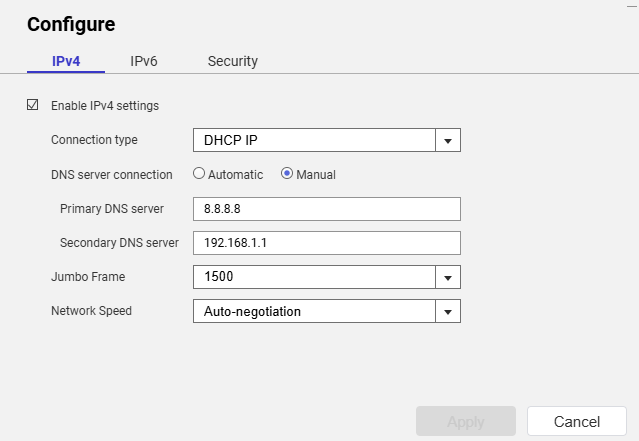
Die Konfigurationseinstellungen für die Netzwerkverbindung auf dem NAS geben als Verbindungstyp DHCP und als DNS-Server-Verbindung „Automatisch“ an. Mein OPNSense Router vergibt eine IP-Adresse und zeigt die DNS-Server-Adresse als 192.168.1.1, was die Adresse des Routers ist.
Ich habe die Logs des Unbound DNS-Diensts in OPNSense überprüft, und die Einträge zu Anfragen vom NAS zeigen, dass anscheinend alles in Ordnung ist:
2026-08-14T13:06:32Informationalunbound[35157:2] info: 192.168.1.70 auth.myqnapcloud.io. A IN NOERROR 0.000000 0 234
2026-08-14T13:06:32Informationalunbound[35157:2] info: 192.168.1.70 auth.myqnapcloud.io. A IN
Von einer SSH-Session aus habe ich versucht, eine bekannte Domain (theregister.com) anzupingen, aber ich erhalte den Fehler „bad address“. Wenn ich die Datei /etc/resolve.conf überprüfe, steht dort nur der Eintrag „nameserver 127.0.1.1“ und nicht die erwartete 192.168.1.1.
Kann mir jemand erklären, warum ich diese DNS-Warnung von meinem QNAP NAS sehe?
[quote=“dolbyman, post:2, topic:6670, full:true”]
Hast du zur Probe eine manuelle IP-Konfiguration (außerhalb des DHCP-Bereichs) ausprobiert?
[/quote]Noch nicht, aber ich habe das DNS manuell eingestellt:
Ich werde sehen, ob das einen Unterschied macht, aber ehrlich gesagt sollte es keinen Unterschied machen. Andere Geräte in meinem Heim-LAN funktionieren mit DNS problemlos.
Hmmmm, es sieht so aus, als könnte mein NAS nicht auf das Internet zugreifen. Gibt es in QTS ein Diagnose-Tool, mit dem man das testen kann? Ich kann von einer SSH-Sitzung auf dem NAS eine öffentliche IP-Adresse anpingen…
Ich habe das ausprobiert und eine Menge Fehler bekommen:
[John@NASI ~]$ sudo /mnt/ext/opt/netmgr/netmgr.sh reset_all_settings_to_default
Password:
None
[John@NASI ~]$ sudo /etc/init.d/network.sh reset_network_config_to_default

[16:19:57] cmd: /usr/local/bin/nacli reset_config
[16:19:58] cmd: /usr/local/bin/nacli reset_wifi_phy_status_conf
[16:19:58] cmd: /usr/local/bin/nacli reset_wired_eap_conf
[16:19:59] cmd: /usr/sbin/nmcli ddns resetcfg
[16:19:59] cmd: /usr/local/bin/nacli reset_dhcpserver_conf
[16:19:59] cmd: /usr/local/bin/nacli migrate_dhcpserver_conf
[16:19:59] cmd: /usr/local/bin/nacli reset_radvd_conf{"data":"","error":0}

[16:19:59] cmd: /usr/local/bin/nacli migrate_nat{"data":"","error":0}
{"data":"","error":0}

[16:19:59] cmd: /usr/local/bin/nacli bootup_static_route
[16:19:59] cmd: /usr/local/bin/nacli reset_vlan_driver_conf[John@NASI ~]$ sudo /                             etc/init.d/network.sh clean-restart

[16:20:17] cmd: /usr/local/sbin/qsh NetworkService.ncaas.write_back path=all
[16:20:17] cmd: /sbin/daemon_mgr nmd ignore /usr/sbin/nmd.sh
[16:20:18] ERROR: cmd(/sbin/daemon_mgr nmd ignore /usr/sbin/nmd.sh) failed, ret=                             1
[16:20:18] cmd: nmcli nmd stop_all
[16:20:23] cmd: kill 11365
[16:20:23] cmd: /sbin/daemon_mgr ifd ignore /usr/local/bin/ifd
[16:20:23] ERROR: cmd(/sbin/daemon_mgr ifd ignore /usr/local/bin/ifd) failed, re                             t=1
[16:20:23] cmd: kill 11317
[16:20:23] cmd: /usr/local/bin/nacli stop
[16:20:37] cmd: kill 11304
[16:20:37] cmd: kill 11498
[16:20:37] cmd: /usr/local/bin/nacli write_hostsmodprobe: module x_tables not fo                             und in modules.dep
modprobe: module nf_conntrack not found in modules.dep
modprobe: module nf_defrag_ipv4 not found in modules.dep
modprobe: module ip_tables not found in modules.dep
modprobe: module xt_tcpudp not found in modules.dep
modprobe: module nf_nat_ipv4 not found in modules.dep
modprobe: module nf_nat_masquerade_ipv4 not found in modules.dep
modprobe: module nf_conntrack_ipv4 not found in modules.dep
modprobe: module iptable_filter not found in modules.dep
modprobe: module iptable_mangle not found in modules.dep
RTNETLINK answers: No such file or directory
iptables: Chain already exists.
iptables: Chain already exists.

[16:20:39] cmd: /sbin/ifconfig eth0 0.0.0.0 up &
[16:20:39] cmd: /sbin/ifconfig eth1 0.0.0.0 up &
[16:20:39] cmd: /sbin/ifconfig eth2 0.0.0.0 up &
[16:20:39] cmd: /sbin/ifconfig eth3 0.0.0.0 up &
[16:20:39] cmd: /sbin/hal_event --net_scan
[16:20:40] cmd: /sbin/daemon_mgr ifd start /usr/local/bin/ifd
[16:20:40] ERROR: cmd(/sbin/daemon_mgr ifd start /usr/local/bin/ifd) failed, ret                             =1
[16:20:40] cmd: /usr/local/bin/nacli start
[16:20:45] cmd: /sbin/daemon_mgr nmd start /usr/sbin/nmd.sh
[16:20:45] ERROR: cmd(/sbin/daemon_mgr nmd start /usr/sbin/nmd.sh) failed, ret=1
[16:20:45] cmd: /usr/local/bin/sbgw
[16:20:46] cmd: /usr/local/bin/nacli do_wifi_pcie_autoconnectmodprobe: module x_                             tables not found in modules.dep
modprobe: module nf_conntrack not found in modules.dep
modprobe: module nf_defrag_ipv4 not found in modules.dep
modprobe: module ip_tables not found in modules.dep
modprobe: module xt_tcpudp not found in modules.dep
modprobe: module nf_nat_ipv4 not found in modules.dep
modprobe: module nf_nat_masquerade_ipv4 not found in modules.dep
modprobe: module nf_conntrack_ipv4 not found in modules.dep
modprobe: module iptable_filter not found in modules.dep
modprobe: module iptable_mangle not found in modules.dep
boot_setup_mangle_prerouting has been setup before.
start ip_monitor
pidfile /var/run/network/netmgr/ip_monitor.pid already exist. Daemon already running?
/bin/bash: /etc/config/nm_script/*.sh: No such file or directory
Ich bin ziemlich sicher, dass ich diese Befehle vorher schon ohne Erfolg ausprobiert habe.
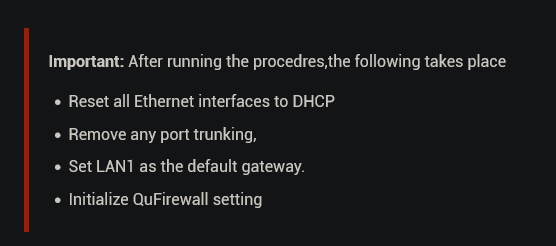
Könnte das Deinstallieren von QuFirewall die Verbindung verloren haben? Ich kann über andere Geräte im Netzwerk auf die Dateifreigaben meines QNAP zugreifen und dass ich mit dem Web-UI verbinden kann, zeigt, dass das LAN okay ist.
Ich verstehe das (habe das auch in der Befehlsausgabe gesehen, ebenso wie sudo), aber einige Funktionen funktionieren einfach nicht mit alternativen Accounts. Probier es deshalb mal mit „admin“.