Saya mendapatkan pop-up error pada TS-453 Pro saya yang berbunyi
Sistem telah mendeteksi bahwa server DNS Anda tidak dapat
menyelesaikan host, dan beberapa aplikasi mungkin tidak
berfungsi dengan baik.

Silakan masuk ke "Control Panel > Network > Network & Virtual
Switch > Interfaces" dan cek apakah server DNS dan default
gateway sudah benar. Anda dapat menghubungi ISP (Internet
Service Provider) Anda untuk informasi server DNS.
Pengaturan konfigurasi koneksi jaringan di NAS saya menetapkan tipe koneksi sebagai DHCP dan koneksi server DNS sebagai Otomatis, router OPNSense saya memberikan alamat IP dan menampilkan alamat server DNS sebagai 192.168.1.1, yang merupakan alamat router saya.
Saya sudah memeriksa log layanan Unbound DNS yang dikonfigurasi di OPNSense dan entri apa pun yang diterima dari NAS menunjukkan semuanya tampak baik-baik saja:
2026-08-14T13:06:32Informationalunbound[35157:2] info: 192.168.1.70 auth.myqnapcloud.io. A IN NOERROR 0.000000 0 234
2026-08-14T13:06:32Informationalunbound[35157:2] info: 192.168.1.70 auth.myqnapcloud.io. A IN
Dari sesi SSH saya telah mencoba ping ke domain yang dikenal (theregister.com) tapi saya mendapatkan error “bad address”. Jika saya cek file /etc/resolve.conf, isinya hanya satu entri “nameserver 127.0.1.1” dan bukan 192.168.1.1 seperti yang saya harapkan.
Jadi, bisakah seseorang menjelaskan mengapa saya melihat peringatan DNS seperti yang disebutkan dari QNAP NAS saya?
[quote=“dolbyman, post:2, topic:6670, full:true”]
Sudah mencoba mengatur IP manual (di luar cakupan DHCP) untuk mengetes?
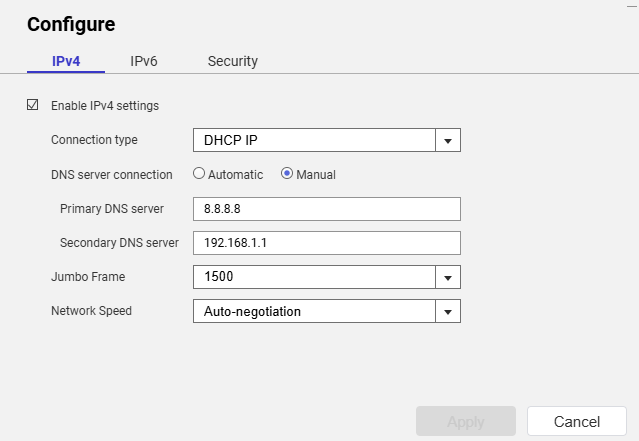
[/quote]Belum, tapi saya sudah mengatur DNS secara manual:
Hmmmm sepertinya NAS saya tidak bisa mengakses internet, apakah ada alat diagnostik di QTS untuk mengujinya? Saya bisa melakukan ping ke alamat IP publik dari sesi ssh di NAS…
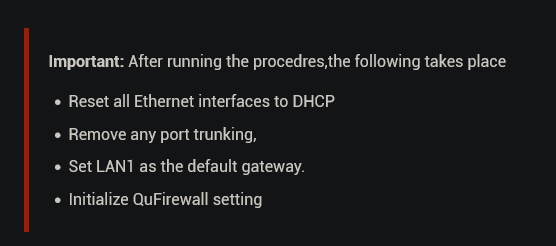
[John@NASI ~]$ sudo /mnt/ext/opt/netmgr/netmgr.sh reset_all_settings_to_default
Password:
None
[John@NASI ~]$ sudo /etc/init.d/network.sh reset_network_config_to_default

[16:19:57] cmd: /usr/local/bin/nacli reset_config
[16:19:58] cmd: /usr/local/bin/nacli reset_wifi_phy_status_conf
[16:19:58] cmd: /usr/local/bin/nacli reset_wired_eap_conf
[16:19:59] cmd: /usr/sbin/nmcli ddns resetcfg
[16:19:59] cmd: /usr/local/bin/nacli reset_dhcpserver_conf
[16:19:59] cmd: /usr/local/bin/nacli migrate_dhcpserver_conf
[16:19:59] cmd: /usr/local/bin/nacli reset_radvd_conf{"data":"","error":0}

[16:19:59] cmd: /usr/local/bin/nacli migrate_nat{"data":"","error":0}
{"data":"","error":0}

[16:19:59] cmd: /usr/local/bin/nacli bootup_static_route
[16:19:59] cmd: /usr/local/bin/nacli reset_vlan_driver_conf[John@NASI ~]$ sudo /                             etc/init.d/network.sh clean-restart

[16:20:17] cmd: /usr/local/sbin/qsh NetworkService.ncaas.write_back path=all
[16:20:17] cmd: /sbin/daemon_mgr nmd ignore /usr/sbin/nmd.sh
[16:20:18] ERROR: cmd(/sbin/daemon_mgr nmd ignore /usr/sbin/nmd.sh) failed, ret=                             1
[16:20:18] cmd: nmcli nmd stop_all
[16:20:23] cmd: kill 11365
[16:20:23] cmd: /sbin/daemon_mgr ifd ignore /usr/local/bin/ifd
[16:20:23] ERROR: cmd(/sbin/daemon_mgr ifd ignore /usr/local/bin/ifd) failed, re                             t=1
[16:20:23] cmd: kill 11317
[16:20:23] cmd: /usr/local/bin/nacli stop
[16:20:37] cmd: kill 11304
[16:20:37] cmd: kill 11498
[16:20:37] cmd: /usr/local/bin/nacli write_hostsmodprobe: module x_tables not fo                             und in modules.dep
modprobe: module nf_conntrack not found in modules.dep
modprobe: module nf_defrag_ipv4 not found in modules.dep
modprobe: module ip_tables not found in modules.dep
modprobe: module xt_tcpudp not found in modules.dep
modprobe: module nf_nat_ipv4 not found in modules.dep
modprobe: module nf_nat_masquerade_ipv4 not found in modules.dep
modprobe: module nf_conntrack_ipv4 not found in modules.dep
modprobe: module iptable_filter not found in modules.dep
modprobe: module iptable_mangle not found in modules.dep
RTNETLINK answers: No such file or directory
iptables: Chain already exists.
iptables: Chain already exists.

[16:20:39] cmd: /sbin/ifconfig eth0 0.0.0.0 up &
[16:20:39] cmd: /sbin/ifconfig eth1 0.0.0.0 up &
[16:20:39] cmd: /sbin/ifconfig eth2 0.0.0.0 up &
[16:20:39] cmd: /sbin/ifconfig eth3 0.0.0.0 up &
[16:20:39] cmd: /sbin/hal_event --net_scan
[16:20:40] cmd: /sbin/daemon_mgr ifd start /usr/local/bin/ifd
[16:20:40] ERROR: cmd(/sbin/daemon_mgr ifd start /usr/local/bin/ifd) failed, ret                             =1
[16:20:40] cmd: /usr/local/bin/nacli start
[16:20:45] cmd: /sbin/daemon_mgr nmd start /usr/sbin/nmd.sh
[16:20:45] ERROR: cmd(/sbin/daemon_mgr nmd start /usr/sbin/nmd.sh) failed, ret=1
[16:20:45] cmd: /usr/local/bin/sbgw
[16:20:46] cmd: /usr/local/bin/nacli do_wifi_pcie_autoconnectmodprobe: module x_                             tables not found in modules.dep
modprobe: module nf_conntrack not found in modules.dep
modprobe: module nf_defrag_ipv4 not found in modules.dep
modprobe: module ip_tables not found in modules.dep
modprobe: module xt_tcpudp not found in modules.dep
modprobe: module nf_nat_ipv4 not found in modules.dep
modprobe: module nf_nat_masquerade_ipv4 not found in modules.dep
modprobe: module nf_conntrack_ipv4 not found in modules.dep
modprobe: module iptable_filter not found in modules.dep
modprobe: module iptable_mangle not found in modules.dep
boot_setup_mangle_prerouting telah diatur sebelumnya.
start ip_monitor
pidfile /var/run/network/netmgr/ip_monitor.pid sudah ada. Daemon sudah berjalan?
/bin/bash: /etc/config/nm_script/*.sh: Tidak ada file atau direktori seperti itu
Saya cukup yakin sudah mencoba perintah-perintah itu sebelumnya dan tetap gagal.
Apakah uninstall QuFirewall bisa menyebabkan hilangnya konektivitas? Saya masih bisa mengakses share file QNAP dari mesin lain di jaringan, dan fakta bahwa saya bisa mengakses web UI menandakan LAN-nya baik-baik saja.
Saya paham (melihat itu dan sudo di output perintah), tapi beberapa fungsi memang tidak bisa berjalan di akun alternatif, jadi coba saja lewat ‘admin’.