QNAP NAS 偵測到 DNS 伺服器無法解析主機名稱

我的 TS-453 Pro 出現一個錯誤彈窗,訊息如下:

系統偵測到您的 DNS 伺服器無法解析主機,一些應用程式可能無法正常運作。

請前往「控制台 > 網路 > 網路與虛擬交換器 > 介面」,檢查 DNS 伺服器和預設閘道是否正確。您可以向 ISP(網際網路服務供應商)詢問相關的 DNS 伺服器資訊。

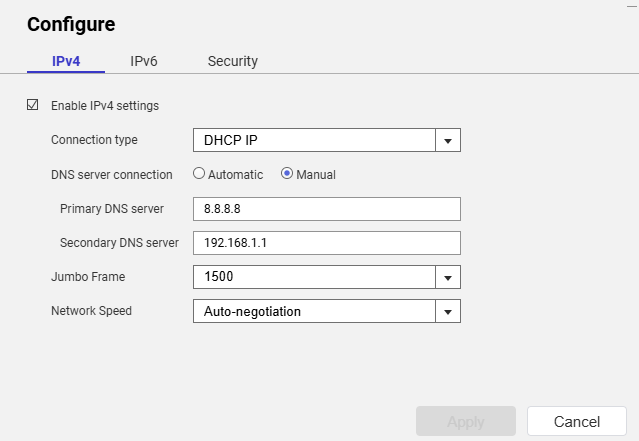
NAS 網路連線的設定指定連線型態為 DHCP、DNS 伺服器連線為自動,我的 OPNSense 路由器提供 IP 位址,並顯示 DNS 伺服器位址為 192.168.1.1,就是我的路由器位址。

我查閱了 OPNSense 上 Unbound DNS 服務的日誌,收到 NAS 的相關記錄顯示一切狀況正常:

2026-08-14T13:06:32Informationalunbound[35157:2] info: 192.168.1.70 auth.myqnapcloud.io. A IN NOERROR 0.000000 0 234
2026-08-14T13:06:32Informationalunbound[35157:2] info: 192.168.1.70 auth.myqnapcloud.io. A IN

從 SSH 連線我試著 ping 一個已知的網域(theregister.com),但出現「bad address」錯誤。如果我檢查 /etc/resolve.conf 檔案,裡面只有「nameserver 127.0.1.1」這個設定,並沒有我預期的 192.168.1.1。

請問,有人可以解釋為什麼我的 QNAP NAS 會出現前述的 DNS 警告嗎?

有嘗試手動設定 IP(在 DHCP 範圍之外)來測試嗎?

[quote=“dolbyman, post:2, topic:6670, full:true”]
試過手動設定 IP(在 DHCP 範圍之外)來測試嗎?
[/quote]我還沒試過,不過我已經手動設定了 DNS:


我會看看這樣有沒有什麼不同,但說實話應該沒什麼影響。家裡其他裝置在我的區域網都用 DNS 沒問題。

嗯,看起來我的 NAS 無法連接到網路,QTS 有沒有什麼診斷工具可以測試這個狀況?我可以在 NAS 的 ssh 連線下 ping 公網 IP 地址……

停用還是移除 QuFirewall(QuFirewall)?

我已移除 QuFirewall

你可以試試這個

我試過那些指令,結果出現了一堆錯誤:

[John@NASI ~]$ sudo /mnt/ext/opt/netmgr/netmgr.sh reset_all_settings_to_default
Password:
None
[John@NASI ~]$ sudo /etc/init.d/network.sh reset_network_config_to_default

[16:19:57] cmd: /usr/local/bin/nacli reset_config
[16:19:58] cmd: /usr/local/bin/nacli reset_wifi_phy_status_conf
[16:19:58] cmd: /usr/local/bin/nacli reset_wired_eap_conf
[16:19:59] cmd: /usr/sbin/nmcli ddns resetcfg
[16:19:59] cmd: /usr/local/bin/nacli reset_dhcpserver_conf
[16:19:59] cmd: /usr/local/bin/nacli migrate_dhcpserver_conf
[16:19:59] cmd: /usr/local/bin/nacli reset_radvd_conf{"data":"","error":0}

[16:19:59] cmd: /usr/local/bin/nacli migrate_nat{"data":"","error":0}
{"data":"","error":0}

[16:19:59] cmd: /usr/local/bin/nacli bootup_static_route
[16:19:59] cmd: /usr/local/bin/nacli reset_vlan_driver_conf[John@NASI ~]$ sudo /                             etc/init.d/network.sh clean-restart

[16:20:17] cmd: /usr/local/sbin/qsh NetworkService.ncaas.write_back path=all
[16:20:17] cmd: /sbin/daemon_mgr nmd ignore /usr/sbin/nmd.sh
[16:20:18] ERROR: cmd(/sbin/daemon_mgr nmd ignore /usr/sbin/nmd.sh) failed, ret=                             1
[16:20:18] cmd: nmcli nmd stop_all
[16:20:23] cmd: kill 11365
[16:20:23] cmd: /sbin/daemon_mgr ifd ignore /usr/local/bin/ifd
[16:20:23] ERROR: cmd(/sbin/daemon_mgr ifd ignore /usr/local/bin/ifd) failed, re                             t=1
[16:20:23] cmd: kill 11317
[16:20:23] cmd: /usr/local/bin/nacli stop
[16:20:37] cmd: kill 11304
[16:20:37] cmd: kill 11498
[16:20:37] cmd: /usr/local/bin/nacli write_hostsmodprobe: module x_tables not fo                             und in modules.dep
modprobe: module nf_conntrack not found in modules.dep
modprobe: module nf_defrag_ipv4 not found in modules.dep
modprobe: module ip_tables not found in modules.dep
modprobe: module xt_tcpudp not found in modules.dep
modprobe: module nf_nat_ipv4 not found in modules.dep
modprobe: module nf_nat_masquerade_ipv4 not found in modules.dep
modprobe: module nf_conntrack_ipv4 not found in modules.dep
modprobe: module iptable_filter not found in modules.dep
modprobe: module iptable_mangle not found in modules.dep
RTNETLINK answers: No such file or directory
iptables: Chain already exists.

[16:20:39] cmd: /sbin/ifconfig eth0 0.0.0.0 up &
[16:20:39] cmd: /sbin/ifconfig eth1 0.0.0.0 up &
[16:20:39] cmd: /sbin/ifconfig eth2 0.0.0.0 up &
[16:20:39] cmd: /sbin/ifconfig eth3 0.0.0.0 up &
[16:20:39] cmd: /sbin/hal_event --net_scan
[16:20:40] cmd: /sbin/daemon_mgr ifd start /usr/local/bin/ifd
[16:20:40] ERROR: cmd(/sbin/daemon_mgr ifd start /usr/local/bin/ifd) failed, ret                             =1
[16:20:40] cmd: /usr/local/bin/nacli start
[16:20:45] cmd: /sbin/daemon_mgr nmd start /usr/sbin/nmd.sh
[16:20:45] ERROR: cmd(/sbin/daemon_mgr nmd start /usr/sbin/nmd.sh) failed, ret=1
[16:20:45] cmd: /usr/local/bin/sbgw
[16:20:46] cmd: /usr/local/bin/nacli do_wifi_pcie_autoconnectmodprobe: module x_                             tables not found in modules.dep
modprobe: module nf_conntrack not found in modules.dep
modprobe: module nf_defrag_ipv4 not found in modules.dep
modprobe: module ip_tables not found in modules.dep
modprobe: module xt_tcpudp not found in modules.dep
modprobe: module nf_nat_ipv4 not found in modules.dep
modprobe: module nf_nat_masquerade_ipv4 not found in modules.dep
modprobe: module nf_conntrack_ipv4 not found in modules.dep
modprobe: module iptable_filter not found in modules.dep
modprobe: module iptable_mangle not found in modules.dep
boot_setup_mangle_prerouting has been setup before.
start ip_monitor
pidfile /var/run/network/netmgr/ip_monitor.pid already exist. Daemon already running?
/bin/bash: /etc/config/nm_script/*.sh: No such file or directory

我很確定之前也執行過這些指令但沒有任何效果。

有沒有可能是我手動解除安裝 QuFirewall(QuFirewall)導致連線問題?我可以在網路上的其他設備瀏覽我的 QNAP(QNAP)檔案分享,而且也能登入網頁管理介面,這表示區域網路(LAN)是正常的。

重新啟用原有的『admin』帳號,然後用那個帳號再試一次

我用一個擁有和「admin」相同權限的替代管理帳戶來執行這些指令

我明白(看到那個和指令輸出裡的 sudo),但有些功能在其他帳號上就是無法運作,所以請試著用『admin』來執行看看。

請檢查是否已設定「default gateway」(預設閘道)。
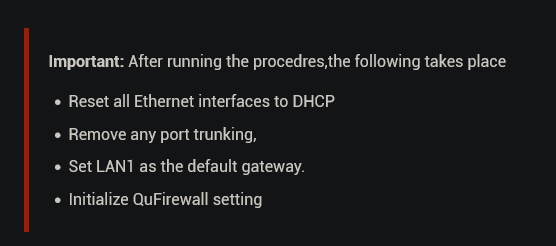
vswitch 重置時,其中有一項也會被重置

我們建議你先在 NAS SSH 主控台上執行 traceroute 8.8.8.8,看看連線到 Google(8.8.8.8)時在哪裡斷掉。可以和我們分享一下結果嗎?謝謝!

Logged in as admin and ran the following commands:

sudo /mnt/ext/opt/netmgr/netmgr.sh reset_all_settings_to_default
sudo /etc/init.d/network.sh reset_network_config_to_default
sudo /etc/init.d/network.sh clean-restart

Output is as follows

[~] # sudo /mnt/ext/opt/netmgr/netmgr.sh reset_all_settings_to_default
None
[~] # sudo /etc/init.d/network.sh reset_network_config_to_default

[11:00:11] cmd: /usr/local/bin/nacli reset_config
[11:00:12] cmd: /usr/local/bin/nacli reset_wifi_phy_status_conf
[11:00:12] cmd: /usr/local/bin/nacli reset_wired_eap_conf
[11:00:12] cmd: /usr/sbin/nmcli ddns resetcfg
[11:00:13] cmd: /usr/local/bin/nacli reset_dhcpserver_conf
[11:00:13] cmd: /usr/local/bin/nacli migrate_dhcpserver_conf
[11:00:13] cmd: /usr/local/bin/nacli reset_radvd_conf{"data":"","error":0}

[11:00:13] cmd: /usr/local/bin/nacli migrate_nat{"data":"","error":0}
{"data":"","error":0}

[11:00:13] cmd: /usr/local/bin/nacli bootup_static_route
[11:00:13] cmd: /usr/local/bin/nacli reset_vlan_driver_conf[~] #
[~] #
[~] # sudo /etc/init.d/network.sh clean-restart

[11:00:35] cmd: /usr/local/sbin/qsh NetworkService.ncaas.write_back path=all
[11:00:35] cmd: /sbin/daemon_mgr nmd ignore /usr/sbin/nmd.sh
[11:00:35] ERROR: cmd(/sbin/daemon_mgr nmd ignore /usr/sbin/nmd.sh) failed, ret=1
[11:00:35] cmd: nmcli nmd stop_all
[11:00:41] cmd: kill 11278
[11:00:41] cmd: /sbin/daemon_mgr ifd ignore /usr/local/bin/ifd
[11:00:41] ERROR: cmd(/sbin/daemon_mgr ifd ignore /usr/local/bin/ifd) failed, ret=1
[11:00:41] cmd: kill 11228
[11:00:41] cmd: /usr/local/bin/nacli stop
[11:00:56] cmd: kill 11215
[11:00:56] cmd: kill 11405
[11:00:56] cmd: /usr/local/bin/nacli write_hostsmodprobe: module x_tables not found in modules.dep
modprobe: module nf_conntrack not found in modules.dep
modprobe: module nf_defrag_ipv4 not found in modules.dep
modprobe: module ip_tables not found in modules.dep
modprobe: module xt_tcpudp not found in modules.dep
modprobe: module nf_nat_ipv4 not found in modules.dep
modprobe: module nf_nat_masquerade_ipv4 not found in modules.dep
modprobe: module nf_conntrack_ipv4 not found in modules.dep
modprobe: module iptable_filter not found in modules.dep
modprobe: module iptable_mangle not found in modules.dep
RTNETLINK answers: No such file or directory
iptables: Chain already exists.

[11:00:59] cmd: /sbin/ifconfig eth0 0.0.0.0 up &
[11:00:59] cmd: /sbin/ifconfig eth1 0.0.0.0 up &
[11:00:59] cmd: /sbin/ifconfig eth2 0.0.0.0 up &
[11:00:59] cmd: /sbin/ifconfig eth3 0.0.0.0 up &
[11:00:59] cmd: /sbin/hal_event --net_scan
[11:00:59] cmd: /sbin/daemon_mgr ifd start /usr/local/bin/ifd
[11:00:59] ERROR: cmd(/sbin/daemon_mgr ifd start /usr/local/bin/ifd) failed, ret=1
[11:00:59] cmd: /usr/local/bin/nacli start
[11:01:04] cmd: /sbin/daemon_mgr nmd start /usr/sbin/nmd.sh
[11:01:04] ERROR: cmd(/sbin/daemon_mgr nmd start /usr/sbin/nmd.sh) failed, ret=1
[11:01:04] cmd: /usr/local/bin/sbgw
[11:01:05] cmd: /usr/local/bin/nacli do_wifi_pcie_autoconnectmodprobe: module x_tables not found in modules.dep
modprobe: module nf_conntrack not found in modules.dep
modprobe: module nf_defrag_ipv4 not found in modules.dep
modprobe: module ip_tables not found in modules.dep
modprobe: module xt_tcpudp not found in modules.dep
modprobe: module nf_nat_ipv4 not found in modules.dep
modprobe: module nf_nat_masquerade_ipv4 not found in modules.dep
modprobe: module nf_conntrack_ipv4 not found in modules.dep
modprobe: module iptable_filter not found in modules.dep
modprobe: module iptable_mangle not found in modules.dep
boot_setup_mangle_prerouting has been setup before.
start ip_monitor
pidfile /var/run/network/netmgr/ip_monitor.pid already exist. Daemon already running?
/bin/bash: /etc/config/nm_script/*.sh: No such file or directory

[11:01:32] cmd: /sbin/qpkg_cli --disable container-station[~] #
[~] #
[~] #
[~] #
[~] # [~] # sudo /mnt/ext/opt/netmgr/netmgr.sh reset_all_settings_to_default
-sh: [~]: command not found
modprobe: module nf_defrag_ipv4 not found in modules.dep
modprobe: module ip_tables not found in modules.dep
[~] # None
-sh: None: command not found
modprobe: module nf_nat_ipv4 not found in modules.dep
modprobe: module nf_nat_masquerade_ipv4 not found in modules.dep
modprobe: module nf_conntrack_ipv4 not found in modules.dep
modprobe: module iptable_filter not found in modules.dep
modprobe: module iptable_mangle not found in modules.dep
boot_setup_mangle_prerouting has been setup before.
start ip_monitor
pidfile /var/run/network/netmgr/ip_monitor.pid already exist. Daemon already running?
/bin/bash: /etc/config/nm_script/*.sh: No such file or directory

[11:01:32] cmd: /sbin/qpkg_cli --disable container-station[~] #[~] # [~] # sudo /etc/init.d/network.sh reset_network_config_to_default
-sh: [~]: command not found
[~] #
[~] # [11:00:11] cmd: /usr/local/bin/nacli reset_config
-sh: [11:00:11]: command not found
[~] # [11:00:12] cmd: /usr/local/bin/nacli reset_wifi_phy_status_conf
-sh: [11:00:12]: command not found
[~] # [11:00:12] cmd: /usr/local/bin/nacli reset_wired_eap_conf
-sh: [11:00:12]: command not found
[~] # [11:00:12] cmd: /usr/sbin/nmcli ddns resetcfg
-sh: [11:00:12]: command not found
[~] # [11:00:13] cmd: /usr/local/bin/nacli reset_dhcpserver_conf
-sh: [11:00:13]: command not found
[~] # [11:00:13] cmd: /usr/local/bin/nacli migrate_dhcpserver_conf
-sh: [11:00:13]: command not found
[~] # [11:00:13] cmd: /usr/local/bin/nacli reset_radvd_conf{"data":"","error":0}
-sh: [11:00:13]: command not found
[~] #
[~] # [11:00:13] cmd: /usr/local/bin/nacli migrate_nat{"data":"","error":0}
-sh: [11:00:13]: command not found
[~] # {"data":"","error":0}
-sh: data:: command not found
[~] #
[~] # [11:00:13] cmd: /usr/local/bin/nacli bootup_static_route
-sh: [11:00:13]: command not found
[~] # [11:00:13] cmd: /usr/local/bin/nacli reset_vlan_driver_conf[~] #
-sh: [11:00:13]: command not found
[~] # [~] #
-sh: [~]: command not found
[~] # [~] # sudo /etc/init.d/network.sh clean-restart
-sh: [~]: command not found
[~] #
[~] # [11:00:35] cmd: /usr/local/sbin/qsh NetworkService.ncaas.write_back path=all
-sh: [11:00:35]: command not found
[~] # [11:00:35] cmd: /sbin/daemon_mgr nmd ignore /usr/sbin/nmd.sh
-sh: [11:00:35]: command not found
[~] # [11:00:35] ERROR: cmd(/sbin/daemon_mgr nmd ignore /usr/sbin/nmd.sh) failed, ret=1
-sh: syntax error near unexpected token `('
[~] # [11:00:35] cmd: nmcli nmd stop_all
-sh: [11:00:35]: command not found
[~] # [11:00:41] cmd: kill 11278
-sh: [11:00:41]: command not found
[~] # [11:00:41] cmd: /sbin/daemon_mgr ifd ignore /usr/local/bin/ifd
-sh: [11:00:41]: command not found
[~] # [11:00:41] ERROR: cmd(/sbin/daemon_mgr ifd ignore /usr/local/bin/ifd) failed, ret=1
-sh: syntax error near unexpected token `('
[~] # [11:00:41] cmd: kill 11228
-sh: [11:00:41]: command not found
[~] # [11:00:41] cmd: /usr/local/bin/nacli stop
-sh: [11:00:41]: command not found
[~] # [11:00:56] cmd: kill 11215
-sh: [11:00:56]: command not found
[~] # [11:00:56] cmd: kill 11405
-sh: [11:00:56]: command not found
[~] # [11:00:56] cmd: /usr/local/bin/nacli write_hostsmodprobe: module x_tables not found in modules.dep
-sh: [11:00:56]: command not found
[~] # modprobe: module nf_conntrack not found in modules.dep
-sh: modprobe:: command not found
[~] # modprobe: module nf_defrag_ipv4 not found in modules.dep
-sh: modprobe:: command not found
[~] # modprobe: module ip_tables not found in modules.dep
-sh: modprobe:: command not found
[~] # modprobe: module xt_tcpudp not found in modules.dep
-sh: modprobe:: command not found
[~] # modprobe: module nf_nat_ipv4 not found in modules.dep
-sh: modprobe:: command not found
[~] # modprobe: module nf_nat_masquerade_ipv4 not found in modules.dep
-sh: modprobe:: command not found
[~] # modprobe: module nf_conntrack_ipv4 not found in modules.dep
-sh: modprobe:: command not found
[~] # modprobe: module iptable_filter not found in modules.dep
-sh: modprobe:: command not found
[~] # modprobe: module iptable_mangle not found in modules.dep
-sh: modprobe:: command not found
[~] # RTNETLINK answers: No such file or directory
-sh: RTNETLINK: command not found
[~] # iptables: Chain already exists.
-sh: iptables:: command not found
[~] # iptables: Chain already exists.
-sh: iptables:: command not found
[~] #
[~] # [11:00:59] cmd: /sbin/ifconfig eth0 0.0.0.0 up &
[1] 29863
[~] # [11:00:5-sh: [11:00:59]: command not found
9] cmd: /sbin/ifconfig eth1 0.0.0.0 up &
[2] 29864
[1]   Done(127)               [11:00:59] cmd: /sbin/ifconfig eth0 0.0.0.0 up
[~] # [11:0-sh: [11:00:59]: command not found
0:59] cmd: /sbin/ifconfig eth2 0.0.0.0 up &
[3] 29865
[2]   Done(127)               [11:00:59] cmd: /sbin/ifconfig eth1 0.0.0.0 up
[~] # [11:0-sh: [11:00:59]: command not found
0:59] cmd: /sbin/ifconfig eth3 0.0.0.0 up &
[4] 29866
[3]   Done(127)               [11:00:59] cmd: /sbin/ifconfig eth2 0.0.0.0 up
[~] # [11:0-sh: [11:00:59]: command not found
0:59] cmd: /sbin/hal_event --net_scan
-sh: [11:00:59]: command not found
[4]+  Done(127)               [11:00:59] cmd: /sbin/ifconfig eth3 0.0.0.0 up
[~] # [11:00:59] cmd: /sbin/daemon_mgr ifd start /usr/local/bin/ifd
-sh: [11:00:59]: command not found
[~] # [11:00:59] ERROR: cmd(/sbin/daemon_mgr ifd start /usr/local/bin/ifd) failed, ret=1
-sh: syntax error near unexpected token `('
[~] # [11:00:59] cmd: /usr/local/bin/nacli start
-sh: [11:00:59]: command not found
[~] # [11:01:04] cmd: /sbin/daemon_mgr nmd start /usr/sbin/nmd.sh
-sh: [11:01:04]: command not found
[~] # [11:01:04] ERROR: cmd(/sbin/daemon_mgr nmd start /usr/sbin/nmd.sh) failed, ret=1
-sh: syntax error near unexpected token `('
[~] # [11:01:04] cmd: /usr/local/bin/sbgw
-sh: [11:01:04]: command not found
[~] # [11:01:05] cmd: /usr/local/bin/nacli do_wifi_pcie_autoconnectmodprobe: module x_tables not found in modules.dep
-sh: [11:01:05]: command not found
[~] # modprobe: module nf_conntrack not found in modules.dep
-sh: modprobe:: command not found
[~] # modprobe: module nf_defrag_ipv4 not found in modules.dep
-sh: modprobe:: command not found
[~] # modprobe: module ip_tables not found in modules.dep
-sh: modprobe:: command not found
[~] # modprobe: module xt_tcpudp not found in modules.dep
-sh: modprobe:: command not found
[~] # modprobe: module nf_nat_ipv4 not found in modules.dep
-sh: modprobe:: command not found
[~] # modprobe: module nf_nat_masquerade_ipv4 not found in modules.dep
-sh: modprobe:: command not found
[~] # modprobe: module nf_conntrack_ipv4 not found in modules.dep
-sh: modprobe:: command not found
[~] # modprobe: module iptable_filter not found in modules.dep
-sh: modprobe:: command not found
[~] # modprobe: module iptable_mangle not found in modules.dep
-sh: modprobe:: command not found
[~] # boot_setup_mangle_prerouting has been setup before.
-sh: boot_setup_mangle_prerouting: command not found
[~] # start ip_monitor
-sh: start: command not found
[~] # pidfile /var/run/network/netmgr/ip_monitor.pid already exist. Daemon already running?
-sh: pidfile: command not found
[~] # /bin/bash: /etc/config/nm_script/*.sh: No such file or directory
-sh: /bin/bash:: No such file or directory
[~] #
[~] # [11:01:32] cmd: /sbin/qpkg_cli --disable container-station[~] #
-sh: [11:01:32]: command not found

I’ll reboot to see what happens…

如果你已經以「admin」身份登入(我可以看到你就是),就不需要用 sudo。 :nerd_face:

這是執行 traceroute 8.8.8.8 的結果

traceroute to 8.8.8.8 (8.8.8.8), 30 hops max, 46 byte packets
 1  192.168.1.1 (192.168.1.1)  0.451 ms  8.8.8.8 (8.8.8.8)  0.387 ms  192.168.1.1 (192.168.1.1)  1.075 ms

哎呀!當然啦,我用我的另外一個管理員帳號的時候才需要用 sudo :grinning_face_with_smiling_eyes:

出於好奇,我執行了 traceroute 8.8.8.8 -v,這會產生大量輸出,其中一個跳點顯示:

72 bytes from 192.168.1.1 to 192.168.1.1: icmp type 3 (Dest Unreachable) code 3
 4: x42000045
 8: x00404150
12: xd2661140
16: x4601a8c0
20: x0101a8c0
24: x3500ea9d
28: x614b2e00
32: x00014c79
36: x00000100
40: x00000000
44: x38013801
48: x38013801
52: x2d6e6907
56: x72646461
60: x70726104
64: x0c000061
68: x00000000

執行了 3 秒重置,並依照 @dolbyman 關於如何透過命令列重置網路和虛擬交換器設定的建議操作後,還是沒有用,我現在真的卡住了 :frowning: