I’m having a hard time replicating snapshots with 2 qnap TS435XeU; the sync is running by more than a day for just 5Tb of data.
basic info about the env:
direct ethernet connection between the units with a brand new cat.6 cable 1mt long, both units reports a 2.5gb link (using a 2.5g switch in between produces the same result)
the source unit has 4x4Tb disks in a RAID5 configuration
the target unit has a single 8Tb disk (the volume to be copied is 5Tb, can fit on the target)
all the disks are wd nas models
both units have the latest firmware available
the sync process has no speed limit, no encryption, no compression
math says that 5Tb at 2.5gbps should be somewhere around 5 hours, so accounting for overhead, errors, wizards, lizards and fairy tales I would be good with a 10 hours transfer but after a whole day the progress is a paltry 26,92%
i see that this is a recurring issue…
is there anything obvious i may have missed setting up the process?
i lost my temper and stopped the job: the GUI says that 4Tb have been transferred in 27 hours, that’s not 26,92% but the issue remain, a whole day for 5Tb is too much
the cpu is mostly idle; it has a spike when i login to check the status but after a few seconds gets back to 10%-20% on the source device and below 10% on the target nas.
the disks are all wd red:
4x WD40EFPX-68C6CN0
1x WD80EFPX-68C4ZN0
the issue that strikes me as extremely odd is that the data transfer on the net is non constant: it has spikes of 500/700 mbps for half an hour and then stops completely for some time and then gets back.
i’ve not been able to understand if there is any logic in the timing, how long compared to speed or data transferred.
it looks like as if most of the time both devices sits idle (no activity on the net and no load on the cpu) and i can’t understand why; i would expect a somewhat constant load of data transfer and some checksum/data verify or constant transfer or something mixed.
as a side note, when i wrote my post yesterday i was just restarting the snapshot replica from scratch (deleted the volume on the target nas, reboot both devices, restart the job) and after 20 hours it is at 17.56%: in this very moment the data transfer speed on the net (direct 2.5gbps link, no firewall, no switch) is 33kbps.
From my personal experience, the first Snapshot Replica does tend to take longer, but subsequent ones should be much faster. That said, the speed you mentioned does seem unusual, so I’ll have our internal team analyze and check whether there are any issues. Thanks for the information!
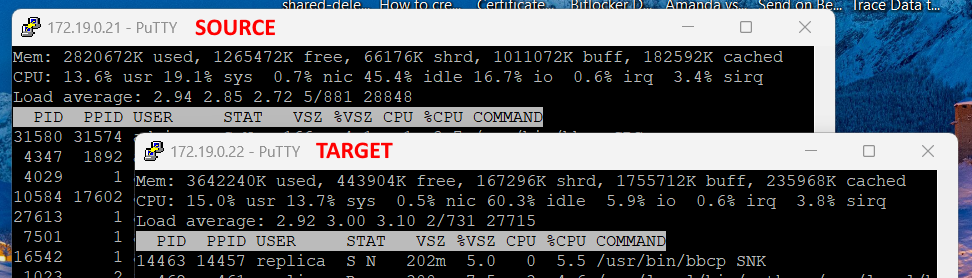
CPU usage means nothing. What you need to look at is the CPU load number in TOP. To access this, log into your NAS using an SSH connection. Then run the “top” command. You will see something like this:
The “Load average” value is what you want to look at. It is roughly the number of threads that your CPU is processing over the last 1, 5 and 15 minutes. You have a 4 core CPU in your NAS. That means if your usage his higher than 4 (say it is 8 or 10), you have a bottleneck and things will start to slow down. These processes can take minimal CPU resources but they are still running and will still slow things down. Each CPU core can only handle one thing at a time. If there are a lot of extra processes waiting in queue, then things slow down.
Running the initial snapshot is likely taking quite a bit of resources especially if you have other things running on the NAS.
i did not check before upgrading the os, unfortunately; i have already updated the devices with a new version from qnap website (inside qts no update was available) and so far the load is below 4
there are spikes that i linked to a connection to the web interface: if i fire up qts then i see the load rise but that’s expected imho.
if anything was off, it has been solved by the latest os release; now i have the sync running steadily, no more speed going from 150MB/s to zero and then stall.
…and I’m back once again because for some reason the snapshot replica works only with a direct cable connection…
it is not a sudden interruption; since may I spent time trying and opened another case with qnap, but the current situation is that the snapshot replica works when there is a direct link between the 2 units but as soon as i put a switch in the middle (managed switch, 2 ports on same vlan, 2 ip on same subnet, no router in between), the snapshot replica fails.
the goal is to have the replica running over a VPN so I tested that as well, but over VPN the snapshot replica fails.
the thing that puzzles me is that an HBS3 activesync job scheduled hourly on the same link works flawlessly: same devices, same link, same ip addresses, HBS3 works, snapshot replica fails.
one could argue that the HBS3 active sync moves far fewer data: I’m making some more tests with different data size.