I have a support ticket open due to an NVIDIA kernel issue after an update to QuTS Hero 6.0.1.3500.
Their support desk has now asked me for the admin account password through the ticket. They did not ask me to enable the remote support option. This seems very sketchy to me. This request is showing in the ticket, so its not someone sending an email spoofing their email address, but the remote support option should allow them administrative-level access to the device for any troubleshooting purposes with the driver and kernel and they didn’t ask for that to be enabled.
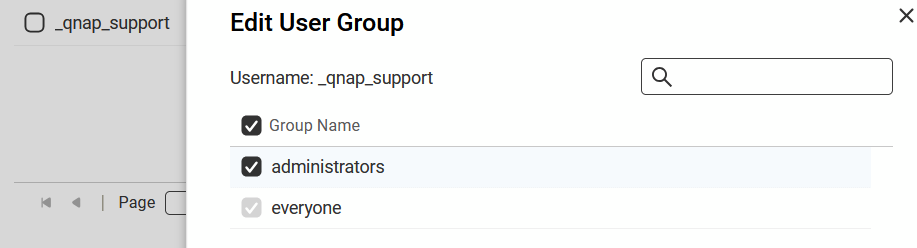
Can anyone chime in on this? The reasoning behind their request makes no sense, as the “_qnap_support” account that gets created is part of the administrators group.*
*
I did in my initial response to them stating sharing admin passwords is DEFINITELY not standard security practice.
The response back I got was:
"The default admin account is the root user and may be needed to troubleshoot this issue in depth. This is why the admin account cannot be removed, only disabled.
I will let them know the remote helpdesk is enabled so they can do some of the testing. If they need to use the admin account, do you mind if they force a password for it to access it? I can discuss with them if they can put the original password back in place when they are done if they have to force it."
If they can force a password and then put the original password back in place, why do they even ask? LOL
Thats for their temporary account that qnap support uses during their remote session. They want the actual “local” administrators account on the machine in addition to that.
Thank you for bringing this to our attention. Regarding the situation you mentioned, we will follow up with our support team to look into it. We sincerely apologize for any inconvenience this may have caused you.
Hi SteveKo,
Thank you for looking into this, but, this isn’t about inconvenience. This is about device security and industry standards. There needs to be a better method to share that information rather than via a support system where any tech would have access to it, which would then be susceptible to unauthorized access. And QNAP has had a history of poor security with their systems.
We told you to ask for remote support and you can enter the password in a browser in team viewer. If you are paranoid, you can immediately change the password after the session.
I know what I was told Franklin - I can read. That doesn’t change the fact that they need to update their practices and offer alternatives such as the one you suggested when someone expresses a concern. And not all of their users are aware of the implications of this practice.