I have a QNAP TS-261G that, compared to my previous Synology with similar performance, is very, very slow when using the web interface. How is this slowness possible? Just opening the Files app takes more than 20 seconds.
How is everything connected?
All sync processes done?
How is the normal file exchange bahaving (SMB) as web interface usage should be a rare thing.
Do you mean a TS-216G? I don’t see a TS-261G as a valid QNAP product.
The TS-216G is a 2 GHz ARM core CPU. It is not a speed demon at all. What CPU did your Synology NAS have? That could be one reason.
And if you are building the RAID or doing other system processes on starting up, that will slow things down too (like Qsirch or Multimedia Console indexing).
Yes, synchronization is complete and file exchange via SMB is fine, with no local issues. Access via QSync is also fine, with no issues.
The problem is that when I need to access the NAS via a web browser and use the QTS interface, it’s incredibly slow. If I open File Station, it opens incredibly slowly, and then it opens slightly better.
Hope that NAS is not web exposed.
Any heavy tasks on your CPU ?
Sorry, I got the wrong TS-216G.
I know it’s not a lightning bolt, but my old Synology isn’t a lightning bolt either, and it’s over 2 years old.
I’ll check any other processes further.
Disable all the apps that you aren’t using such as multimedia
Open an SSH session. Run the command top
It will look like this:
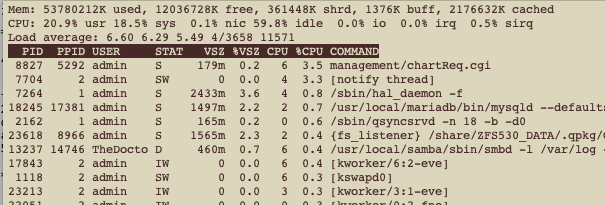
Look at the Load Average number. This is roughly the 1 minute, 5 minute and 15 minute average thread load that the NAS is processing. If it is higher than the number of cores on your NAS, then you will get a slow down. I believe the old ARM core NAS is a dual core. So any number higher than 2 is going to start to get way slow. My number is 6 but my NAS has 4 cores and 2 threads per core so I can go as high as 8.
See what processes listed are taking a lot of CPU time…
Taking more than 20 seconds for File Station to open is not normal behavior. I’ll check with our internal team on what information we’ll need, and then ask you to provide it so we can look into the possible cause. Thanks for your patience!
Thank you, I await your instructions.
Hi,
news for me?
Thanks
I’ve just sent you a direct message — thank you!