Hi, my new TS-233 with QTS 5.2.5 and mechanical drives keeps spinning its disks. I have done the following to fix this, to no avail:
Standby mode (30 mins) is enabled via Control Panel-> Hardware → General.
EuP mode is enabled via Control Panel → Power
Tried to disable the multimedia scanning (in case that is the reason for not switching of the disks): the current Multimedia Console APP does NOT have a button anymore to disable it (it used to have one, but 2.8.0 does not have it). Thumbnail generation can be disabled, but Indexing not.
Even a system that has multimedia disabled or removed along with anything and everything that can be disabled, will still have some activity as log files and other system tasks keep the drives awake.
Many have tried over the years, but particularly with these older units there isn’t much you can do about it.
On the flip side, NAS rated drives are designed to run 24/7 so this isn’t really an issue in terms of longevity for the drives (and you should always have a backup strategy for important data in any case). The other main reason people want the drives to “sleep” is the noise, but a NAS is designed to run in a location that can be away from the user (hence the “N” in “NAS”).
Hi @blutsvente ,we have added a change in the next version of Multimedia Console 2.9.0 that it will check the HDD status before execute a scheduled task. If the HDD is in standby, the Multimedia Console will not do the task. And this has confirm that it not affect the HDD standby anymore in internal test.
However, the new version 2.9.0 is still under development and the official release date should be in late August to early September. If you are interested in using the Beta version, I can provide it.
@dosborne: thanks for replying. My motivation is noise + power + longevity; but after researching about this topic I also think that I can’t do much about it. Also, regarding longevity I tend to believe you (and others). @haru0 thank you, I will give it a try when it gets released later this summer.
Logged into the forums on simular criteria. My ts-233 is very low use and I’ve had it for over a year now. My take away has been “works great out of the box, great network speeds, learning curve on the UI, and slugish UI”, but my biggest gripe is it is always running. it almost never sleeps. and the fan is always running. The CPU is 40c and the drives are 45c… for ever and ever. My network equipment is in a guest room so I have lived with it but I think it is unnecessary thermals and power use for a unit such as this. I’ll be sticking with it for a while but it does not have me fully satisfied.
It is recently purchased and runs only the pre-installed apps out of the box.
I have set to sleep mode after 30 min of inactivity but without ever entering because there is no inactivity.
Is it normal?
In wd my cloud ex2 ultra (with two WD40EFRX in RAID 1 configuration) there are no such noises and it normally enters sleep mode after inactivity.
Normal or not, I find it difficult to coexist with Qnap TS-233 in the same office.
Have you encountered a similar situation?
Is there a solution?
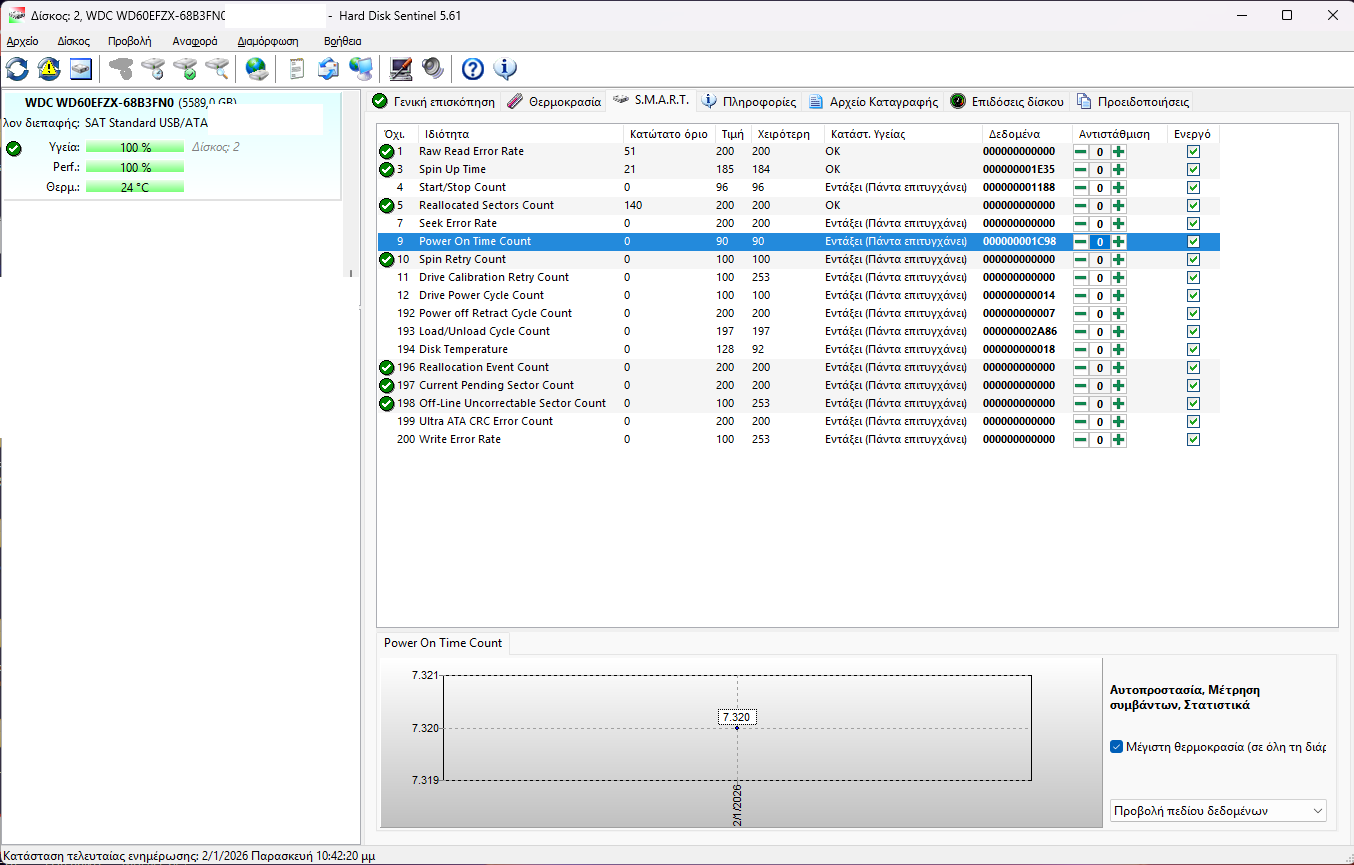
The Qnap TS-233 NAS is new with two used WD60EFZX hdd
The hdd’s s.m.a.r.t. report is good and shows no malfunction.
The Power-on hours (POH) is low , 7,320 hrs only.
Please try Solution 1 first to see if it resolves the issue. If the problem persists, please follow Solution 2 to generate a standby test log and send it to me via Private Message (PM).
I will then have our internal team look into it for you. Thanks!