I can’t find where to update the certificate. What should I do?
Are you referring to the OpenVPN certificate within the VPN service?
Could you take a screenshot so we can see exactly where the message is?
I entered the NAS backend management, and in the Applications section under the OPEN VPN server, there is a certificate download option. Previously, I would copy the certificate to the client and could access it. Yesterday, I found that I couldn’t access it. Checking the downloaded CA.CRT file, it shows that it has expired. See the image below.
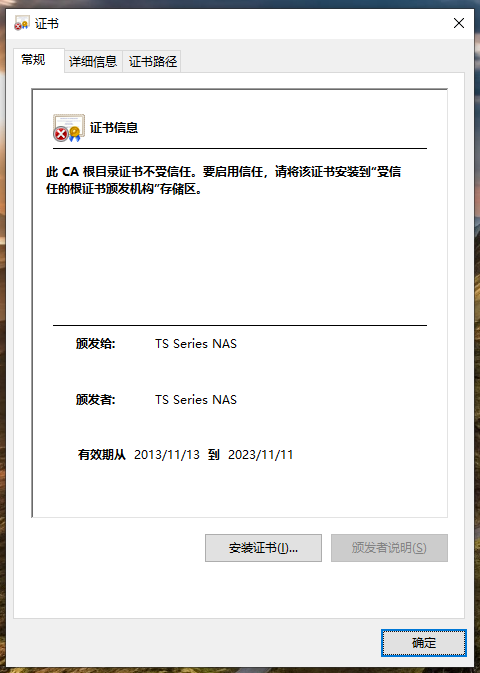
Regarding your TS-239 model, this product has been on the market for a long time and has now reached the End of Life (EOL) stage. We will do our best to communicate internally and assess whether manual assistance is possible.
However, since this model has exceeded its maintenance period, for the safety of your data and the stability of your system, we recommend that you consider upgrading to a newer model. New models not only offer better performance and security, but also ensure you continue to receive official technical support.
If you have any procurement needs or would like to learn more about our trade-in offers, please feel free to contact us at any time. We will be happy to provide professional advice and assistance.
Thank you for your understanding and support!
Hello, is there any method?
Hello, since the TS-239 is relatively old, we need more time to study how to assist with your issue.
If there is any new information, we will provide it to you. Thank you!
Hi Yzgolden,
Could you please provide the version numbers of QTS and QVPN that you are currently using?
In our newer versions, the OpenVPN application should already be integrated into QVPN Service.

I checked, and the TS-239 should only support up to QTS 4.2.6.
At that time, QNAP had not yet integrated the OpenVPN application into QVPN, and the application provided back then should have been L2TP/IPsec VPN.
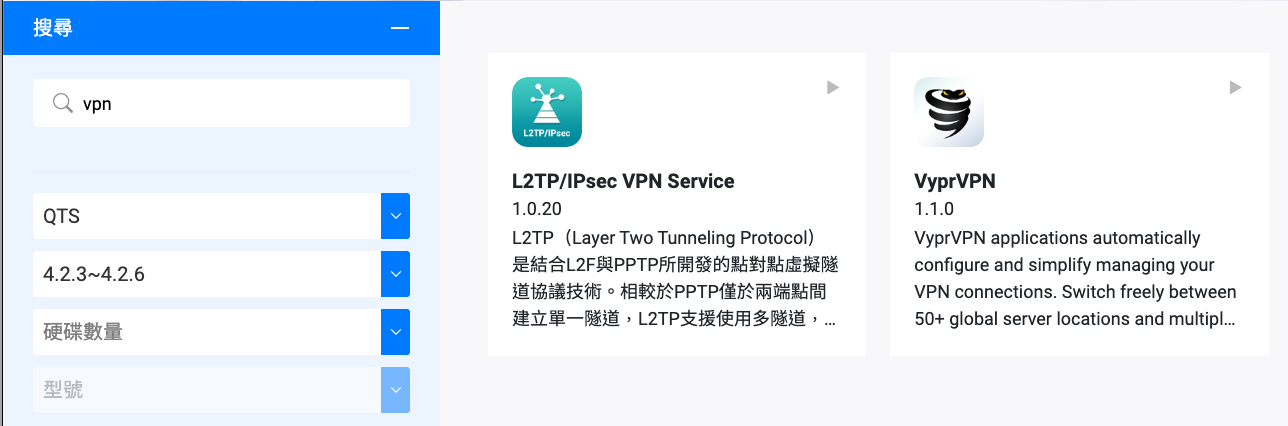
So if the application you see is called OpenVPN,
could you please provide a screenshot of the OpenVPN application you mentioned for our confirmation?

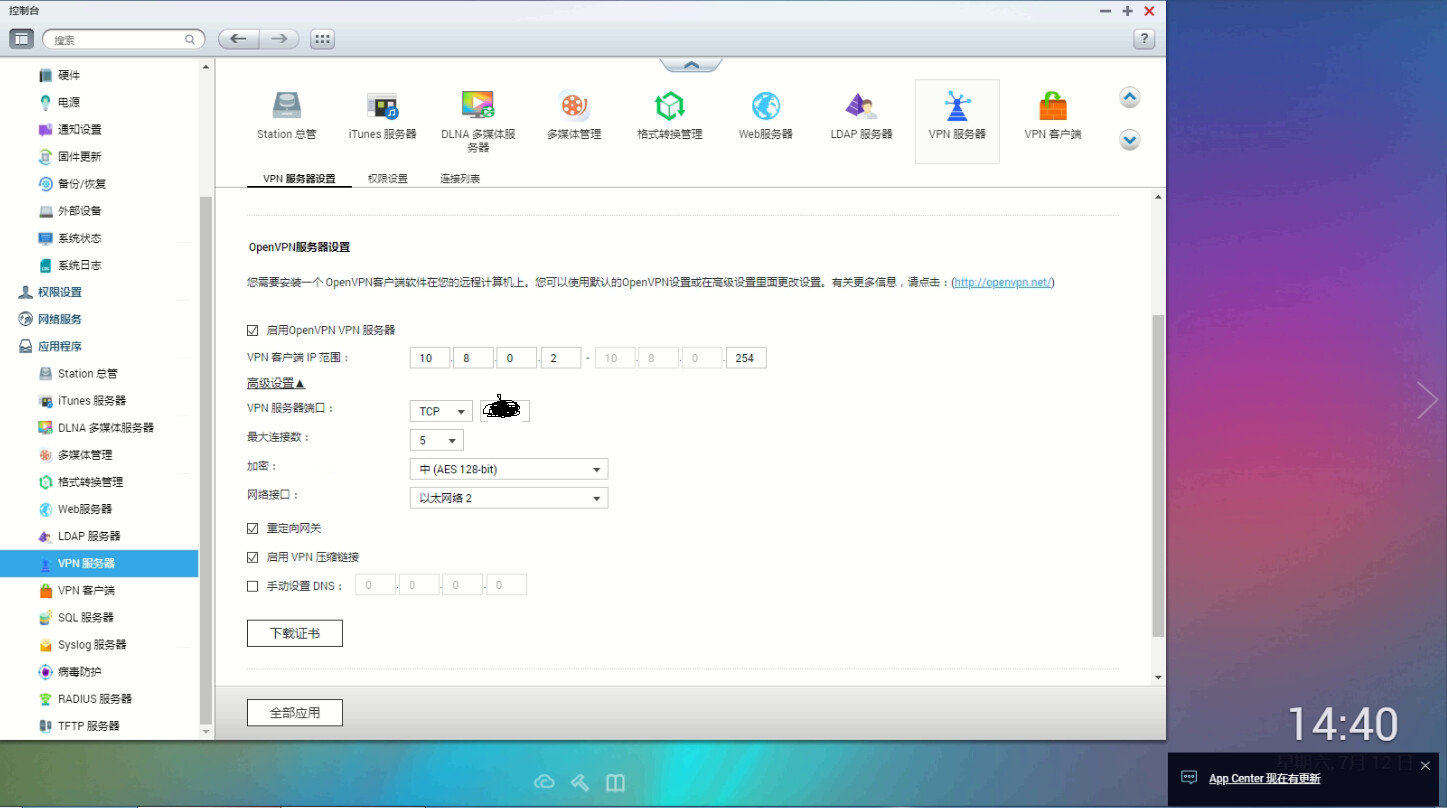
Hello, I have replied to the post. There is version information. Although the NAS is quite old, it has been used for 10 years and has been stable without any problems. I used OPENVPN before, but now it can’t be used. The system log indicates that the CA certificate has expired. After entering the NAS configuration interface, I couldn’t find an option to update the certificate, only an option to download the certificate.
The OpenVPN you are using may not be the official OpenVPN provided by QNAP, because it looks like the “QVPN” application that supports OpenVPN was not available during the 4.2.6 era (as shown in the screenshot I posted earlier).
If the application is not provided by QNAP, then it’s also difficult to provide support…
No! I have never installed any other OPENVPN applications. You can see that this VPN server is inside the firmware program. I did not install it additionally.
It seems that QVPN was separated from the system application later on.
In this case, you should open a ticket and ask the team to confirm whether there are other ways to update the CA.
Hi Yzgolden,
Hello, after internal team testing, please follow the steps below.
- Log in to the NAS via SSH using the admin account.
- Execute the following commands
export VPN_EASY_RSA="/etc/openvpn/easy-rsa"
export VPN_KEY_PATH="/etc/openvpn/keys"
export EASY_RSA="${VPN_EASY_RSA}"
export OPENSSL="/usr/bin/openssl"
export PKCS11TOOL="pkcs11-tool"
export GREP="/bin/grep"
export KEY_CONFIG=$(${VPN_EASY_RSA}/whichopensslcnf ${VPN_EASY_RSA})
export KEY_DIR="${VPN_KEY_PATH}"
export PKCS11_MODULE_PATH="dummy"
export PKCS11_PIN="dummy"
export KEY_SIZE=1024
export CA_EXPIRE=3650
export KEY_EXPIRE=3650
export KEY_COUNTRY="TW"
export KEY_PROVINCE="Taiwan"
export KEY_CITY="Taipei"
export KEY_ORG="QNAP Systems Inc."
export KEY_EMAIL="admin@qnap.com"
export KEY_CN="TS Series NAS"
export KEY_NAME="NAS"
export KEY_OU="NAS"
export PKCS11_MODULE_PATH=changeme
export PKCS11_PIN=1234

/etc/openvpn/easy-rsa/clean-all
/etc/openvpn/easy-rsa/build-dh
/etc/openvpn/easy-rsa/pkitool --initca
/etc/openvpn/easy-rsa/pkitool --server myserver
- Go to the OpenVPN page and disable > apply > enable > apply.
- Re-download the certificate.
This should update the certificate date. Please try it out, thank you.
1 Like
Thank you very much, VPN is now working properly according to your method!