I can’t log in to my Qnap as admin, I’ve already reset it even to factory default… still can’t log in… Please, if anyone has a solution or knows the answer, let me know.
Thank you
I can’t log in to my Qnap as admin, I’ve already reset it even to factory default… still can’t log in… Please, if anyone has a solution or knows the answer, let me know.
Thank you
Please describe what “can’t log in” means?
What model NAS do you have?
What firmware version are you running?
Does the admin console GUI load in your browser?
Are you logging in as the “admin” user after the reset? https://www.qnap.com/en/how-to/faq/article/what-is-the-default-system-administrator-password-for-my-nas
Operating System: QTS
Can the admin console GUI interface load in your browser? Yes, but I still can’t log in with the default QNAP account and password.
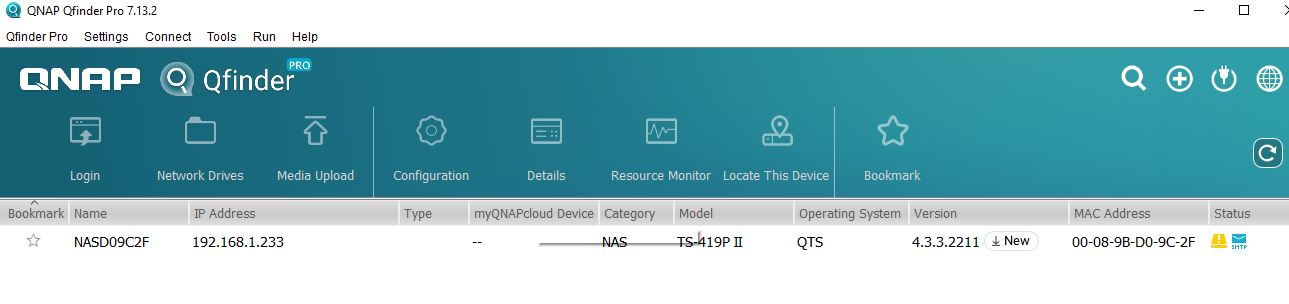
Could you please provide a screenshot of Qfinder? Also, if you are unable to log in via QTS, are you able to connect via SMB? Thanks!
Can you connect via SMB? Yes, I can connect using the local IP assigned to the NAS in the network and can open folders on the NAS with the admin user and admin password.
Hi @Ryes,
Thank you for the information you provided.
We understand that you are still unable to log in to QTS as admin, even though the NAS can still be accessed via SMB. Since this condition requires further investigation, we respectfully suggest that you open a support ticket through our Service Portal, so that our technical team can assist with a more in-depth investigation and determine the root cause.
You can open a ticket via the following link:
https://service.qnap.com/
To ensure the security of your data, we also recommend that any detailed or sensitive information be submitted directly through the support ticket and not shared in a public forum.
When submitting a support ticket, it would be very helpful if you could include your NAS model, current QTS version, screenshots from Qfinder and any error messages when logging in, steps you have already tried, as well as any relevant logs if available.
Thank you for your understanding and cooperation.