[Announcement] World Backup Day QNAP x WD Special Giveaway | Share Your Backup Story, Prizes Await! (Event Ended)

【Winner Announcement】 :partying_face:

Thank you to everyone who participated in our World Backup Day event! The QNAP team carefully read each entry and was truly inspired by the diverse ways you shared about using QNAP products to protect your data. After multiple discussions, we are delighted to announce the three winners:

:1st_place_medal: QNAP myQNAPcloud Storage 10TB One-Year Subscription
:bust_in_silhouette: Dan.ipcam.home -“…Even a digital newbie like me can use QNAP to turn chaos into order. You can too! And when you least expect it, your NAS will save your… backup!”

:2nd_place_medal: WD Red® Pro 3.5-inch 26TB Hard Drive
:bust_in_silhouette: Renald -“…I have further practiced the 3-2-1 backup strategy, so I can ensure reliable backups for multiple users in my circle while performing both direct and scheduled synchronizations.”

:3rd_place_medal: QNAP QNA-UC10G1T – USB 4 Type-C to 10GBASE-T Network Adapter
:bust_in_silhouette: Goldie -“…You never know what will happen next. I’m used to backing up once a week, and I always take a snapshot before each backup. After all, data is life—please protect it well.”

The winning stories showcase different methods of data protection, from solutions suitable for beginners to advanced backup systems. They provide authentic, practical experiences and emphasize the importance of a comprehensive backup strategy in safeguarding digital life.

:tada: Congratulations to the three winners! We will contact the winners via the email linked to their QID to arrange prize delivery. Please keep an eye on your inbox and remember to reply to our email within 7 days of receiving it to confirm your prize!

:raised_hands: Thank you again to everyone who shared.
We hope this event sparks more inspiration and helps us all take another step forward in protecting our data!


Do you regularly back up your data? According to a 2024 survey, 78% of people say they back up their data, but only 33% do so regularly! :scream: Whether it’s work files, precious photos, or business data, having a stable and well-planned backup strategy is the only way to truly protect your data security.

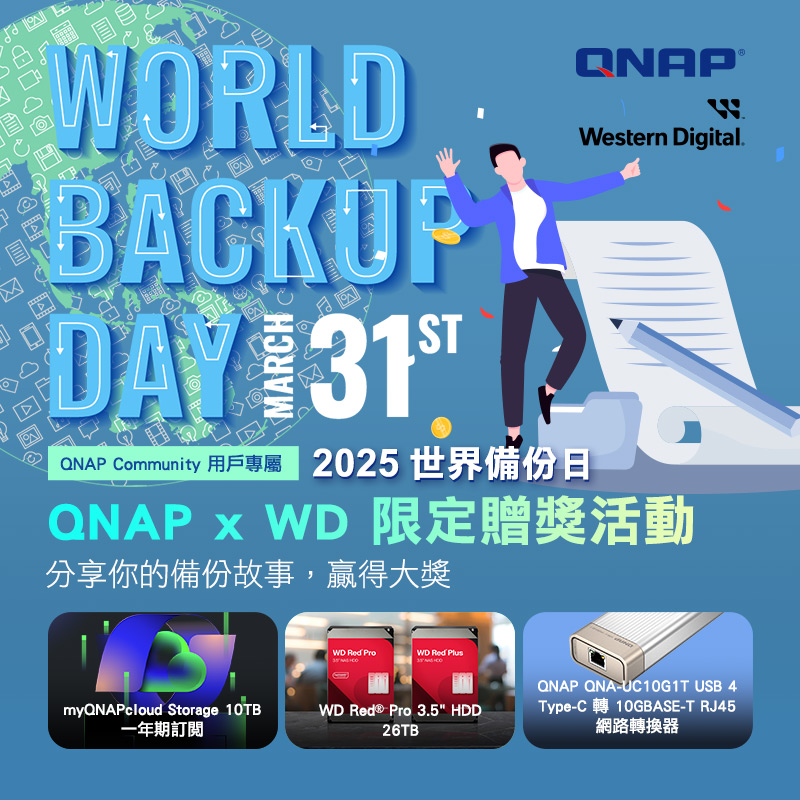
For this year’s World Backup Day, QNAP and WD invite you to share your backup story! Tell us how you keep your data safe for a chance to win a free one-year 10TB cloud space from QNAP or a WD Red® Pro 26TB hard drive!
:pushpin:How to Participate

  1. Log in to the QNAP community.
  2. Reply to this post and share your backup habits or experiences using QNAP solutions (such as NAS, backup software).
    Whether it’s protecting family photos, important work documents, or needing urgent access to files in unexpected situations, we welcome you to share how QNAP has made a difference for you!
  3. Please reply with at least 100 words so we can fully understand your story.

This event is held simultaneously in Traditional Chinese, English, and Japanese, and is open to users worldwide.

:wrapped_gift:Prizes

The QNAP team will select the top 3 responses to receive exclusive gifts.

  • First Prize: QNAP myQNAPcloud Storage 10TB cloud space for one year
  • Second Prize: WD Red® Pro 3.5-inch 26TB NAS HDD (valued at USD 569.99)
  • Third Prize: QNAP QNA-UC10G1T USB 4 Type-C to 10GBASE-T RJ45 Network Adapter

:date: Event Period:

From now until April 6, 2025, 23:59 UTC.

  • Taiwan Time (TST, UTC+8): until April 7, 2025, 07:59
  • Japan Time (JST, UTC+9): until April 7, 2025, 08:59
  • Pacific Time (PT, UTC-8): until April 6, 2025, 15:59

The winner list is expected to be announced in this post on April 14. (Actual announcement time may vary depending on the number of participants.)

:raised_hands: Whether you’re a backup expert or just starting out, join the QNAP community to share your backup experience and exchange ideas on how to keep your data safer!

Terms and Details

  • Winners will be selected based on the originality, relevance, and overall quality of their comments. All decisions made by QNAP regarding winner selection are final and cannot be contested.

  • Entries must be original content by the participant and must not contain any offensive, inappropriate, or plagiarized material. QNAP reserves the right to disqualify any entry that violates these rules.

  • Due to logistics restrictions, prizes cannot be shipped to Russia, Iran, North Korea, Syria, Belarus, Cuba, and certain regions of Ukraine. We apologize for any inconvenience and appreciate your understanding and cooperation.

  • Entries must be submitted by April 6, 2025, 23:59 UTC. Late or incomplete entries will be disqualified and not reviewed.

  • QNAP will contact winners via the email linked to their QID. Winners must provide accurate information, including full name, shipping address, and other required prize delivery details.

  • Each participant can win only one prize. Using multiple or alternate accounts will result in disqualification.

  • If a winner does not respond within seven (7) days, the prize will be forfeited.

  • QNAP and WD are not responsible for any loss, damage, or theft of prizes after shipment. QNAP and WD also do not assume responsibility for delays caused by courier, customs handling, or other uncontrollable logistics issues. If the prize cannot be delivered due to incorrect information provided by the winner, the prize will be forfeited.

  • Prize eligibility and rights are non-transferable; event prizes cannot be transferred, exchanged for cash, or substituted.

  • QNAP and WD will cover standard shipping costs, but winners are responsible for any applicable local taxes, customs duties, and import fees.

  • QNAP reserves the right to modify, suspend, or cancel this event (including its content, duration, and details) at any time without prior notice. QNAP is not responsible for any interruptions, technical issues, or unforeseen circumstances during the event. Participants should regularly check official announcements for the latest information.

  • Participation in this event means winners authorize QNAP and WD to use their name, photo, and entry content provided for the event for global marketing and promotional purposes, free of charge and permanently, without further notice or consent.

  • Participation in this event signifies acceptance of the above terms and conditions.

2 Likes

I still remember the first time I realized the importance of data backup. It was a painful experience—my computer crashed and I lost hundreds of precious family photos and photography works, leaving me with indescribable regret. From that moment on, I was determined never to let such a thing happen again, so I began searching for a reliable backup solution. Later, I discovered QNAP’s NAS system, and it truly changed my life. The installation and setup process was extremely simple, and for someone like me with little technical knowledge, it was completely stress-free. I imported all my photos and important files into the NAS and enabled automatic backup. At that moment, I could finally shoot and edit with peace of mind, no longer worrying that those beautiful moments might disappear at any time. Once, I went on a trip with my family and took many beautiful landscapes and joyful group photos. After returning home, I immediately transferred those images to the NAS. Not long after, when my friends came over, I could instantly summon our travel moments through QNAP’s app, allowing everyone to relive those happy times together. What surprised me even more was QNAP’s remote access feature, which lets me easily access my data no matter where I am. Whether in a café or on the road, I can quickly find the files or photos I need. This convenience has greatly improved my work efficiency, allowing me to respond flexibly to various challenges anytime, anywhere. QNAP is not just a storage solution—it is the guardian of my data in life. It gives me the confidence to pursue my photography dreams, and in every precious moment, I no longer have to worry about data security. This sense of ease and peace of mind makes me cherish every moment in life even more.

2 Likes

I still remember more than 20 years ago when I first started using computers—whenever I had photos, videos, or any kind of computer files, I would just randomly dump them on the desktop. Later, I unfortunately got a computer virus and had to take the computer to a shop to reinstall the system, but none of my data could be recovered. At that time, I told myself not to make the same mistake again and truly realized the importance of backups.

Now, as a network administrator (MIS), I take enterprise backups even more seriously. In addition to following the 3-2-1 backup principle, I also use QNAP NAS’s Hybrid Backup Sync to achieve automated backups. This not only reduces the daily workload for MIS staff but also ensures data backups are more thorough and reliable.

Even today, there are still many traditional industries or small companies with weak awareness of data backup. I hope that through World Backup Day, more business owners and MIS professionals will pay greater attention to the importance and reliability of backups. Thanks to QNAP and WD for organizing activities to promote the importance of backups.

2 Likes

As a user who values data security and convenience, I have always relied on QNAP NAS to manage and back up my important data. Whether it’s work documents, family photos, or various multimedia files, QNAP’s solutions have brought me great convenience and peace of mind.

Backup Habits and Experience Sharing

From the very beginning, I developed the habit of regular backups, mainly because I had previously experienced the pain of data loss. Once, my laptop’s hard drive suddenly failed, causing a large number of important work files and precious photos to become inaccessible. Since then, I decided to look for a more reliable backup solution and ultimately chose QNAP NAS.

QNAP NAS has made my backup process simple and automated. I set up HBS 3 (Hybrid Backup Sync) to regularly sync important data from my computer to the NAS, and also use Snapshot technology to ensure that even in the event of accidental deletion or ransomware attacks, I can quickly restore the original files. In addition, QNAP NAS supports RAID configuration, so even if a hard drive fails, the data remains safe and secure.

QNAP to the Rescue at Critical Moments

Once, I was preparing an important client proposal when my computer suddenly encountered a problem, causing all modifications made that day to disappear. At that moment, I felt desperate, until I remembered the snapshot feature built into QNAP NAS. I immediately logged into the QNAP management interface and used the snapshot restore function to recover the latest files within minutes, saving me from redoing all the work and ensuring the proposal was delivered on time.

Moreover, QNAP’s QuDedup technology has also benefited me greatly. It effectively removes duplicate data, saves storage space, and speeds up the backup and restore process. For work that requires frequent version control, this is truly an indispensable feature.

Remote Access and Mobile Office

In addition to backup features, I often use QNAP NAS’s myQNAPcloud remote access function. As someone who frequently travels for work, my documents and data must be accessible at all times. Through myQNAPcloud, I can securely connect to the NAS and view or download the files I need, no matter where I am, eliminating the hassle of carrying external hard drives.

Additionally, QNAP’s Qsync allows me to synchronize files across multiple devices, ensuring that every time I open my computer, all data is up to date. This seamless integration experience has greatly improved my work efficiency.

Conclusion

QNAP NAS is not just a storage device, but also the guardian of my digital data. Whether it’s regular backups, remote access, or emergency file recovery, QNAP has brought unprecedented convenience and security to my digital life. For anyone looking to protect important data, QNAP is definitely a solution worth investing in.

2 Likes

Backup Habits and Experience Sharing

  1. From the very beginning, I gradually developed the habit of regular backups. For my first backup, I chose the simplest and most common method: using a USB external hard drive (only one, and with limited capacity).
  2. As the amount of data grew significantly, I realized that one drive was not enough and began to worry that if it failed, all my data would be lost. So for the second time, I still used USB external hard drives, but with larger capacity and two drives.
  3. After a while, I discovered issues related to hard drive controllers and lifespan, as well as concerns about cloud security. In the end, I chose two large-capacity hard drives from different brands and two different external enclosures for offline backup. Each time I back up, the data on the second drive is completely rewritten to prevent duplicate content issues.
2 Likes

I use QNAP NAS as a backup center for my home and small office, mainly relying on Hybrid Backup Sync (HBS) to automatically back up important data. My habit is to set up a multi-backup strategy: every day, I sync files from my computers and phones to the NAS, and use HBS to back up NAS data to the cloud (Google Drive & OneDrive), ensuring data security.

Once, my laptop hard drive suddenly failed, but because QNAP NAS had the Snapshot feature enabled, I was able to recover all my critical documents without any loss. This made me even more convinced of the necessity of NAS + cloud backup, and I regularly test the restore function to ensure the backups are effective. QNAP’s backup solution lets me stop worrying about data loss, and I can access work and personal files with peace of mind!

2 Likes

Once, my wife was cleaning up her iPhone’s iCloud and accidentally deleted all her photos. She was extremely upset when she realized it, because those photos contained many precious memories, such as scenery from our travels, group photos with family and friends, and moments from everyday life. She tried to find ways to recover them, but nothing worked, and she became very depressed.

Fortunately, I have a habit of backing up with QNAP regularly. When she told me about the lost photos, I immediately checked the NAS and found that all the photos were intact, so I quickly helped her restore them. When the photos reappeared before her eyes, she simply couldn’t believe it—her sadness instantly turned into gratitude and surprise. She cried and said, “That was so lucky!”

This experience made her truly appreciate the importance of backups, and for me, her gratitude at that moment was more precious than any gift.

2 Likes

My QNAP backup awakening journey began after losing precious family photos due to a hard drive failure three years ago, prompting me to seriously research backup strategies. I acquired a QNAP TS-253D and used the Hybrid Backup Sync software to establish the “3-2-1 principle”: original files stored on the computer, real-time backup synced to the NAS, and then automatically encrypted and transferred to the cloud via HBS. I set up a schedule for daily incremental backups and monthly full backups to save space. Last week, when I accidentally deleted a project, the version control feature helped me recover the edits from three days ago in just 10 minutes. Now, even my mobile photos are automatically archived through QuMagie, and QNAP’s multi-layered protection has finally freed me from “backup anxiety.”

1 Like

This year’s “Sea Breeze Rock Festival” holds special meaning for me—not just because I finally snagged a limited ticket, but also because I decided to capture the three-day, two-night celebration through my lens. For this music festival, I specially prepared high-definition photography equipment, brought several spare batteries, and packed plenty of memory cards. I know these precious memories must be carefully preserved.

Before setting off, I remembered my friend A-Zhe sharing how his company set up a QNAP NAS to back up event files. He even joked that if I captured any amazing behind-the-scenes shots, I could consider backing them up at their place to make sure nothing gets lost. Although it was just a joke, the concept of “backup” really stuck in my mind.

On the first day of the festival, the salty sea breeze mixed with deafening music, and the atmosphere was at its peak. I weaved through the crowd, capturing every exciting moment: the passionate roar of the band’s lead singer on stage, the fans dancing wildly below, and the ever-changing stage lights under the sunset glow. My camera’s shutter barely stopped—every photo and every video carried the emotion of the moment.

Back at the guesthouse, the first thing I did wasn’t collapse into bed, but carefully imported all the day’s photos and videos into my laptop. Looking at the hard drive full of files, I couldn’t help but worry—what if something happened to my computer? Wouldn’t all these precious records be gone?

That’s when I remembered what A-Zhe said about QNAP. Although I don’t have my own NAS, I know there are many cloud storage services now, which are conceptually similar to QNAP—they’re all about protecting important digital data. So I decided that every night at the guesthouse, besides backing up to my portable hard drive, I’d also upload selected photos and videos to my cloud space.

For the next two days, I continued to fully enjoy every moment of the festival, while also keeping in mind the importance of daily backups. Every night, while other exhausted fans were already asleep, I was still busy organizing and uploading my media files.

When the festival ended, I dragged my tired but satisfied body home. Looking at the fully preserved festival memories on my computer and the reassuring backup in the cloud, I was truly grateful for A-Zhe’s casual mention of QNAP. Although I used a cloud service this time, the concept of “an extra layer of protection” is the same.

These photos and videos are not just my personal memories—they’re shared memories for everyone who participated in the festival. With this experience, I’ve come to appreciate the importance of backups even more. In the future, whether I’m attending another music festival or recording other beautiful moments in life, I’ll remember to make thorough backups to ensure these precious moments are preserved for a long time. Maybe it’s time I considered getting my own QNAP!

1 Like

Once, my computer hard drive suddenly failed while I was at the final stage of an urgent project containing many important work documents. Without a backup, these files could have been lost forever. Fortunately, I had previously set up a QNAP NAS system and performed regular automatic backups. Using QNAP’s Hybrid Backup Sync feature, I quickly restored all my files from the NAS and also synchronized the data to cloud storage. This allowed me to immediately continue working and avoided the risk of data loss. QNAP’s backup system ensures that both my work files and family photos are securely protected, greatly reducing my anxiety about losing data.
Especially since I personally run a WordPress website, my biggest worry is losing data due to NAS failure, so it’s essential to do proper backups—the 3-2-1 backup concept is indispensable.

1 Like

I am a professional photographer who loves to travel, with footprints all over the world, capturing countless breathtaking landscapes and cultural photos. My RAW files and 4K videos take up a huge amount of storage space, and these materials are not only shared memories between myself and friends, but also my livelihood.

At first, I mainly used external hard drives to store my works, but often encountered issues such as hard drive damage due to bumps during outdoor shoots, accidental file deletion, and even nearly losing precious photos because of misplaced hard drives during travel. These experiences made me want to find a more stable backup solution.

On a friend’s recommendation, I started using QNAP NAS to build my backup system for my materials. I purchased a QNAP TS-464 NAS, paired with four 8TB hard drives, and configured it with RAID 5 to ensure data safety and prevent data loss. Following my friend’s advice, I designed a three-tier backup strategy:

Local NAS backup: Every day when I return home, I use QNAP Qsync to automatically sync photos and videos from my laptop to the NAS.

External hard drive cold backup: Every week, I use Hybrid Backup Sync (HBS 3) to back up the latest works to an external hard drive, which is then stored in a different location.

Cloud backup (offsite backup): Every month, I use Backblaze B2 to automatically back up the latest three months of RAW files to prevent data loss due to equipment failure or accidents.

During one unexpected incident, my camera memory card was damaged, but fortunately, thanks to the QNAP NAS backup system, my photos were miraculously restored! If I hadn’t had this backup solution, those photos could never be retaken, and it might have affected my delivery time to clients.

This experience made me deeply realize the importance of backups and further optimize my backup process. For example:

Adding NAS snapshot functionality, so even if files are accidentally deleted, they can be quickly recovered.

Setting up version management to ensure historical versions can be traced back.

Remote access to QNAP NAS, so even when I’m away, I can directly manage and download files via the Qfile App.

1 Like

Backup and Sync Seamlessly Integrate Your Phone and Computer
As a regular user, my main purpose for using QNAP NAS is backup and data transfer, especially integration between my phone and computer. Through Qfile Pro, I set up automatic upload tasks, with uploaded file names set to the photo creation time, allowing my phone photos to be uploaded to the NAS sync folder via background services while charging. When I turn on my computer, Qsync automatically syncs these photos to my computer, so I can further organize and archive them by shooting year and month. Additionally, I have set up sync folders on my computer to ensure files are always accessible. When I’m out, Qfile Pro lets me easily search for files on the NAS from my phone, whether documents or photos, making it quick to access and greatly enhancing convenience for both life and work.

SmartShare Makes File Sharing More Secure
During a business meeting, I encountered an unexpected situation: the presentation file I thought I had prepared was unavailable because I forgot to bring my USB drive, which was understandably stressful. Fortunately, I had the presentation saved in my QNAP NAS sync folder. I immediately used Qfile Pro’s SmartShare to generate a download link for the file and sent it via LINE, allowing me to quickly retrieve the file at the meeting site.
To ensure file security, I also set a link expiration date, so the link was only valid until the end of the meeting, preventing the risk of long-term exposure. This experience made me realize that Qfile Pro not only provides convenience but also takes information security into account, successfully solving problems at critical moments and avoiding embarrassing situations. For users who need to access or share files temporarily, it’s a highly recommended feature.

1 Like

My first NAS system was with QNAP.

I remember that in the beginning, my backup method was simply using portable hard drives. I would back up one set of data onto several portable hard drives. When there weren’t many files, this method was still acceptable, but as the company was established and the number of files I handled increased, this approach became time-consuming and labor-intensive. One time, the company’s storage hard drive failed, and when I took out the backup portable drive, I found that the data inside was from a long time ago. Because I was busy with work, I had neglected the backup process, and recovering the important data ended up costing a lot. That’s when I started looking for a NAS system for data backup.

Between the two major professional brands, Synology and QNAP, after a series of evaluations and reviews, I ultimately chose QNAP as the company’s backup system. Personally, I use RAID 5 mode for backup, and after long-term use, it has been very stable. The user interface provided by QNAP is also very intuitive and easy to use, which reduces the learning curve for company administrators. Software updates are also very fast, which is extremely important in today’s rapidly developing technological environment. Overall, QNAP has made me feel very confident about data preservation. Now, as I plan for a second NAS system, QNAP will still be my first choice.

1 Like

I started getting into photography 17 years ago because I loved recording family outings and different stages of my children’s lives. At first, I used traditional hard drives for storage, but later, since I was often on business trips and couldn’t always see my children’s photos, I thought of using a NAS for storage. So, 15 years ago, I got my first NAS, the TS-219P II. This NAS was very easy to set up and organize, and I successfully transferred all my photos into the NAS.

NAS can be used for many operations, such as streaming videos to the TV, and you can also use various programs provided by QNAP to perform different tasks. What I use most often is QNAP’s myqnapcloud to remotely access and view photos, allowing me to find cherished memories anytime, anywhere. Now, with Qnap AI Core’s intelligent photo information organization, it’s even easier for me to find the photos I want.

NAS can also use Qsync to link my work and home computers, synchronizing and backing up data between both devices. This allows me to continue working on tasks at home that I couldn’t finish at the office, and I can also use my phone to quickly look up work-related files when needed.

Of course, when it comes to backing up NAS devices, you can use RAID for basic protection, so if one hard drive fails, you won’t lose all your data. But relying on just one NAS isn’t enough for secure backup; the best protection is having both offsite and local backups. So, in recent years, I added a TS-464 for primary backup, while the 219 handles offsite backup tasks. The HBS3 setup made it easy to connect the two NAS devices, and I also use myqnapcloud storage for basic backups, making my backup strategy even more complete.

QNAP also offers other useful programs like Qsirch, which lets you search for files and images in many different ways, and Qvpn, which can turn your NAS into a VPN server for safer and more convenient access.

QNAP is a trustworthy device and definitely my top choice among NAS options. It’s also my personal first choice.

1 Like

For the system drive, backup software is set up and saved on an external hard drive, with regular backups to the NAS.

For data, it is first stored on the local hard drive, then additionally backed up to the TS-831X NAS. HBS 3 is set to automatically perform regular backups to the newly purchased TS-832X NAS; some data is also set to be backed up to cloud storage.

Previously, a software RAID failure on the computer led to data loss, which is why the current multi-layered backup mechanism was implemented. Data backup must have multiple safeguards, as data can easily be lost forever if you’re not careful.

In the past year, there have been several instances where, after installing Microsoft updates or having the computer manufacturer fix hardware issues, the computer couldn’t boot up. Restoring from backups in these cases saved a lot of time on installation and configuration.

1 Like

After experiencing a ransomware attack, I deeply realized the importance of data backup and risk management. To reduce the risk of similar attacks in the future, I chose to use QNAP storage devices for backups and distributed the backup data across different network environments. This arrangement not only enhances data security but also allows me to restore system operations more quickly when unexpected situations arise. Through this experience, I am even more convinced that establishing multiple layers of redundancy is an essential part of protecting digital assets.

1 Like

I remember staring at the mountain of files and photos, feeling troubled. Some of these precious materials recorded years of my hard work, while others captured warm family memories. But they were scattered across different hard drives, USB drives, and cloud spaces, making them difficult to manage and causing me to worry about losing them.

Just when I was feeling frustrated, I recalled a friend’s recommendation: QNAP NAS. I decided to give this device a try, hoping it would solve all my data management problems.

After purchasing it, I was able to complete the setup easily. I couldn’t wait to upload all my files and photos to the QNAP NAS. QTS’s File Station allowed me to browse, search, and organize my data just like managing files on a computer. I also used QNAP NAS’s multimedia applications to organize my photos and videos into beautiful albums and collections, which I could share with my family anytime.

QNAP NAS’s RAID data protection feature meant I no longer had to worry about losing data due to hard drive failure. I also set up regular data backups, saving important files to another hard drive or cloud space to ensure nothing would ever be lost.

Beyond data management and backup, QNAP NAS offers a wide variety of applications, letting me create my own digital entertainment center. Using QNAP NAS apps, I streamed videos, music, and photos to my TV, phone, and tablet, enjoying high-quality entertainment anytime.

During my time using QNAP NAS, I truly experienced the convenience and benefits it brings. It not only solved my data management troubles but also brought endless possibilities to my digital life. I believe that as QNAP NAS continues to improve and evolve, I will enjoy even more wonderful experiences.

1 Like