We are considering ways to check for QNAP abnormalities with user privileges regarding labeling. After various searches, we are thinking of monitoring by running “Qfinder Pro” resident on a Windows PC. If an abnormality occurs on the QNAP, will a popup notification appear to alert us of the detection? Also, I would like to see what that screen looks like—do you have any image data? I would like to use it for internal review, so your cooperation would be appreciated.
Thank you very much for your inquiry.
We will share this matter with our internal product manager and request further evaluation and consideration.
If possible, could you please provide more details about your actual usage scenarios and specific needs? This may enable us to offer support and solutions that better meet your requirements.
We would greatly appreciate your cooperation. Thank you in advance.
This message has been translated by AI.
Thank you for your response. Let me now provide an overview of my question.
The Qnap in question is being used for operations where it must not be connected to the internet.
The Qnap unit itself is installed in a location separate from the room where the operations are conducted (it is not visible).
Recently, HDD4 failed, but the person in charge happened to visit the installation site for another matter and noticed the error.
The error was discovered several days after it occurred.
(In other words, if the person in charge had not visited the installation site that day, the error would not have been noticed.)
We do take backups of the Qnap, but we still want to respond to failures as quickly as possible.
As I mentioned at the beginning, since we are in an environment where internet connection is not possible, email notifications and similar alerts cannot be used.
Therefore, I am considering running “Qfinder Pro” resident on a PC on the same network to monitor the situation.
Ideally, I would like it to function similarly to Buffalo’s NAS Navigator, which notifies the status of NAS devices on the network.
I would like to have an image showing such a notification status.
(For internal explanation purposes…)
Thank you very much.
Hi @yamatake, thank you for your explanation. Just to confirm:
Is the current operational environment such that the QNAP NAS itself cannot (or does not) connect to the internet, while the office PCs can access the QNAP NAS via the internal network? Is this the correct network configuration?
If possible, could you also let me know the following:
- Are the office PCs and the NAS on the same segment (same LAN), or do they cross a router/VLAN?
**haru0,
Two PCs have been provided to the person in charge of the relevant operations.
One is connected to the internal network and is used for web browsing, email, file servers, etc.
The other is isolated from the internet and is used only for file sharing, printing, and scanning within the LAN via Qnap.
The two PCs are operated on separate segments.
Thank you for your attention.**
We have thoroughly understood your usage situation. We plan to improve our service so that clearer and more detailed guidance will be displayed for devices that cannot connect to the network in the future. Thank you very much for your valuable feedback.
I want a screenshot of “Qfinder Pro” detecting an abnormality in Qnap and notifying about it, but I couldn’t find one even after searching in various ways. Is there any reference image available?
Hi @yamatake, after checking with the Qfinder Pro team, it has been confirmed that in the current version of Qfinder Pro, the status of connected devices is displayed in the “Status” column on the right side of the list screen. At this time, there is no feature to display a dedicated popup notification screen when an abnormality is detected.
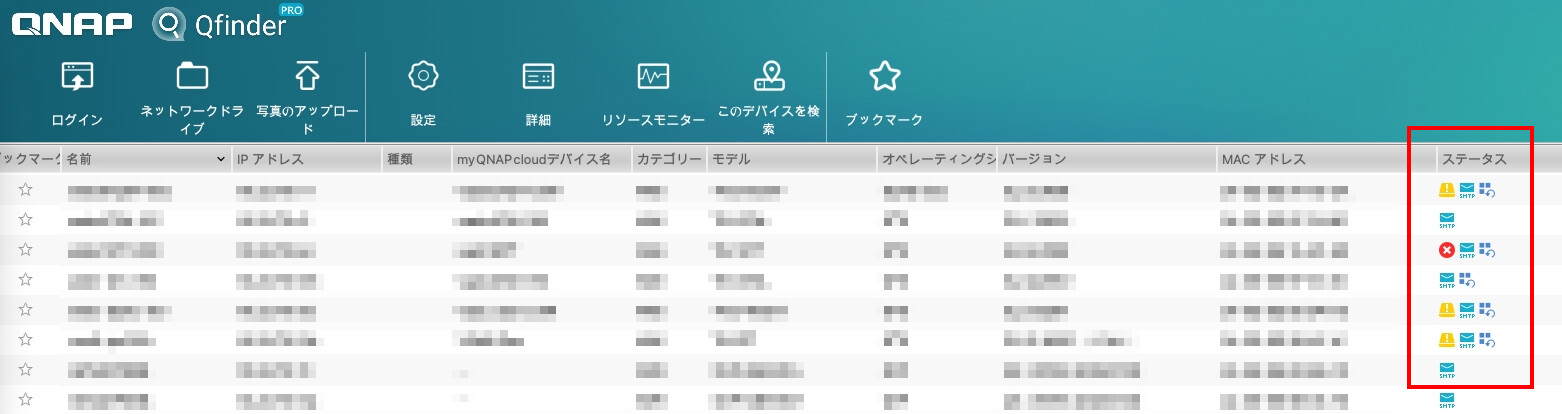
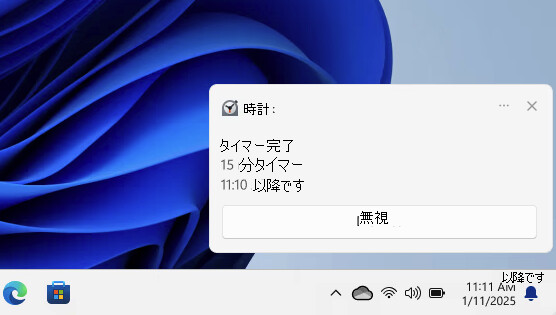
Meanwhile, we are currently considering a method to use the standard notification features of Windows/macOS to notify users of abnormal statuses via pop-up notifications when an abnormality is detected. Please refer to the image below for a sample notification if this feature is implemented.
Thank you very much for all your support.
Please make sure to implement the popup notification feature!