[QPKG] Meet 18yo Rtorrent 16 - Faster, smarter, and completely bloat-free.

Rtorrent 16 for QNAP

From search to screen. Maximum performance & total control.
Your QNAP. Your rules!

WARNING… This software may cause your QNAP to exhibit signs of extreme power. Side effects include fully saturated gigabit links, perfect media libraries, and severe addiction to this dashboard.

Meet Rtorrent 16. Faster, smarter, and completely bloat-free. Built from source natively for QTS 6 and QuTS hero, featuring a revolutionary Control Center. Zero ads, nothing on your system volume, and absolutely no phoning home.

:backhand_index_pointing_right: Open the live demo
:backhand_index_pointing_right: Download Rtorrent 16 from QNAP Club


Stop Guessing. Start Knowing.

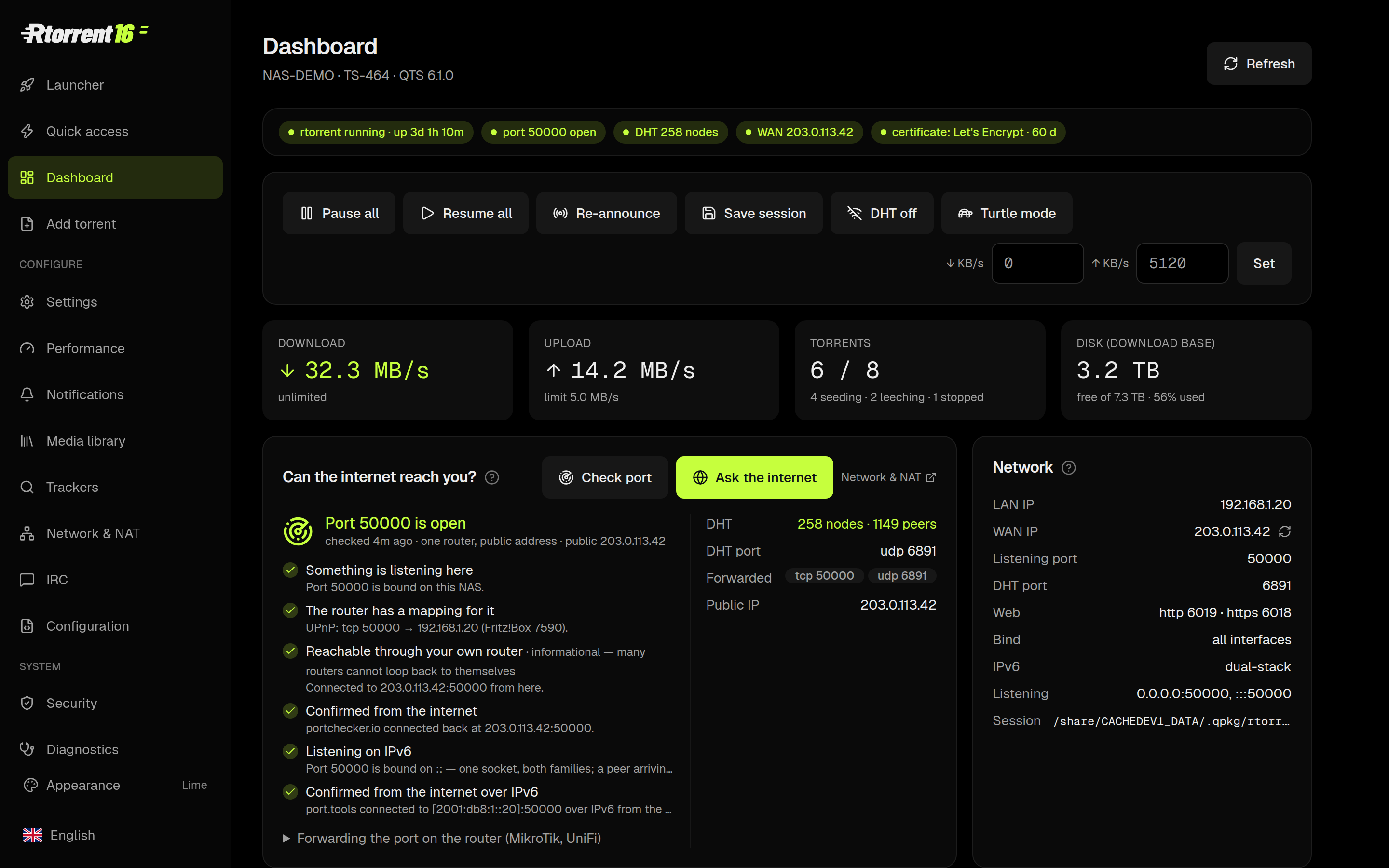
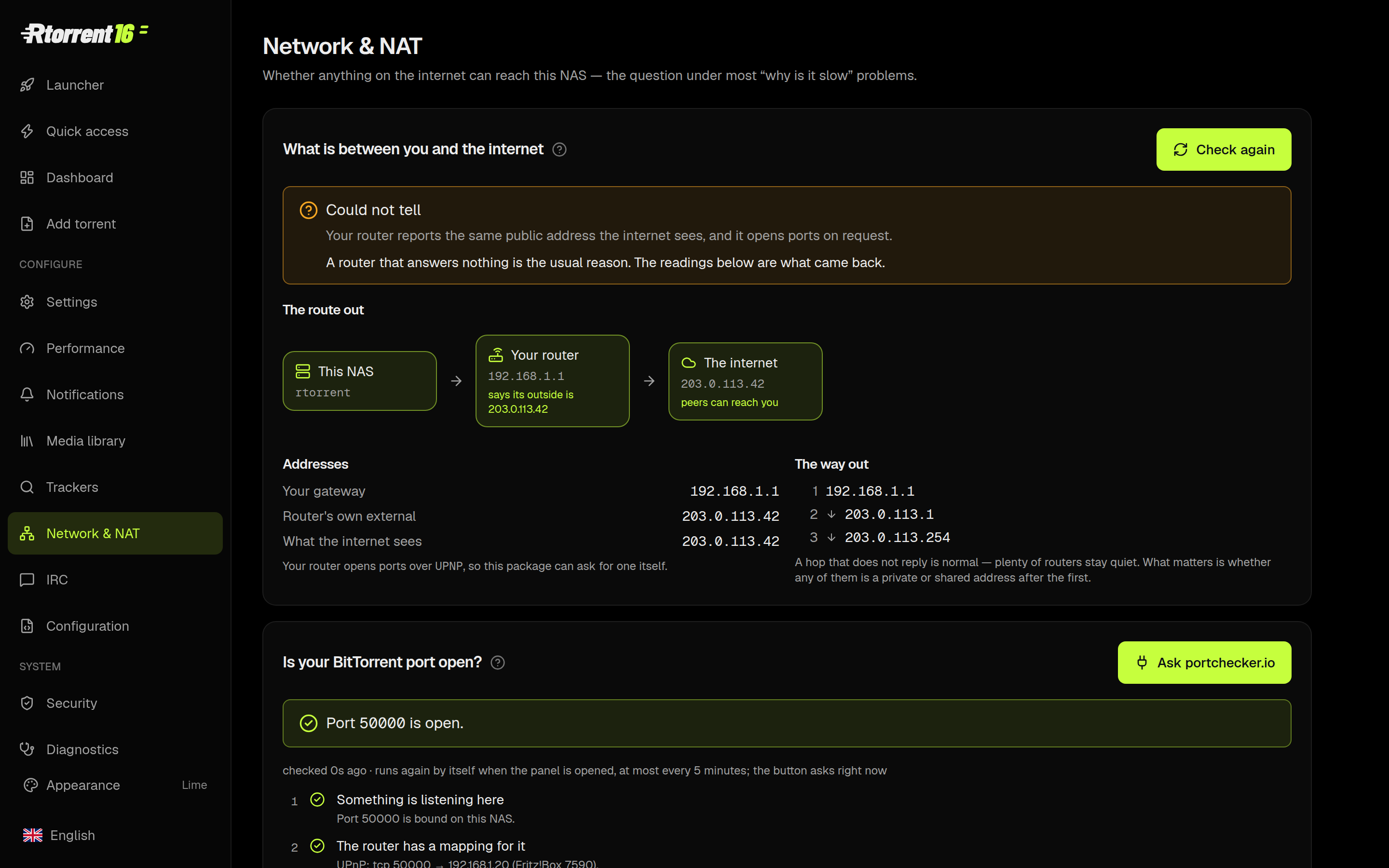
The ultimate dashboard answers the only question that matters: “Is it working?” Monitor live rates, torrent counts, and disk space at a glance. Our advanced port checker walks the entire network path. Each step passes or fails independently.
Power at Your Fingertips. No Clutter.

WARNING… This program may contain interfaces that are… highly addictive. Prolonged exposure may result in an unhealthy obsession with your QNAP NAS. Proceed with caution.

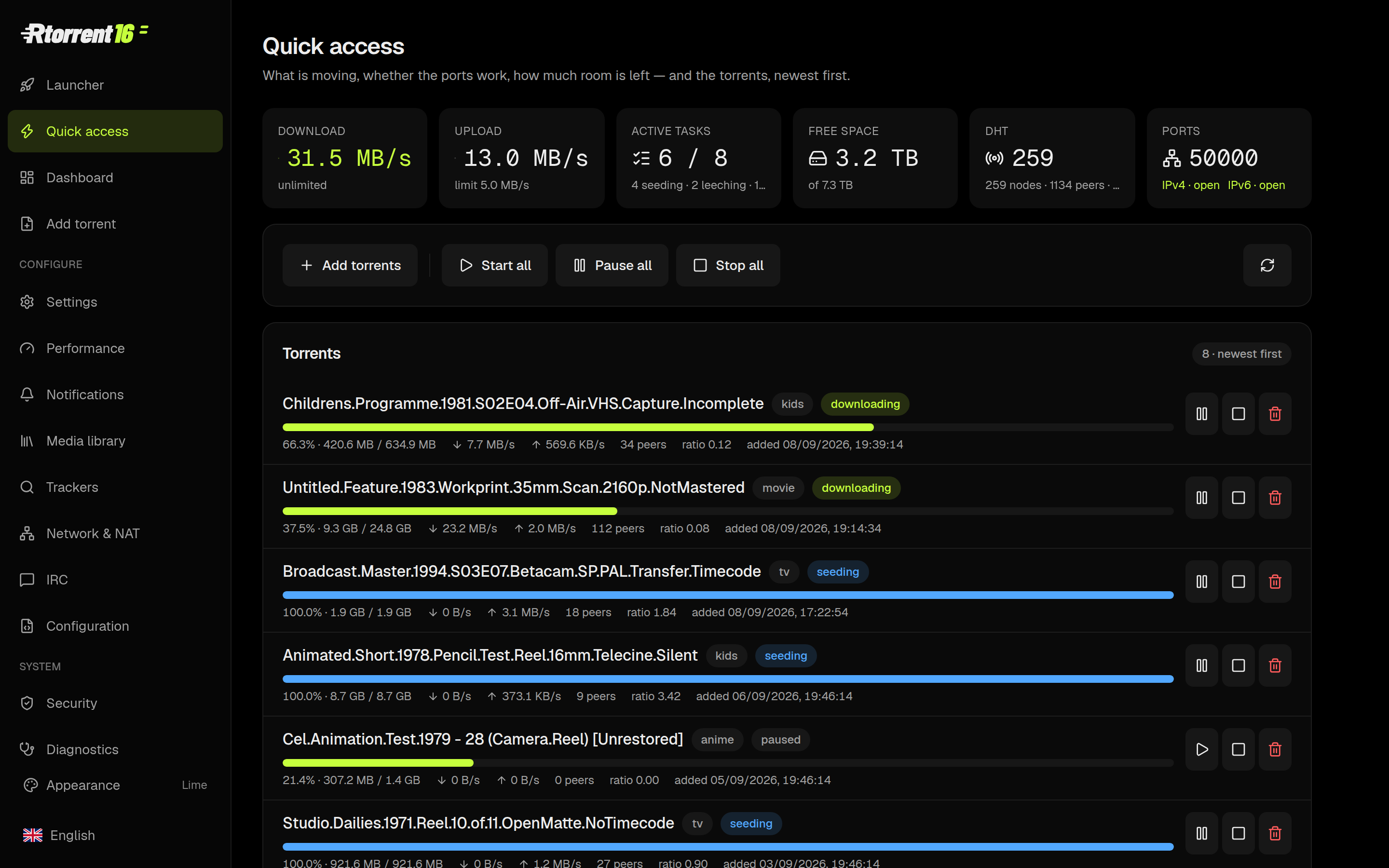
For the days when you just want to see what’s arriving, our Quick Access panel is all you need. Start, pause, trash, re-announce, or set a label with a single click. (ruTorrent is still just one click away for the heavy lifting).
Drop It. Forget It. We Route It.

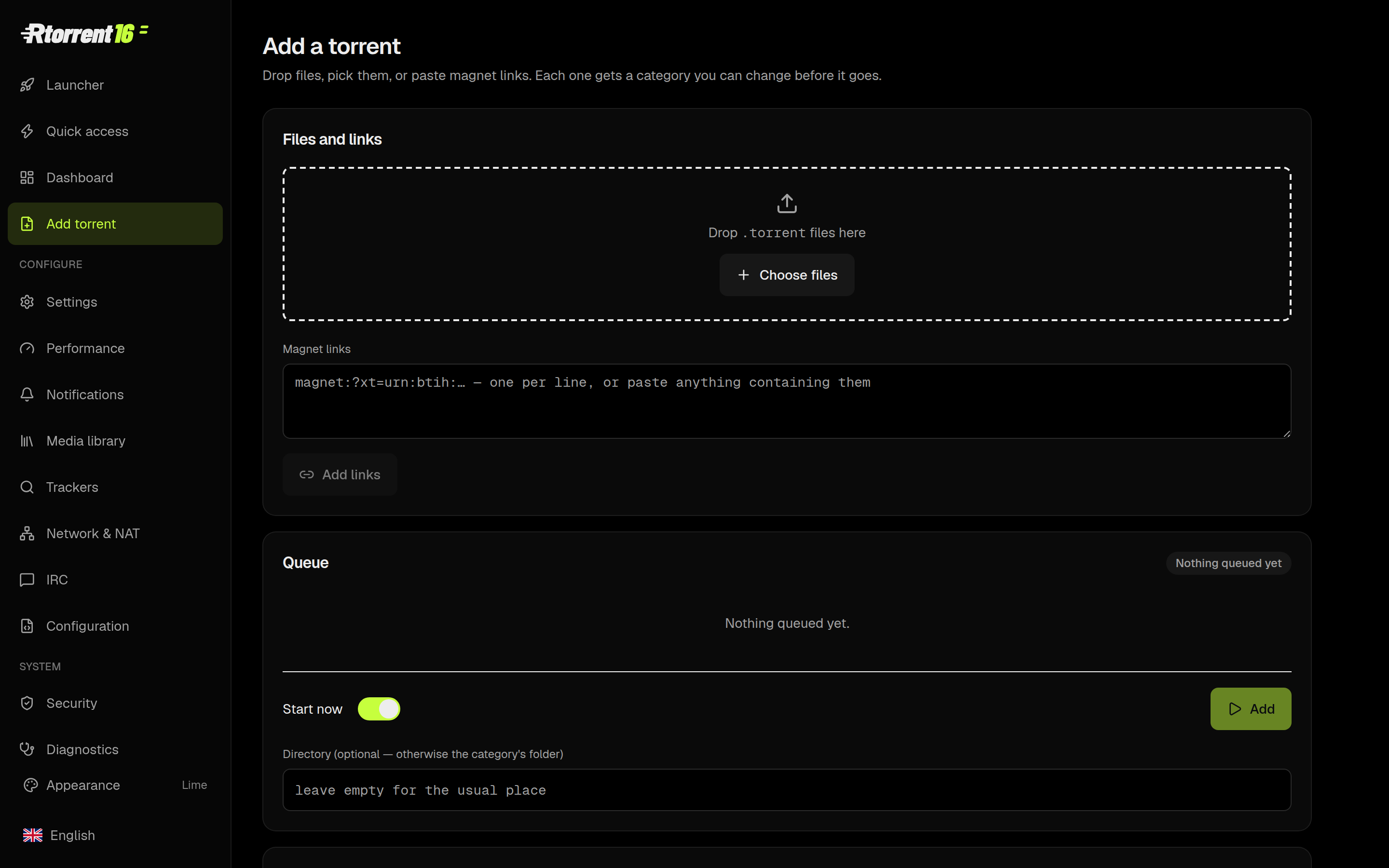
Drop a .torrent in, and Rtorrent 16 takes over. The Add page intelligently reads the name, assigns the perfect category, and routes it to the exact right folder. Magnets, files, RSS, or watch folders—four ways in, one perfectly organized destination.
A Media Library with a Brain

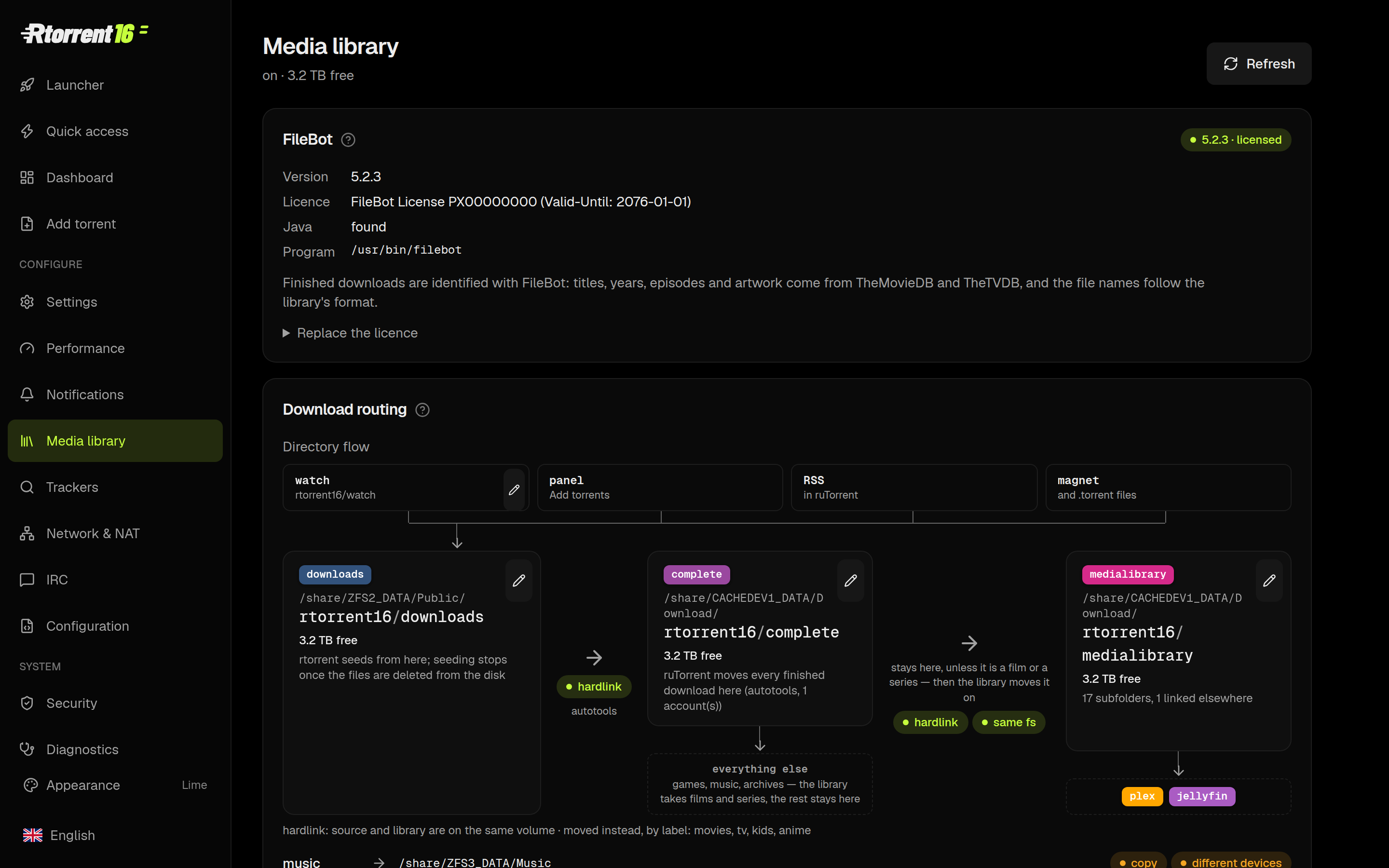
Watch your downloads flow from active, to finished, to your library in real-time. Visually map file operations—hardlinks, copies, or moves. FileBot handles the renaming and artwork, and then we automatically nudge Plex, Kodi, Jellyfin, or Emby to refresh.
Command Your Trackers in Plain English

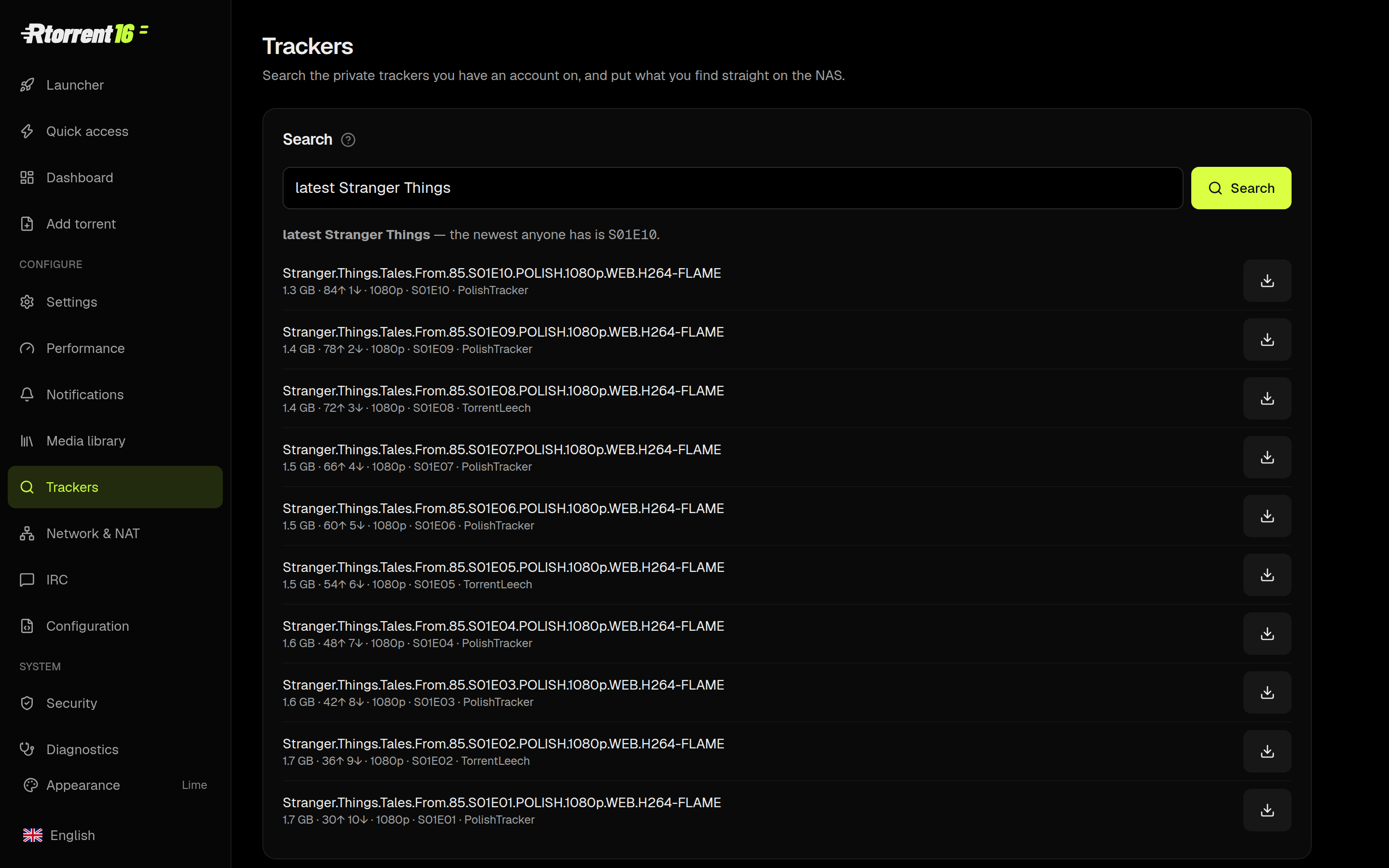
Integrated search on steroids. PolishTracker, TorrentLeech, UNIT3D, Jackett, or Prowlarr—just type latest Stranger Things. The engine translates your intent, grabs the newest episode, ranks the results, and drops your selection straight onto the NAS.
Notifications You’ll Actually Want to Read

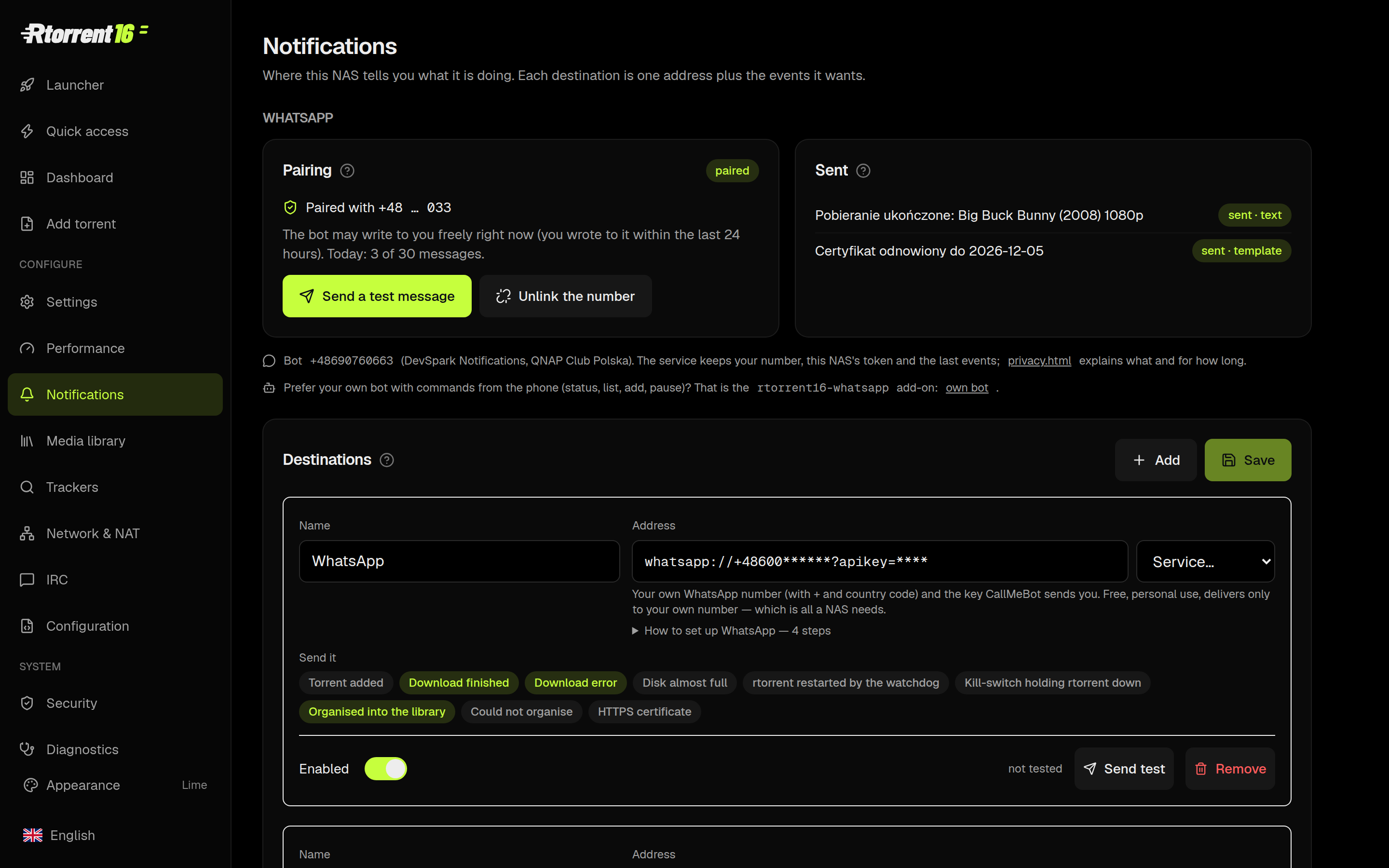
When a movie lands, get the poster, resolution, HDR status, runtime, size, and audio details delivered to WhatsApp, Telegram, Discord, Signal, ntfy, or e-mail. The WhatsApp bot even lets you reply with commands like status or latest Fargo to control your NAS on the go.
Backups You Can See — And Restore Instantly

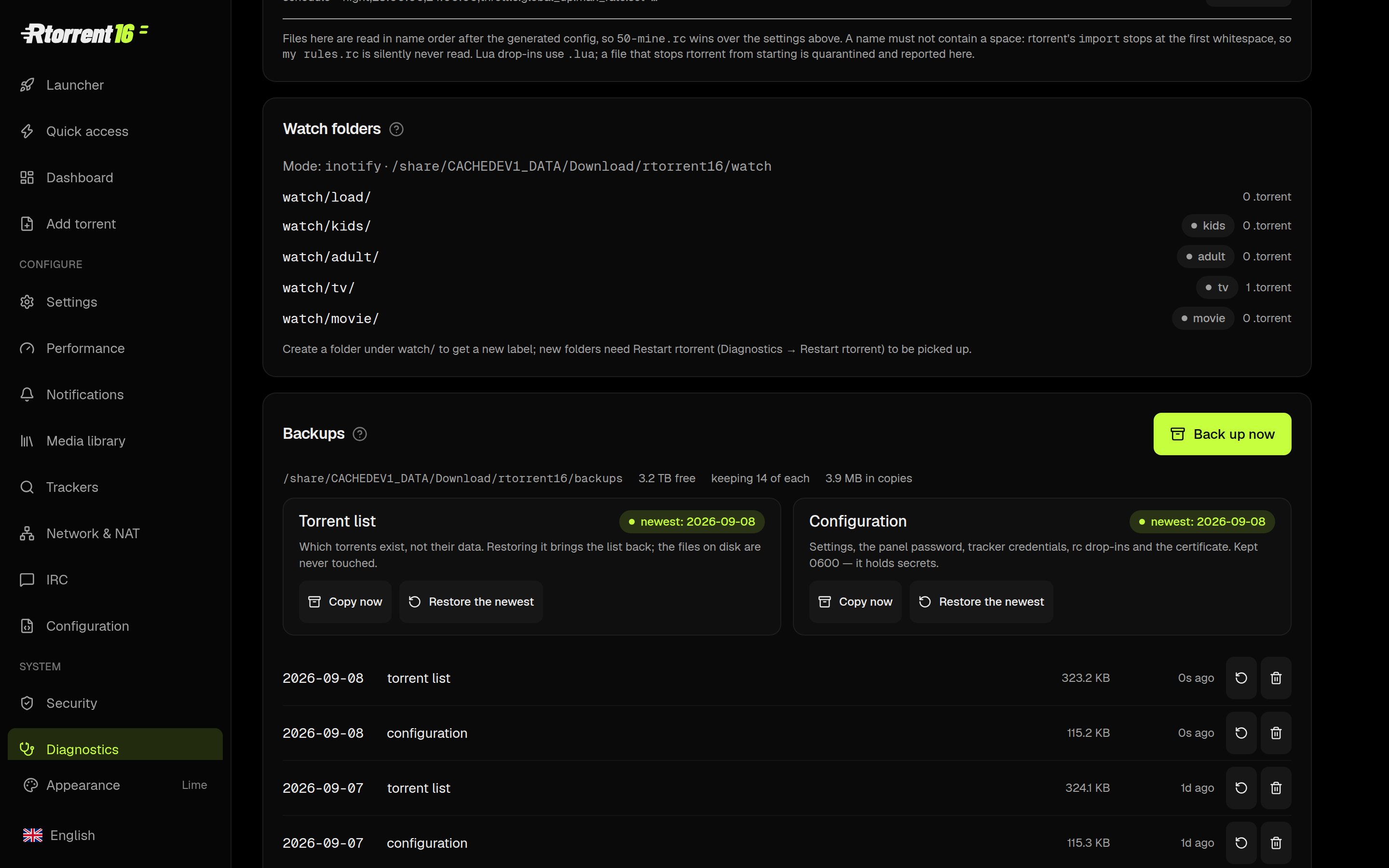
Two automated daily snapshots protect your torrent list and your entire configuration. Restore any single day directly from the web panel. Rtorrent restarts and swaps the list seamlessly without touching a single byte of downloaded data.
Unleash Maximum Hardware Potential

WARNING… This installation has been known to cause spontaneous… maximum overdrive. Your QNAP NAS will never be the same again.

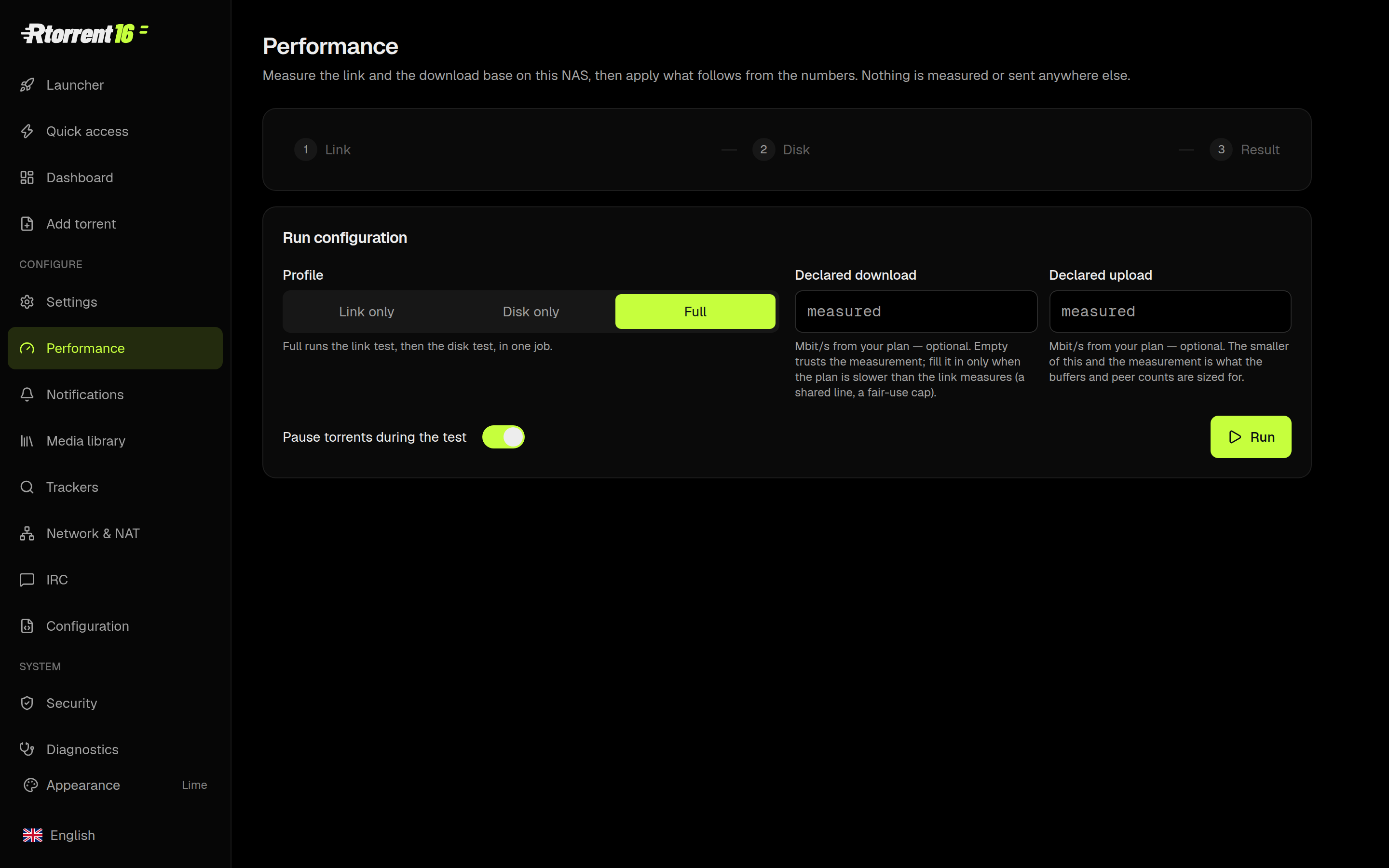
Our built-in Performance Wizard stress-tests your specific disk and network link, comparing results against your hardware to generate tailor-made settings that maximize your bandwidth.
Network & NAT, Told Straight

Rtorrent 16 queries UPnP and NAT-PMP on every start. If the router refuses, the panel gives you the exact error from the router itself, showing you who mapped what, and whether the outside world can actually see you.
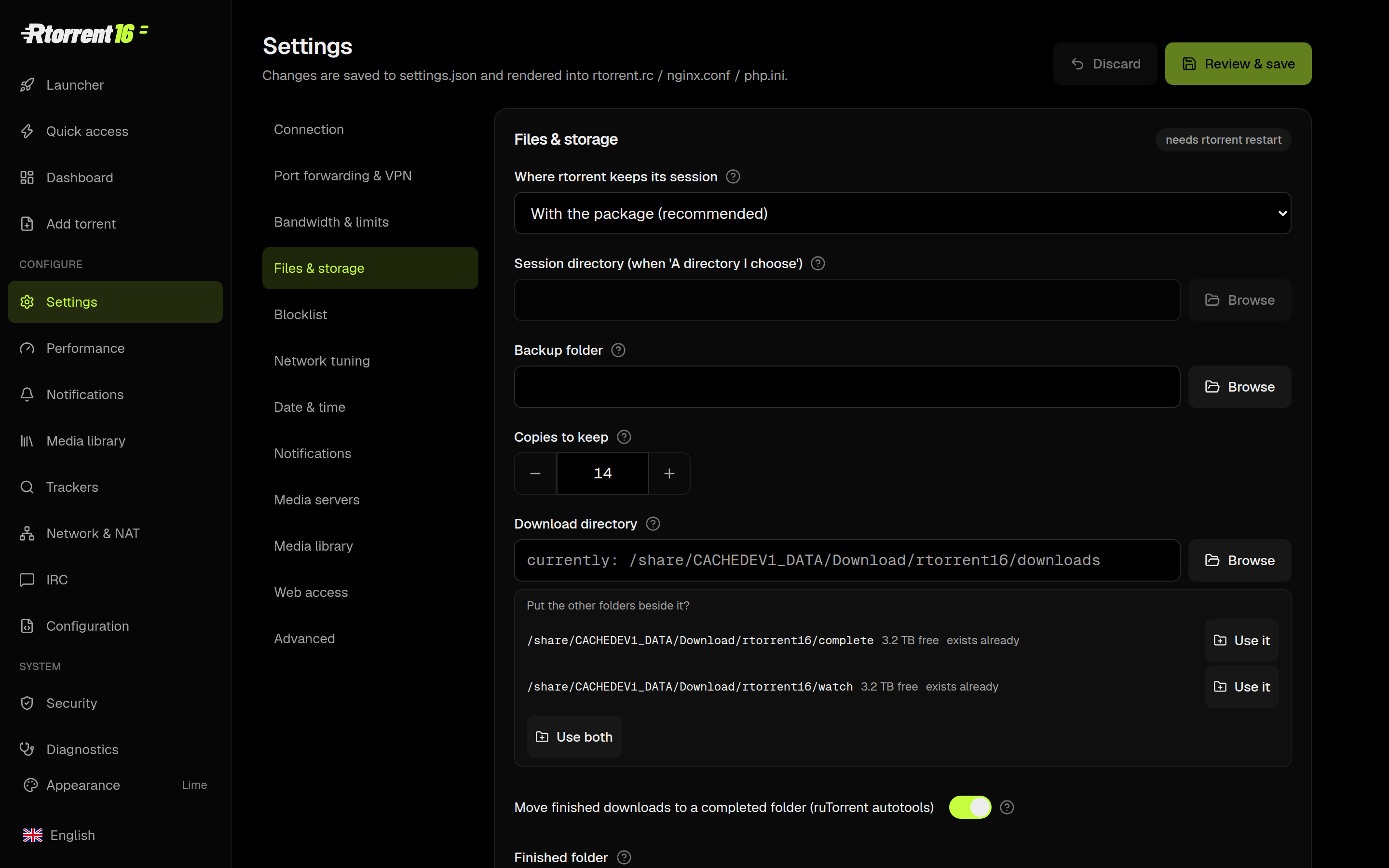
Total Control. Zero Confusion.

116 settings. 11 stunning themes. 9 supported languages. Every single setting explains exactly what it does right in the UI. We put the manual in the panel, not on a wiki.
Hey Silas, this post was auto flagged as SPAM, did you use AI to pad this out? (text seems very sensationalized)

I used AI to do proof reading
i had also problem to add thrid link to: QNAP Utilities · unofficial diagnostic tools for QNAP NAS

Hi @silas, welcome to the forum finally! :grinning_face:

I was waiting until I got something for you guys. Something cool :wink:

Hello,

QTS 6 ?
We wait for QTS 6 Beta.

AFAIK public beta should come out quickly, good news it is compatible backward, bad news not all devices will receive QTS 6.1 (old devices DOM capacity limitation), however when I did benchmark on TS-251 it was about 4 times slower than TS-262, so IMHO it would be even worst to rls qts 6.0 for old devices - but thats just what i think…

btw if you dont mind I would like you guys to invite into SDU benchmark of your QNAP NAS devices (CPU benchmark) this will help on eg. Rtorrent optimization…
i will publish qpkg in couple of seconds here

Rtorrent 16 has an Android app. Your phone opens the panel from your NAS, Quick access included, sends .torrent files and magnet links to the NAS, and shows download notifications with Pause and Open buttons (and a poster when the NAS has one). You pair it once, by scanning the QR code on the panel’s Phone app page.

Google has reviewed the app and cleared it for closed testing. We can apply to publish it for everyone once at least 12 testers have stayed opted in for 14 days without a break. That’s where you come in:

1. Join the rtorrent16-testers Google Group with the Google account your phone’s Play Store uses.
2. Opt in on the Google Play testing page.
3. Install Rtorrent 16 from the Play Store, keep it on your phone and use it.

Already running the APK from our site? The Google Play version carries the same signature, so it installs over it as an update and your phone stays paired with the NAS. Send feedback through the forum. The app is free, with no ads. It needs Rtorrent 16 build 332 or later with HTTPS enabled, and Android 8.0 or later.

Thanks for support!

So I upgraded my NAS to QTS 6.1. I am trying to log into Rtorrent. I see a notice that says I need to use the admin account. I enter admin and my admin password into the RTorrent login page. Says that it’s an incorrect user name or password.

So what gives? How do I get logged in?

And also, I certainly hope that the very long splash screen with obnoxious sounds and graphics doesn’t load every single time I try to log in. I don’t need a reminder of how long Rtorrent has been on QNAP and how it’s the first professional content server. I just want a login window without flashing graphics and without noise. Since I’ve not been able to log in, I don’t know if that goes away but I sure hope so…

Rtorrent 16 after first install has turned on debugging logs on default. Exact the same Warning messages drops into QNAP Event Logs default login and password
It is login: rtorrent | password: admin
In future releases its gonna be random and open for 1 hour only

Yes intro will display shortly
Just please read docs

Did you succeed?

@NA9D Jon do you need any assistance with Rtorrent 16 ?

Let me see…

OK. I am logged in and figuring everything out. I think I am good to go now that I have access.

There’s a lot to this! Looks really powerful.

But please add a way to remove the intro from playing every time the app is accessed.

Rtorrent 16 was built mainly for people who use private trackers and keep their torrents seeding for a long time. This has always been the main focus of the Rtorrent packages I have developed for QNAP. Some users have a few active torrents, while others have several thousand. I heard from some users they are running well over 10k or maybe even 50k torrents. That is a serious workload.

This is why Rtorrent 16 has so many features. They are there to make these large collections easier to manage. Torrenting on a PC and torrenting on a NAS are two different worlds, especially when your NAS keeps running and seeding all the time.

Of course, I could simplify Rtorrent and turn it into a basic download client. But there are already plenty of options if that is what you need: Transmission, qBittorrent, aria2 and others. You can use the qnaputilities.com repository, or build these alternative clients from the recipes available in bvscode there. Rtorrent 16 is designed around a different workflow.

Normally, you start a download by placing a .torrent file in the watch folder, inside a subfolder for the category you want. This is more like a service. UI is even not really necessary. You can create your own categories, such as PC Games or Android Apps just by creating subdirectory inside of watch. Put the torrent file in the right folder, and Rtorrent uses that category to organise the download automatically.

There is also a dedicated system for organising media libraries, built specifically for Plex. You can see how these workflows work in the diagrams in the settings and change directly on the items in diagram (try). Some of you guys have families and children, so keeping different types of content separate matters. The system supports separate categories for children’s content, cartoons, animated films, family movies and anime. This gives you more control over what goes into each library.

I am also aiming to introduce an experimental beta of the Game Agent tomorrow. It is being developed to recognise even retro (abandoned) games, sort them into the right categories and download game information. In the future, this could also help prepare organised game collections with their information already downloaded for devices such as the Steam Deck. This part is still experimental, so the features and release plans may change.

There are also storage optimisation and data retention features that I am continuing to develop. These include rules for keeping and removing data, and a mechanism that aims to keep around 20% of the disk space free. The goal is to help limit fragmentation and maintain disk performance, especially on HDDs.

When you have thousands of torrents, it also makes sense to keep the torrent session files on NVMe storage. These files are separate from the actual downloaded content. NVMe can handle frequent small reads and writes quickly, which can improve responsiveness and reduce the HDD activity, head movement and noise caused by session updates. Your downloaded content can still stay on the HDDs while being fastest torrent client on earth.

Many of the defaults in Rtorrent 16 were chosen with this kind of setup in mind. They may look complicated at first, especially if you are new to automatic sorting and media library management. But the main thing you need to do is simple:

Give each torrent the correct category, such as game, movie or TV.

Once you follow that rule, the sorting and library features can do their job automatically. That is the whole idea behind Rtorrent 16: a little organisation when you add a torrent makes a large collection much easier to manage over time.

Ah and btw:
Rtorrent 16 keeps using hardlinks (w/ fallback to move/copy). So same downloaded content eg 1gb file, even if it’s already in media library parsed by movie agent another 1gb file, costs your disk/volume space only ONCE = 1gb

That’s the whole story :wink:
Rtorrent 16 is freeware.

Thank for support

SECURITY UPDATE

Rtorrent 16.25-09I

Upgraded PHP to 8.3.36, this release updates core components and dependencies with important security patches (including fixes for CVE-2026-109618 and CVE-2026-109619):

  • Web Server & Encryption: Updated to nginx 1.30.6 and OpenSSL 3.5.9.

  • Tracker Connections: Updated curl 8.23.0 and its supporting libraries.

  • PHP Libraries: Upgraded libxml2, SQLite, and PCRE2. PHP now uses the system PCRE2 library instead of the older build

  • Media & File Tools: Updated UnRAR 7.2.7, 7-Zip 26.05, and MediaInfo.

  • Audio Processing: Replaced SoX with sox_ng, resolving 26 security vulnerabilities.

  • Go Runtime: Updated to Go 1.27.3.

Rtorrent 16 for QNAP · from search to download | QNAP Utilities · Free QNAP apps: torrent client, diagnostics

I think your software is quite impressive. It’s going to take a while to discover everything! :smiley:

But so far it has worked pretty well…

I assume it means you may like it. That’s good!

So in such case I think I might have a suprise for you, we’re testing internally protocol for knocking & handshake :handshake: with mTLS between mobile phone and a NAS. Once paired from local LAN your smartphone can safely talk to Rtorrent16 without need for VPN. I can’t say more details and with full respect this part of the app will not go on public for safety reasons.