Recently, QSirch uses all available RAM and swap storage and is then shut down by the system. It used to work fine but a recent update has broken it. I’d love to go back to a previous version that behaves.
QTS version 5.2.7.3256 (20250913). QSirch version 6.0.2.0. EC-880.
Q1. Has anyone else seen this?
Q2. Where can I find older qpkg for QSirch. Ideally pre version 6
Try rebooting your NAS if you have not done so. I had a similar issue with HybridMount when scanning a remote cloud mount volume. After a reboot, I didn’t have the issue.
I can post a screenshot of the memory usage although that is difficult as the NAS freezes and the resource monitor freezes with it. Basically, the free RAM plummets and the in use memory climbs just a few seconds are QSirch is started.
It would be nice to be able to install an older version as I never had this problem before.
QSirch is definitely the problem as a look at the running processes shows.
Thank you for your patience and for helping us investigate the issue with Qsirch. To better understand the problem and review your system logs and environment, we kindly ask you to open a Support Ticket via the Helpdesk app on your NAS. This will allow us to access more detailed information and assist you more effectively.
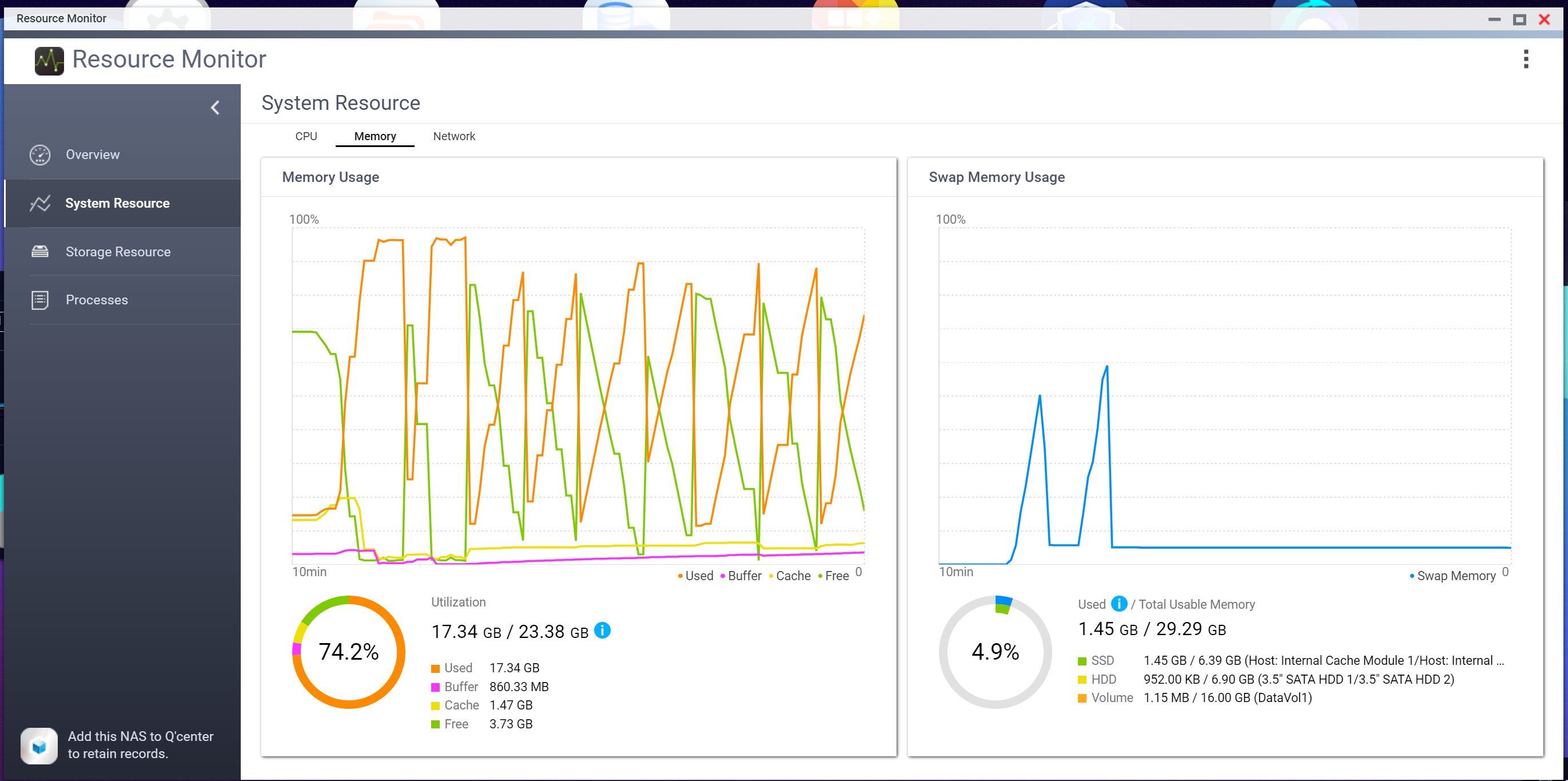
After several weeks of this problem, QSirch yesterday started to play nicely. The attached screen shots of the RAM usage shows what the problem looked like although this image is from when it started to play nicely. QSirch starts at the left hand side and it is obvious when it starts. Eventually it calms down and RAM usage returns to a normal pattern. Still quite high RAM usage, oscillating between ~90% and 10% for about 10 mins then it settled down once it had finished doing whatever it was doing. Much better than 100% now. For now, the problem has gone away but would be interesting - even if not need now - what people think might have caused this.
QSirch has to index every file on the entire NAS. When you first start it, even on a powerful NAS it takes a lot of resources. After it has indexed the entire NAS, it only has to deal with new files and calms way down. You can lower the burden by excluding files/folders from QSirch in the settings.
Thank you for the update and for sharing the screenshots, I’m really glad to hear that Qsirch is now running normally again.
If you encounter the same behavior again or notice any other unusual activity, we’d recommend opening a Helpdesk support ticket so that we can review your system logs in real time and assist you more efficiently.