Dear Qsync users, we’re excited to announce that Qsync Client for Windows 6.0.3 is now officially available!
As Qsync 6.0 brings file backup and synchronization together into one client, everyday usability — quickly recovering an earlier version of a file, and recognizing files at a glance — matters more than ever. This release focuses on exactly that: version history you can reach without leaving your desktop, and thumbnail previews for cloud-only files in Space-Saving Mode, alongside stability, login, and sharing fixes.
View and restore previous versions of synced files — right from your desktop
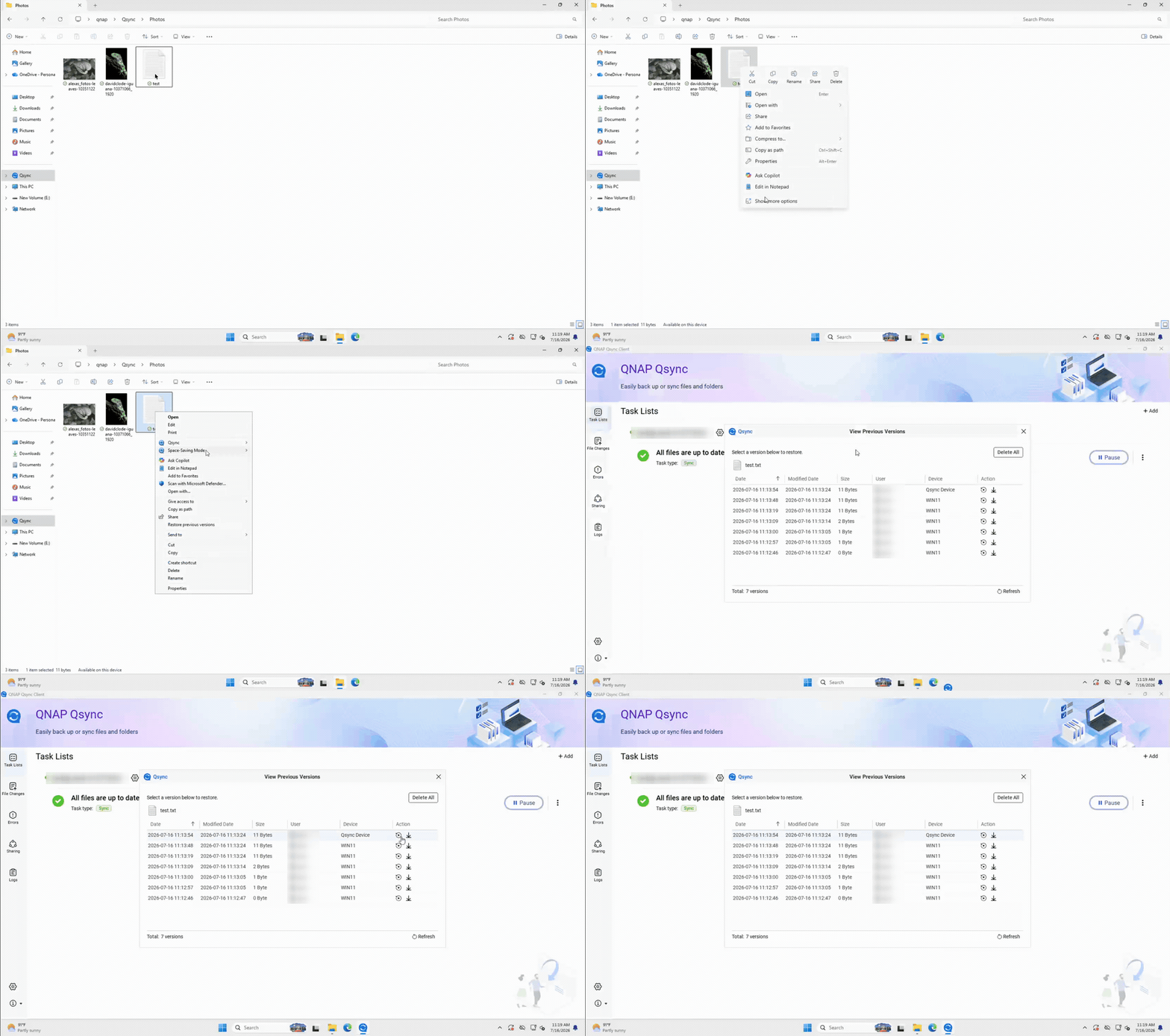
Qsync keeps a version history of your synchronized files, but until now, checking or rolling back an earlier version of a synced file meant jumping over to the NAS web UI (File Station). With 6.0.3, you can do it directly from Windows, in two places:
- Windows File Explorer right-click menu → Qsync → View previous versions
- The File Changes page in Qsync Client → View versions action
Both open the familiar View Previous Versions dialog, where you can see every retained version with its backup date, modified date, size, and the device it came from — then restore or download any version with a single click. No more switching to the browser just to recover a file.
Thumbnail previews for cloud-only files in Space-Saving Mode
Space-Saving Mode keeps files as cloud-only placeholders so they don’t take up local disk space — but that also meant Windows File Explorer couldn’t show a preview until you downloaded the file. With 6.0.3, cloud-only files now display thumbnail previews in File Explorer, so you can recognize photos and images at a glance while still saving space.
Thumbnails are generated by your NAS, so make sure the File Station Thumbnail service is enabled on the NAS. When at least one paired folder uses Space-Saving Mode and the NAS thumbnail service is off, Qsync Client now shows an in-app notice with a link to help you turn it on. If a thumbnail can’t be retrieved, Windows simply falls back to its default icon.

Learn more: How to view cloud file thumbnails in Windows File Explorer
Other improvements and fixes
- Smarter computer-name handling — when your PC name contains characters Qsync can’t use, the client now handles it smoothly, so device setup and connection go through without a hitch.
- Improved overall stability, including a fix for a case where the client could unexpectedly exit.
- A more stable login and connection experience, with fixes to the NAS connection and authentication flow.
- Fixed an issue where a share link could contain an incorrect address under certain settings.
Download Qsync Client for Windows 6.0.3 now!
Recover earlier file versions without leaving your desktop, and preview your cloud-only files at a glance while saving disk space. Download and view the full release notes here: QNAP Utilities — Qsync
Thank you for your continued support of QNAP and Qsync. We’re committed to making file sync and backup simpler, more reliable, and easier to use every day.