From reading the release notes in the other thread, it doesn’t look like it is available for this model or at least not right now.
Just to be clear, are you referring to QuTS 6.0 or QTS 6.0? I’m aware QuTS version is out, but haven’t heard about QTS.
Hero. That’s the only thing I know is out and thought you were looking for that.
TS-253D. Give me the big 6. Please include the option for an integration with gemini Pro.
Please add the “Trusted proxy” option to “General settings” and “Web Server settings” to handle the “X-Forwarded-For” headers correctly.
+1 to both of these!
Also:
net.core.default_qdisc=fq_codelby default (should come with new kernel)- NFSv4.2 and
[NFS]Enable_V42 = TRUEby default in/etc/config/uLinux.conf - LUKSv2 with
aes-xts-plain64&argon2idas default for encrypted volumes (this already exists in QTS kernel version5.10.60-qnap, but is not used by default when QTS creates volumes. - A way to persist SSHd drop-in config files (e.g.
/etc/ssh/sshd_config.d/or/etc/config/ssh/sshd_config.d/*.conf)- These seem to get overwritten by current QTS
5.2.8.3359on reboot & some other operations - This does not have to be in the Web UI, just don’t clobber files that are placed there by an admin and keep the appropriate include directive
Include /etc/ssh/sshd_config.d/*.confin the mainsshd_configfile.
- These seem to get overwritten by current QTS
I’d like to see the ability to manage SSD Cache independently without the need to reset the NAS to factory settings.
I’d like to see support for more than 8GB on my TS-464, like 64 GB, too.
How did you get it to run with32 GB?
I had to restore the original 8GB as it kept crashing with 64GB … I was told there was an intrinsic problem with the Linux kernel which I know is not true, still it appears unstable with the QNAP generated kernel.
Fix caching in QTS
Two dimms 16gb each. Found a topic somewhere on reddit. The guy there posted exact ram model that fits and runs flawlessly. Crucial maybe, but I’m not sure honestly. Just bought, replaced stock 8gb and voila, it all works with zero issues.
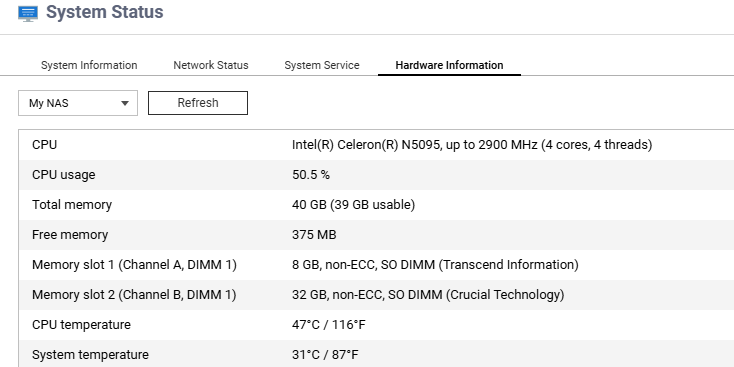
I had two 32GB CompuRAM modules, supposedly compatible with QNAP. However, I later read that many people had problems with that much memory, and QNAP immediately demanded a return to the standard 8 GB at the first sign of any issue. This happened to me as well. And I checked the kernel logs; there really were memory problems, indeed.
I wasn’t willing to experiment with the exact clip level after it corrupted my SSD’s write cache. However, I had stability issues even without that; only with the corrupted cache I could no longer access any data. Sigh.
Since reverting to the original 8 GB, my system has been running stable for many months. However, despite the great help from support via a temporary mount point that allowed me restoring my data, the journey getting there was anything but pleasant…
The only problem was that once I had everything restored, support told me that to use my SSDs again, I would first have to reset the NAS to factory settings and then re-onload all the data, which I haven’t (yet) done with 47 TB of data. The journey to this point was agonizing enough, but the now-defunct RAID group of my SSDs is somehow “burned” into the QNAP configuration itself, so only a factory reset can make it “forget”… and so I live with occasional error messages from the Storage Manager stating that my cache RAID group is inactive – which makes sense, since it no longer exists, but QTS 5 thinks the NVMe SSDs are unusable when I try to create a new (read) cache (they are grayed out).
If update today to QuTS6 beta, will we be able to move to stable after official release without re-installing or loosing existing data? When do you think the stable version will be released? THX !!!
Hi and welcome to the forum. 
If stability and data security are important then DON’T EVEN THINK of installing beta software. It’s known to contain bugs, and is much more likely to affect your data than a stable release.
I would say that the goal is that you would be able to upgrade to an official release w/o losing anything in that process. What happens to your data in the beta testing phase could be an entirely different situation. I would hope that the beta is stable enough that you would not lose data, but as things can crash, you never can be certain.
So if you want that stability and safety now, follow @OneCD’s advice and don’t upgrade! Even after the official release there are still likely going to be some bugs and things not working quite right. Usually after any major OS release (Windows, Apple, QNAP, etc), one finds subsequent “dot” release to be far better…
Been running with 32GB of RAM too on the TS-464 since the day i purchased it, with no problems what so ever, running latest (non-beta) QuTS Hero and the sticks I purchased were: Crucial DDR4 RAM 32GB Kit (2x16GB) 3200MHz SODIMM CL22, Laptop Computer Memory, Mini PC (or 2933MHz, 2666MHz) - CT2K16G4SFRA32A from Amazon
Hope that helps
Thank you for the friendly advices, I have a second NAS that is more a backup of a backup and we are able to play with without any complications… If update today to QuTS6 beta, will we be able to move to stable after official release without re-installing ?
(erasing everything from v6beta to install v6stable will complicate my life pretty badly in case i like some settings, configurations, etc…)
Only QNAP can say for-sure.
But, historically, there’s been no issue upgrading from QTS beta to stable, so I assume QuTS will be the same.
Yes
Any news?