I had an unexpected problem with my QNAP TS-216G-US. I have it connected to three laptops in our home via our home network. 2 machines are running Tahoe and 1 is running whatever came before Tahoe. We are successfully storing files using Time Machine, and I’ve successfully restored earlier versions of files. So everything seemed good.
Two weeks ago, my entire hard drive had to be reformatted, and I wasn’t worried because I have my QNAP Time Machine. (I also run a utility that does a nightly backup onto an external USB drive and I have most of the files also backed up in OneDrive.) So I initialized the hard drive, ran the utility to restore the OS, and I used Migration Assistant to restore the latest backup from my QNAP. I selected the option to find backup from a Time Machine, and I made sure the devices were on the same network … and Migration Assistant never found the QNAP.
There was an option to select another server, and I put in the IP address for the QNAP, but that didn’t do anything — I have a feeling that there’s probably a way to help Migration Assistant see the backup using the other server option, but I didn’t know how to identify the QNAP. What advice can anyone offer before I need to do a full backup again on this machine or one of the others?
Hmm.. I’ve never done it the way you have done it. The few times I have needed to restore a Mac, I boot into the restore partition and then chose recovery from TimeMachine. I’m not entirely sure I’ve connected to a QNAP before when doing this… I’m trying to think if I have ever used TimeMachine with Migration Assistant.
I’ve recovered files that were accidentally deleted or changed using TM backups on my NAS but that’s in the normal “operational” mode.
Anyhow, I don’t have specific information for you. TM is kinda funky. It can take a while for it to recognize files, etc over the network as it has to enumerate and cache all of the backup data. Be sure you are using a wired (not wireless) connection when doing this as it will be much faster. It may also be a login thing. Not sure. And there are some Tahoe issues some people have had with TM..
I would say try the wired connection and see if that helps.. Might help the Mac find it more easily.
I tried the wired connection, too — I have a converter that goes from USB-C to ethernet. I plugged the QNAP to it, and the Assistant still didn’t recognize the drive.
What do you mean when you say you booted into the restore partition? So maybe I started down the wrong path. But I don’t know what a restore partition means.
So here’s what I got from AppleCare. My hard drive was failing First Aid and they finally had me erase it. Then I used the recovery system to reinstall macOS and run First Aid again to test the drive. Then they had me set up a new, temporary account on the machine so that I could log on and then run Migration Assistant. I don’t remember an option to restore from TM in the recovery system … but I’m old and it’s been three weeks so maybe I just don’t remember that step failing.
Thank you for the update! It sounds like the issue has been successfully resolved. If you have any further questions or would like to discuss anything else, please feel free to let us know. Thanks again for your feedback!
I’m backing up files but I don’t know why I wasn’t able to restore from the backup when I had to erase my hard drive. And I don’t have any reason to believe that I’ll be able to access a backup the next time a machine fails. It feels like my QNAP backup is a black hole that failed when I needed it. And even though I have data backups back to about November of 2024, I can’t access any of them earlier than Jan 15, 2026.
Well, if you have your Mac back, then you can click on the Time Machine icon in the top menu bar and Browse Time Machine Backups. Then you can go in and select a file you want to recover. See if it works that way.
Just be aware that it may take some time for all your data and backups to show up. There’s quite a lot that has to be enumerated and passed between the NAS and your network. I’ve seen it take minutes before I am able to access stuff.
• I used to be able to access TM backups. I still can access TM backups since my restart.
• It looks like all of the old TM backups that can no longer be accessed are still on the device. I don’t know how to delete them and recover the space.
• And if I have to erase the drive in the future, it seems likely that the QNAP TM backup won’t provide any help again. That’s what I was hoping someone would be able to help with but so far no help,.
First, I’ve never had to attempt to recover my Mac from Time Machine using my QNAP. So unfortunately, I cannot help you there. I have suggested just about every idea I can think up. I wish I had something more for you.
So you can access your TM backups - good. You just can’t access your “historical” ones from before your wipe/restart - not surprising. I don’t think that’s QNAP’s issue but more Apple’s.
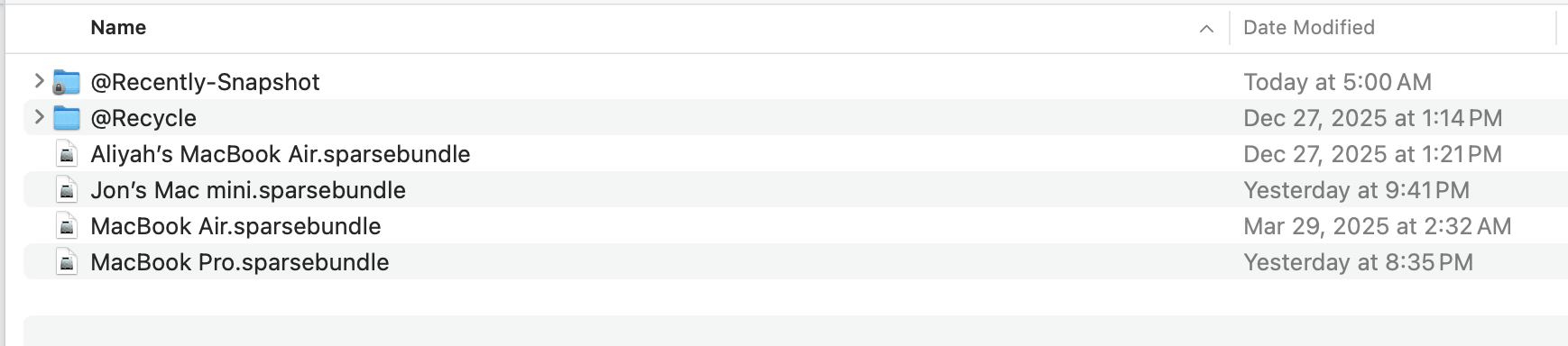
As for getting rid of your old backup data, in the Finder, access your NAS and go to your TM folder where you store the backups.
How many files do you see. You should see something like this:
I have the option to view file name extensions turned on so if you don’t see the .sparsebundle, no worries.
Do you have just one file for your Mac? Or do you see multiple? It’s possible you changed the name of your Mac on the wipe/re-install. If you see an older file there, that’s your old data. You can just delete it. I’ve never figured out how to successfully mount an “old” Time Machine bundle. I have had multiple from different AirPort Time Capsules, etc. over the years.
Yeah, I don’t think it is easy. Apple builds in some security elements into TM - it’s like the TM folder is paired to the machine. I’ve had plenty of old TM file bundles, that TM can see but attempting to access them fails. It used to be fairly easy to do, years ago. Not any more…
My UserID on my machine was chuckbo. Like I said, the QNAP never showed up as a way to recover from TM and I had to use a disk backup. But there was a separate problem and it rebuilt the Username as chuckbo_1. So I’ll try to delete the old images.
But more importantly, I’m hoping next time SteveKo checks on the status he might be able to provide some guidance on how to test the connection for a TM recovery in case this happens with one of my other machines.
Oh interesting - it didn’t restore the user name to the same user name. That could be a problem as now your user settings are all different. There’s still probably a chuckbo user folder on your Mac…
Well, I really don’t know what you did during recovery, so I can’t really comment much more.
That’s my fault. At one time I started a recover from the disk and it froze. So I started it again. After the recovery was finished (with the new username), I found a hidden directory that had the original username (probably was in the middle of being created when it froze so wasn’t deleted nor made into a directory I could see at the time).