Hi,
I look for view people filtering logic, where photos are …
- showing all the marked people together on photo(s) [Rule#1] or
- showing any of the marked people on photo(s) [Rule#2].
Thank you for reading / thinking on it.
Hi,
I look for view people filtering logic, where photos are …
Thank you for reading / thinking on it.
I believe you can do this using Qsirch.
Hi @othello162 ,
Thank you for your feedback! This feature is actually already available in QuMagie. Here’s how to use it:
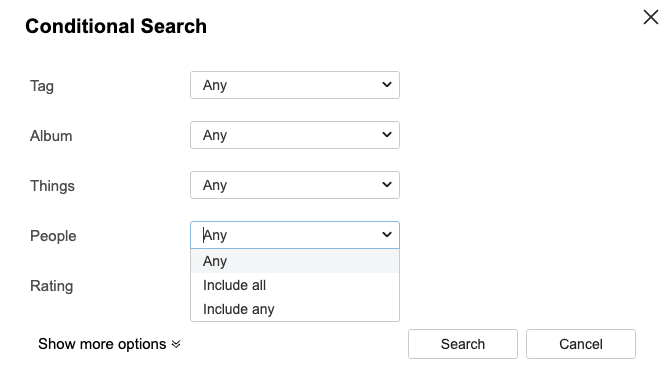
Click the icon next to the search bar to open the Conditional Search panel.
Under the People section, use the dropdown menu to choose your preferred filtering logic:
Include all — shows only photos where all selected people appear together (AND logic)
Include any — shows photos where any of the selected people appear (OR logic)
Then select the people you’d like to filter.
This should cover both scenarios you described. Give it a try and let us know if it works for you!
Hi
@Dday,
Thank you for the help.
Unfortunately, searching for 2 people [Include all] in 150.000+ pictures resulted 14 photos, but only 7 were real match from them. And I know, that such photos are there in the hundreds, which shows in case of viewing them one by one.
If I may have a suggestion, then the custom date filter does not help to choose photos e.g. between 2013 and 2018, somehow it could not handle my way of trying …
@Jon,
thank you for calling my attention to this app, am going to check it.
Hi @othello162
Thank you for the detailed feedback — this is very helpful.
Based on what you described, it sounds like the filtering logic itself is working as expected, but the underlying face recognition results may not be accurate enough, which directly affects the search outcome.
To help our team investigate further, could you share a bit more information?
Are the two people you searched for already correctly tagged under the People album? For example, do their People albums contain most of the photos you’d expect, or are there many missing/incorrect ones?
Have you noticed if either person has been split into multiple clusters in the People section? (i.e., the same person showing up as two or more separate entries)
This will help us understand whether the issue is more on the detection side or the clustering side.
Regarding the date filter issue you mentioned — could you describe what you tried and what happened? We’d like to look into that as well.
Thanks again for taking the time to report this.
Hi David,
thank you for following the issue
1 - are the two people …> yes
2 - have you noticed … > yes, both of them was merged from more than 4 parts
? - regarding the date filter… > Custom Date
TextWindow [2019/01/01 - 2019/01/01]
→ 2014
→ 01
→ 01
[OK]
TextWindow [2014/01/01 - 2014/01/01]
→ … 2nd 14 changed to 19
[OK]
TextWindow [2019/01/01 - 2019/01/01]
my intention was to search for the years between 2014 and 2019.
Regards