Hi everyone,
I’m struggling with a video playback issue on my QNAP NAS. When I play MP4 files (from a Samsung smartphone) through QuMagie in a web browser, I can only hear the audio, but the screen remains black.
Here is my current setup and what I’ve already tried:
Model: QNAP TS 264
License: I have already purchased and activated the CAYIN MediaSign Player Plus license.
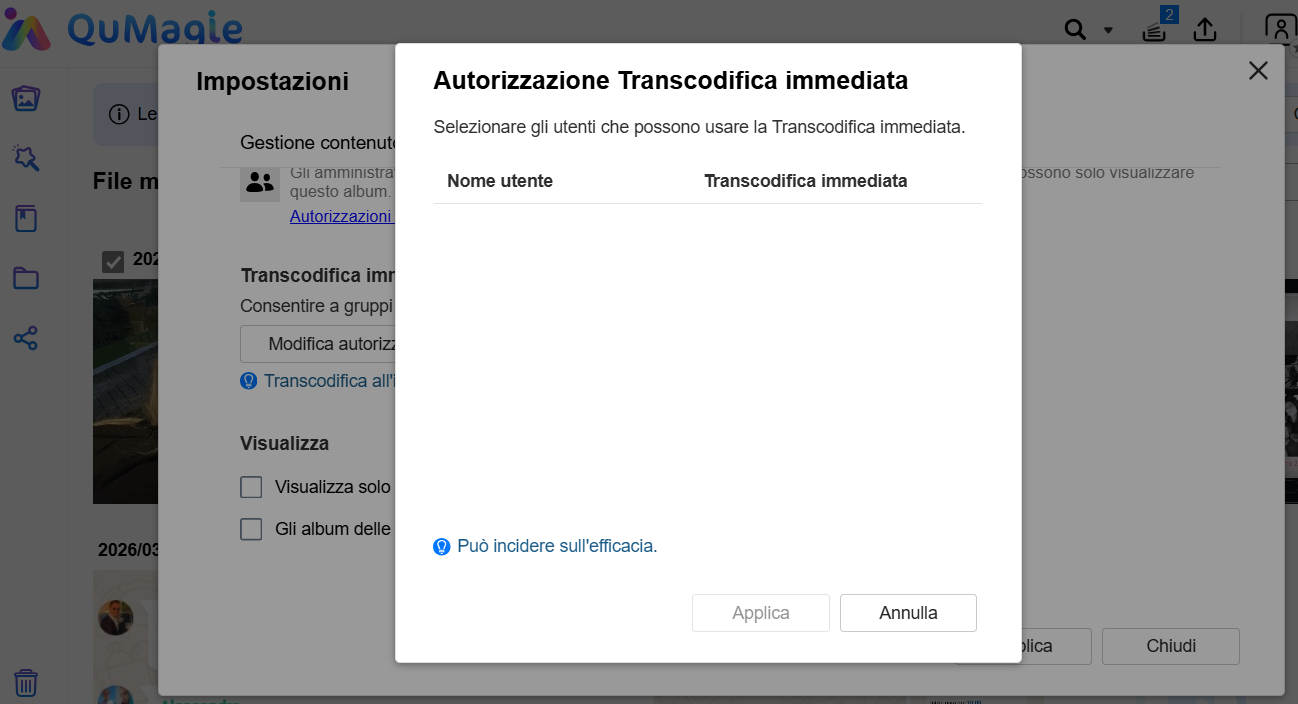
Issue: Despite the license, the video doesn’t show up in the browser. I understand I need to enable “On-the-fly transcoding,” but when I go to QuMagie > Settings > On-the-fly Transcoding Authorization, the user list is completely empty. I cannot select or authorize my user.
What I’ve checked so far:
Verified that my user has “Application Privileges” for Video Station and Multimedia Console in the Control Panel.
Thumbnails are generated correctly and look fine; the problem is only during playback.
How can I populate the user list in QuMagie to enable transcoding? Or is there another global setting in Multimedia Console I’m missing to make the CAYIN Plus license actually work with the browser player?
Thanks in advance for any help!