I have a TS-251B with 2 x 4TB HDDs. It functions great for all my needs, except QuMagie is very slow to use. Most notably, thumbnails can take 10-20 seconds to load when scrolling through pictures. (Thumbnail generation is complete in the multimedia console.) Wondering if any of the following would help:
Are there any upgrades I can make to my NAS that would actually help? (E.g., more RAM, although that doesn’t seem to max out now, or add an SSD, or…?) Or is this feature really just beyond the performance of a TS-251B?
Hello, I’ve browsed via both a the web UI and my mobile device (iPhone 17) with similar results. I reduced thumbnails to the lowest quality setting which seems to have sped things up slightly, but still much slower than I would consider a satisfactory performance.
Hello, I would be curious to know of upgrade recommendation from a TS-251B which would see marked improvements ? I am considering a TS-264 with 16Gb ram ? I am limited in my working knowledge and chose the TS-264 as I can migrate my existing HDD’s into this unit ?
I currently have a TS-451 that was my only NAS until just over a year ago. I ended up going with a TS-873A.
First of all, I would recommend going larger than a 2 drive unit. Get yourself a TS-464 or TS-664. This lets you run RAID5 which is way better than RAID1.
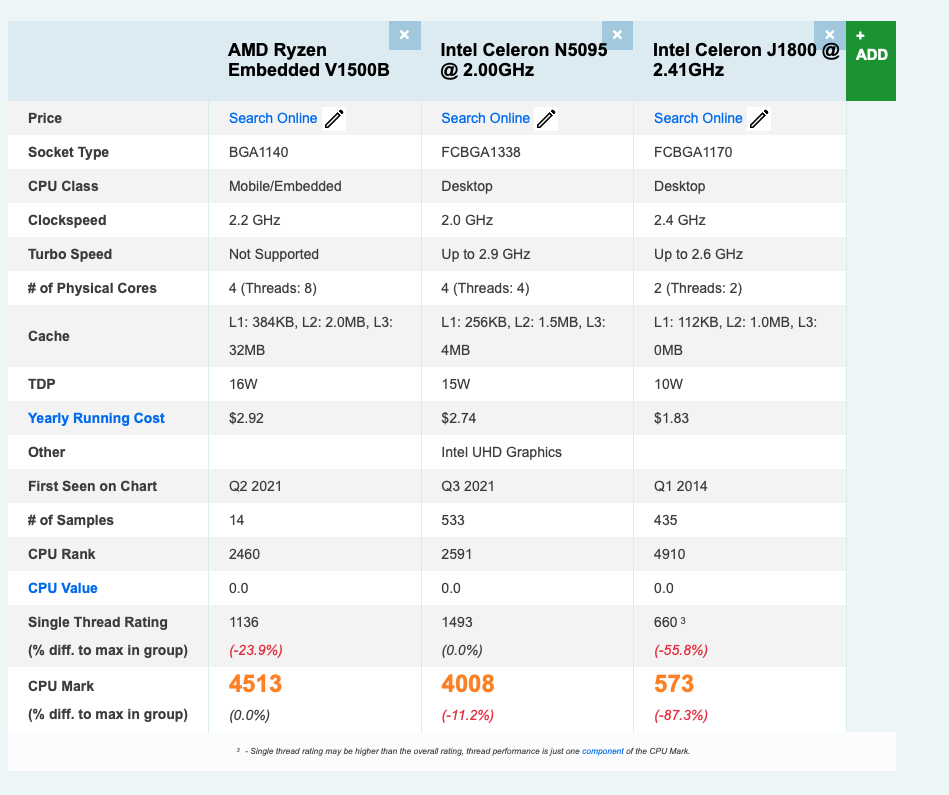
The TS-x51 series uses an Intel Celeron J1800. On Passmark this has a CPU mark of 573. The TS-x64 runs a Celeron N5095 while the TS-x73A runs an AMD Ryzen V1500B. Both are roughly 9x the performance of the J1800. You will see a HUGE improvement in performance. See pic:
Personally, I think the V1500B is still a little weak for some applications. I just recently upgraded my TS-672XT from a 7th generation i3 to an 8th generation i7 and the difference is very significant. The 7th generation i3 and the V1500B are pretty comparable in performance.
A TS-673A is about $100 more than a TS-664. The decision on what to get depends on your. Each unit has advantages and disadvantages.
Jon, Many thanks for your detailed insight to my question. It does help to know the facts. I had been tempted to purchase a TS-262 on cost. However I haven’t based on your advice. I’ll probably go with the TS-264 though I will look into the 4bay unit and raid 5 option.
Same problem here (TS-251D, 8GB RAM). Installed Immich and works very well. Works very well with PhotoStation and Qphoto too. So it may be Qumagie software specific. Qnap is looking into it (for 2 months already). Hopefully they find a solution. Otherwise will use Immich or Photostation (no longer supported).
I have the exact same problem with a TVS-h474: painfully slow thumbnail loading; however, it’s not a resource problem. I have a 12th-gen i5 with 20 cores, 64GB of RAM, and everything, including the OS, is on SSD. It has the very latest BIOS and an NVidia RTX3050 GPU to assist, though QuMagie doesn’t use GPU acceleration. The indexes are fully built, and all thumbnails are generated. I’ve tried removing Multimedia Console, QuMagie, and QSirch, then reinstalling and rebuilding all indexes and thumbnails. Nothing seems to make a difference. I don’t think the problem is your hardware; although this may have some impact, it’s just very slow.
The CPU never seems to get much above 25%, and disk latency is basically 0, so I believe there is just some inherent delay in the API layer and thumbnail recovery. Will give up soon, uninstall everything, and look for something better.
I let Qnap know that other users are having the same problem. I don’t think it is the hardware either. As I said, Immich and Photostation work well. I will stick with Immich if they can’t fix Qumagie.
Thank you very much for your feedback. Regarding the performance issues with QuMagie, we have been unable to replicate the same slowness in our internal testing environments. Therefore, we would greatly appreciate it if users experiencing similar issues could open a technical support ticket and allow us to perform a remote analysis.
This will be immensely helpful for us to identify performance bottlenecks and implement optimizations. We sincerely thank you for your support and cooperation!
So @SteveKo let me give you some insight with QMagie that I see just taking a look at things really quickly:
Using my TS-873A. 64K RAM QuTS h5.2.8
1.) Initial loading of thumbnails seems OK. Reasonable for a web based app
2.) Scrolling a bit lower - thumbnails take a while to load. But they load up OK eventually. Seems like the software takes some time to cache the pictures from the database and display them.
3.) It seems like the software is caching BOTH the thumbnail and the image. I say this because if you let QMagie sit for a bit in the library with all your images up, then clicking on any image results in a very quick image display. However, when you try to display an image while it is still loading thumbnails or shortly thereafter, it takes a bit of the picture to come up.
4.) Now what I see happening and what I think people are seeing issues is in CPU loading. Looking at TOP, when I start jumping around the app and trying to cache images and bring up images, my CPU Load goes up to like 19. With 8 available cores that my 873A effectively has, a CPU load of 19 means that there’s a bunch of thread processes that are stuck in queue. It comes back down, but during this time, QMagie gets quite slow as would be expected.
So to everyone who says, “CPU never goes about 25%” or similar - that doesn’t matter. You need to look at the CPU Load number. Open an SSH shell, run TOP and look at your CPU load. If that number is very much higher than the number of cores you have in your processor, things will crawl. CPU usage percentage can be very low and CPU Load high and things will crawl.
So I would say QMagie is not the fastest. It seems like it is taking some time to get all the images out of the database (I’ll see the MariaDB process heavily engaged - taking up to 90% of a core’s usage) and then dumped to the browser. Is it crazy bad? I don’t know. I gotta wait maybe 15 seconds when scrolling to a section of the library where nothing is loaded.
It was me that said 25% CPU and I did monitor active processes using SSH and top, I have many years of Unix/Linux system administrator experience. The only processes using significant CPU are the 5 or 6 processes that make up Samba, which curiously use about 10% of the CPU night and day. IO wait also seems higher than expected. There are occasional spikes, that are attributable to expected activities, but there appears to be no connection between QuMagie activity and high CPU. I have 45,000 images and QuMagie takes nearly 20 seconds to load the initial view and the first 20 or so image thumbnails take maybe a further 30 seconds to appear. If I scroll down I just get grey squares, unless I wait a few minutes. If I click on an image, it takes maybe 10-15 seconds to appear.
OK. When I load Qmagie with my TS-873A (Ryzen Embedded V1500B), I have about 53,000 images. The initial view loads in about 2 seconds. I start seeing images instead of grey squares in about 10 seconds and maybe it takes a total of about 20 seconds for the whole page to populate. While doing this though my CPU Load does spike.
If I click on say 2011, that makes the system go and search the database and it takes less then 20 seconds to load the whole page with thumbnails. The page itself with grey squares is shown instantly.
Once the thumbnails are loaded, the image is shown instantly.
I imagine that if I loaded QMagie and all my images onto my TVS-672XT which now has an i7-8700T, it would be at least twice as fast. The difference between the i7 and the V1500B in terms of responsiveness is simply amazing. Of course the i7 is over twice as fast.
You TVS-h474 has a Pentium Gold G7400 which has a CPU mark of 6709. My V1500B has a CPU mark of 4513, so your issue is not your processor. You should have a better QMagie experience than I have but you don’t.
Are you using NVMe drives for your system volume? That could make a difference. And what else are you running on the NAS (I’m actually running a ton of stuff on my 873A).
Thanks Steve. Technical support ticket has been opened since December 2025. QNAP has been trying to look into it with multiple remote sessions (that expire). I will update if I hear anything from QNAP. It may just be a software issue (QuMagie). Just surprised that I have no issues with Photostation (Qphoto) or Immich.
My TVS-h474 has a 12th Gen i5-12400 and 64GB of RAM, not the Pentium Gold G7400. The system and all images are stored on RAID 1 NVMe SSDs with an additional 4-disk RAID 5 volume, unused by QuMagie. I’m at a loss as to why it’s so appallingly slow. It does have several VMs running, but they don’t do much, and 2 Docker containers. But as I said, it doesn’t seem taxed at all. I suspect it has something to do with how QuMagie stores its metadata.