One app for your everyday NAS essentials —and you can even “talk” to it to get things done! From system setup and quick file searches to photo browsing and real-time status monitoring, QuONE seamlessly integrates everything into a single experience. With natural language AI control, managing your NAS is completely hands-free and effortless.
 Android Beta Early Access is Live! We invite our community members to be the first to join the test—come unlock the most intuitive mobile NAS experience!
Global: Mobile App | QNAP (US)
Features Overview
Smart Setup: Take the Guesswork Out of Configuration
- QuONE automatically detects your NAS hardware specs and recommends optimal configurations, guiding you step-by-step through network setup, storage allocation, and app installation.
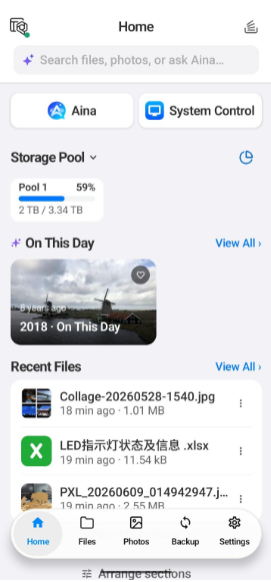
Dashboard: At-a-Glance Insights, Instant Action
-
“On This Day”: Relive memories with photos from the same date in previous years.
-
Clear Overview: Monitor background backup progress and storage usage at a glance.
-
Quick Actions for Recent Files: Send copies, generate share links, move, or protect files. Simply swipe left to grab a share link instantly.
-
Seamless Switching: Switch between multiple NAS devices with a single tap.
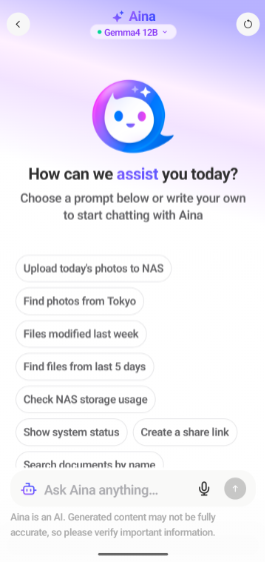
Aina Assistant: Hands-Free NAS Management
Manage your NAS using natural language—from searching for files to creating user accounts.Try asking:
-
“Find the files I modified last week” — then download them to your phone or generate a share link.
-
“Upload today’s photos to the NAS” — preview thumbnails, select the backup destination, and confirm to upload.
*Note: QuAgent must be installed and enabled on your NAS before using Aina.
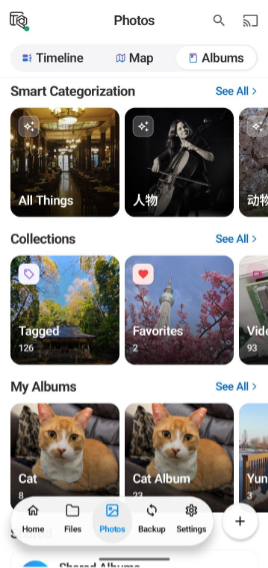
Photos: Every Picture Tells a Story
-
Timeline: Browse photos and videos organized chronologically by date.
-
Map View: Explore your memories sorted by shooting location.
-
Smart Albums: Automatically group photos by people and pets via facial recognition, alongside AI-powered categories like nature, architecture, and food.
-
Casting: Cast photos and videos directly to your TV.
Folders: Never Lose Your Way in File Management
- Supports breadcrumb path navigation, Team Folders, share links, and password protection.
System Control & Settings: Everything Under Control
-
Real-Time Monitoring: Track CPU, memory, storage, temperature, and network traffic. Keep tabs on RAID volume health with instant alerts for any anomalies.
-
Multi-Account Management: Manage all logged-in QNAP Accounts and linked devices in one centralized hub.
-
Transfer Settings: Automatically detects metered networks, with independent file conflict rules for uploads, downloads, and copy/move actions.
-
Privacy & Security: Supports biometric unlock and 2FA management.
Join the Beta Now
- Download QuONE:
Global: Mobile App | QNAP (US)
-
Connect & Configure: Link your NAS and follow the Smart Setup wizard.
-
Enable AI: Install and enable QuAgent on your NAS to start using Aina.
-
Share Your Feedback: Leave your thoughts in this thread! Feature suggestions and screenshots are always welcome.
Learn More: