One app for everything NAS—and you can even control it by talking to it!
From system settings and quick file searches to photo browsing and real-time monitoring, QuONE brings everything together in one place. With natural-language AI controls, you can manage your NAS with just your voice.
 The Android Beta is here! We’re inviting our community to be among the first to try it. Join the test and discover the most intuitive mobile NAS experience!
Feature Overview
Smart Installation: No More Guesswork
- QuONE automatically detects your NAS hardware specifications and recommends a suitable configuration, guiding you step by step through network setup, storage configuration, and app installation.
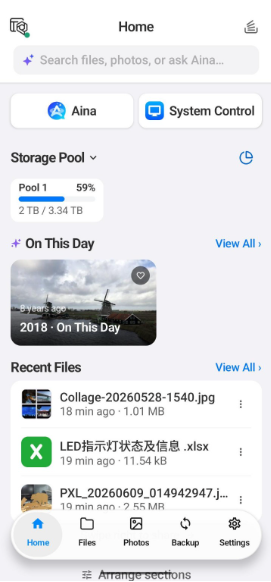
Dashboard: Everything at a Glance, Ready for Action
-
“On This Day”: Relive photos from the same time in previous years.
-
See background backup progress and storage usage at a glance.
-
Quick Actions for Recent Files: Send a copy, share a link, move, or protect files. Swipe left to get a sharing link.
-
Switch between multiple NAS devices with a tap.
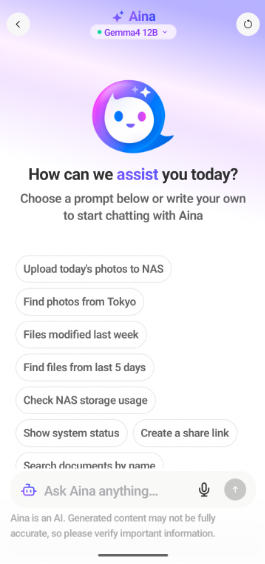
Aina Assistant: Just Ask, and Aina Does It
Manage your NAS using natural language, from finding files to creating users.
Try asking:
-
“Find files I modified last week”, then download them to your phone or create a sharing link
-
“Upload today’s photos to my NAS”, then preview the thumbnails, choose a backup location, and confirm the upload
*Before using Aina, you need to install and enable QuAgent on your NAS.
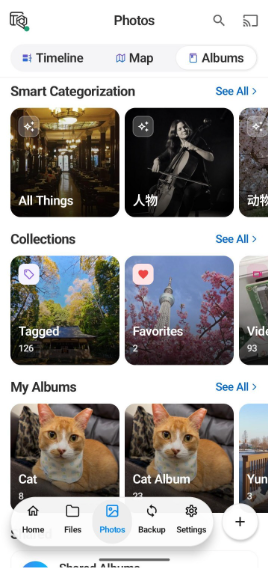
Photos: Every Photo Has a Story
-
Timeline: Browse photos and videos organized by date.
-
Map: Browse by location.
-
Smart Albums: Organize photos by the faces of people and pets, with AI automatically sorting them into categories such as nature, architecture, and food.
-
Cast: Cast photos and videos to your TV.
Folders: Find Your Way Around Your Files
- Supports path navigation, team folders, sharing links, and password protection.
System Controls and Settings: Stay in Control
-
Real-Time Monitoring: Check CPU, memory, storage, temperature, and network traffic, keep an eye on RAID volume health, and receive alerts when something is wrong.
-
Multiple Account Management: Manage signed-in QNAP Accounts and linked devices in one place.
-
Transfer Settings: Detect metered networks and set separate file conflict rules for uploads, downloads, and copy/move operations.
-
Privacy and Security: Supports biometric unlock and 2FA management.
Join the Beta Now
-
Download QuONE:
Mobile App | QNAP (US)
QNAP 行动 App | 威联通科技 QNAP -
Connect to your NAS and follow Smart Installation to complete setup.
-
Before using Aina, install and enable QuAgent on your NAS.
-
Leave your feedback in this thread! Share your feature suggestions or screenshots.
Learn more: