QuTS hero 6.x UPS - question

Hi,

I’m new to QNAP system all together (switching from Synology) and sofar it’s overwhelming with features/settings but since i’m computer geek I like what I see/can tweak :).
So many good things in hero 6.x but i have one thing that bothers me.
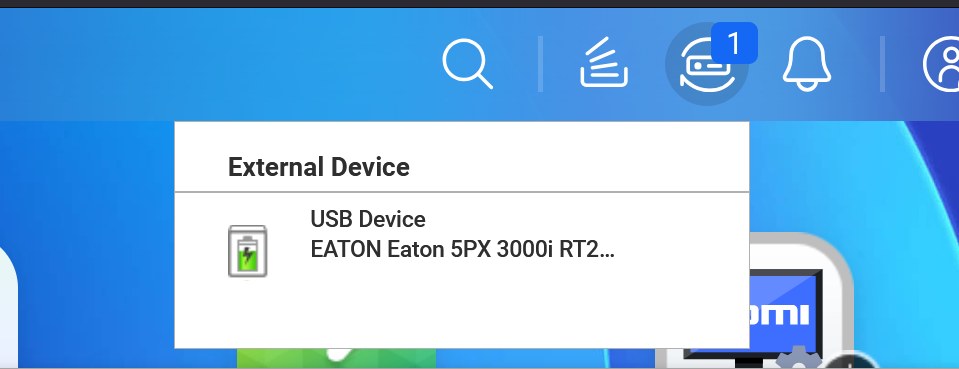
Is there a way to remove this “+1” notification that i have UPS connected to my NAS ?
Yes i know it’s connected, I connected it :smiley: so not sure why QuTS hero insist having that notification all the time on GUI ?

I tried to log out/log in back but it’s constantly there :confused:
Thanks in advance, and please excuse me if there is something obvious i missed (QNAP newbie still :)).

Here is screengrab attached

Hi Lewis. :nerd_face:

This isn’t a +1, it’s a count of connected external devices.

It’s not removable (as-far-as-I-know.)

Hi OneCD.

Thanks for quick reply.

Not answer I hoped for but still an asnwer.
Dang it annoys me so much, i constantly think i have unread message :).
But OK for now, maybe QNAP team will manage to update it soon and enable “read” or clear notes there also.

I’ve found few more GUI issues that could use some polishing just not sure should i add separate topic for each one or make one general called “things that Irritate me in QuTS hero 6.x” :).

Do QNAP Devs read forums or I’d need to open “case” for such stuff?

cheers

Creating a support ticket is the formal way of notifying QNAP.

Informally, you can create a new topic in the Feature Requests subforum. Maybe a dev will see it, maybe not?

Hmm, i just tried to through Help ticket system, but it gives me just error so maybe it’s broken on QuTS hero 6.x beta :confused: ?

Can you please try submitting a ticket through the QNAP website? You’ll need to ensure you’re logged-in with your QNAP ID (QID) to submit a ticket.

QNAP Account Center

Yep, I’ve just done it that way and that worked so not sure why it doesn’t work from Device directly. My internet speed definitely isn’t problem (as error message suggests) 'coz i have 2Gbit down and 1Gbit up, fiber.

Anyway let’s see what Devs say to my “ticket” :).

Thanks for help

I had the same issue when I installed my UPS. I agree this is very annoying.
I do like to be notified if anything is connected, but also want full control over my own system…lol. So, I or we should be able to clear any notification once we’ve read it.

They can add it to a hardware attached section like drives or ssd’s, if desired, no big deal there, but not keep it permanently listed in notifications, like it’s a new notification every day.

Falsely crying wolf every day, as the old saying goes, can develop a bad habit that may cause some to ignore notifications because its just that annoting junk UPS notification again, and potentially miss a needed notification instead.

Notifications should be kept for new matters that may or may not need attention, but the option to clear them, especially after we’ve read them. IE: We’ve been notified, and we determined it’s ok, and cleared.

Unfortunantly, I don’t have the answer yet either.
Please update us what QNAP responds. I’m sure we are not the only ones annoyed with it.

Greg

This shows the number of connected external devices. It’s designed so that when you have multiple devices attached, or if one disappears, you can spot it at a glance and confirm quickly. If you have any other questions or suggestions, feel free to let us know!

Come on guys - really? It’s a very valuable tool as if that number of devices changes you will know that the UPS or another external drive is not connected when it should be. It’s not a “message” icon but a “device” icon:

So yeah, it’s very valuable.