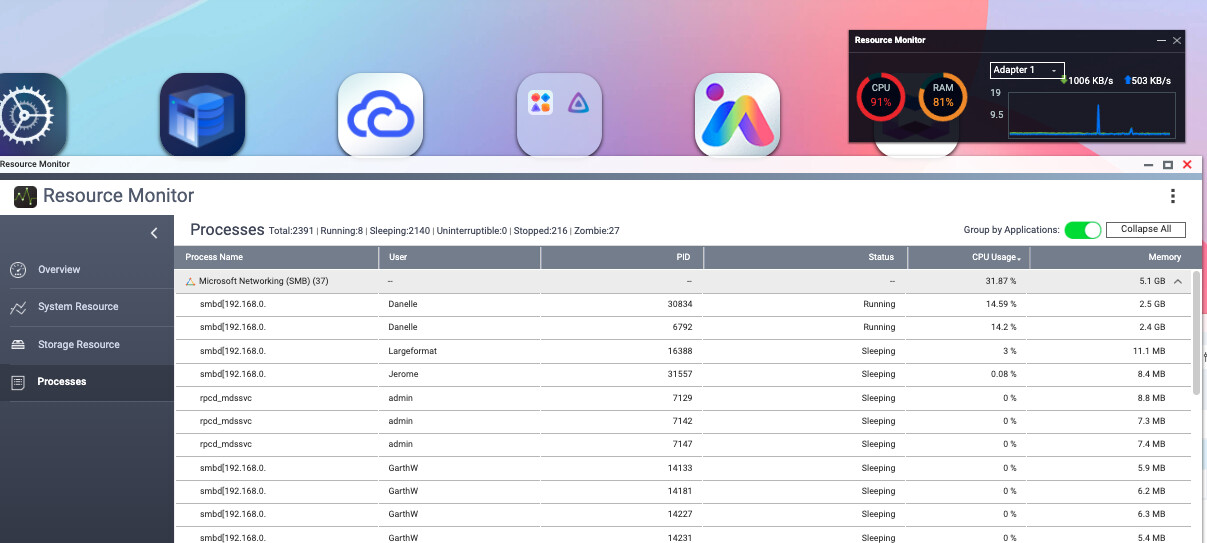
I am testing QuTS hero h6.0 Beta in a real production environment and I am still hitting serious SMB stability issues with macOS Tahoe clients.
Environment
-
NAS OS: QuTS hero h6.0 Beta (latest available build at time of testing)
-
RAM: 32 GB
-
Storage: ZFS pool with SSD write acceleration enabled
-
Clients: Multiple macOS Tahoe workstations
-
Network: 1 GbE LAN
-
Workload: Large design studio shares, high file count, many small files, active browsing and saving
Issue summary
When Tahoe Macs connect over SMB, the NAS experiences runaway memory usage by SMB processes (smbd). Individual connections can consume multiple GB of RAM each, even when the Mac appears to only have one share mounted.
As RAM usage increases, the NAS eventually automatically stops the SMB service, which disconnects all users and disrupts production.
Symptoms observed
-
smbd[client-ip]processes consuming 2 GB to 6 GB RAM per connection -
Multiple
smbdprocesses per single Mac client -
CPU spikes during heavy SMB activity
-
In some cases, SMB worker processes remain after a client disconnects or reboots (orphaned “zombie”
smbdprocesses still holding RAM) -
“Online Users” does not always reflect the real resource usage, as the
smbdprocess can remain even after the user is no longer connected
Steps to reproduce (simplified)
-
Tahoe Mac connects to NAS SMB share
-
Browse large folders and work normally (Finder + Adobe apps)
-
Over time, memory usage climbs rapidly in SMB processes
-
NAS hits RAM pressure and SMB service is stopped automatically
Expected behaviour
Stable SMB connections with reasonable memory usage per client, and no scenario where one or two clients can consume enough RAM to force the NAS to stop SMB for everyone.
Actual behaviour
SMB memory usage grows uncontrollably until SMB is killed, disconnecting all users.
Troubleshooting already attempted
-
Adjusted SMB settings and disabled features like leases / async IO where possible
-
Applied macOS side mitigations (disable network .DS_Store, nsmb.conf file_ids_off, Spotlight exclusions)
-
Manual cleanup of stuck SMB processes temporarily resolves RAM usage, but the issue returns under normal use
Question
Is QNAP aware of a compatibility issue between macOS Tahoe SMB client behaviour and the QuTS hero h6.0 Samba build?
Are there recommended settings or a patch planned to prevent runaway RAM usage and zombie smbd processes?
Thanks in advance, happy to provide logs or screenshots if needed.