I am using the surveillance camera feature in a macOS 15.5 environment.
Until yesterday, QVR Pro would automatically log in and start up after booting up the PC, but suddenly it stopped auto-login, and now it stays on the ID/password screen with “Connecting…” and does not connect to the camera.
I can log in to the NAS, go to the QVR PRO app, and launch QVR Pro Client from “Camera Display.”
Based on the details you provided, it appears that you are using QVR Pro Client in a macOS 15.5 environment. Previously, you were able to log in to QVR Pro automatically after starting your PC, but now it seems you are stuck on “Connecting…” and cannot connect to the cameras. However, if you log in to the NAS and launch QVR Pro Client by clicking “Show Camera” from the QVR Pro screen, you are able to connect normally—is this understanding correct?
If so, we have not confirmed any related specification changes at this time and are continuing to investigate.
To help us better understand the situation and identify the cause, could you please provide the following information:
QTS version
QVR Pro version
QVR Pro Client version
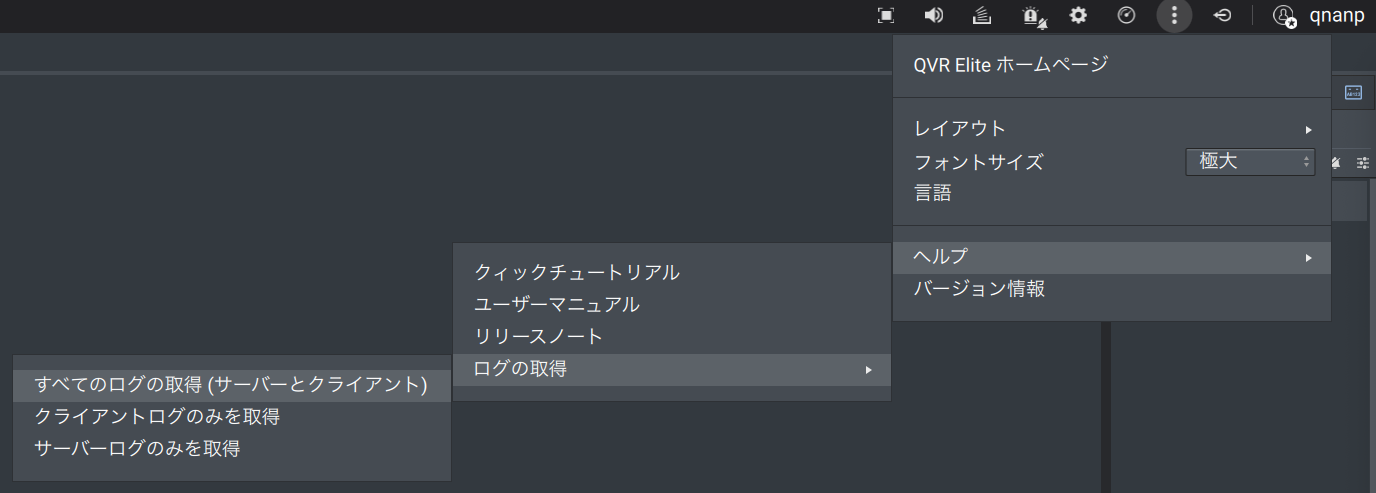
Logs obtainable from QVR Pro Client (please refer to the attached image for instructions)
Based on previous cases, it is possible that the issue is caused by the QTS authentication token expiring. If possible, restarting the NAS may resolve the issue (please note that recording will be temporarily interrupted during this process).
If you have any additional information or questions, please feel free to let us know. We will support you as much as possible.
There are no mistakes in the confirmation details.
QTS version: I was unable to find how to check it.
QVR Pro version: 2.6.1.1029 2024/10/25
QVR Pro Client version: 2.7.1.1173 2025/3/18
Surveillance system version: 2.6.1.1029 2024/10/25
Server version: 5.2.4.3079 20250321
I have obtained the logs that can be retrieved from QVR Pro Client, but since I do not know how to attach the file (ZIP), I will keep the data stored for now.
Regarding restarting the NAS:
I pressed the power button but was unable to restart, so I turned off the power once and started it again.
However, the issue was not resolved.
Thank you very much for your cooperation. Upon checking, we found that the reason for the connection issue was due to the change in the NAS IP address. I am very glad that I could help resolve the problem.
If you have any other questions or feedback, please feel free to contact us. Thank you for your continued support.