I’ve got a situation where QVR Pro is not capturing motion from one of my cameras. It had been but let me give some detail.
I have an Amcrest IP5M-1190EW camera mounted on my home viewing my driveway and the street. This camera is not listed in the QNAP supported camera so I use ONVIF which works fine. I installed the camera last February.
The camera worked fine but QVR Pro was causing excessive usage on my TS-873A. So I made my TS-451 into a dedicated NAS for QVR Pro. Turns out around the same time (roughly July), I would see the camera reboot multiple times a day - sometimes every few minutes. Long story short, Amcrest ended up sending me a replacement but it had the exact same problem. I replaced the LAN cable going to the camera (a major pain as it’s on the other side of the house from the NAS) and still same issue. I change the switch being used. Still same issue. All during this time, the QVR Pro would detect motion and alert me appropriately.
Something was causing the camera to reboot and given that the reboot issues started when I moved to the much less powerful TS-451, I figured maybe there’s an issue between the camera and QVR Pro. So I dropped the data rate from like 8 Mb/s to 4 Mb/s. Well, now the camera is stable and doesn’t reboot. But now, I get no motion detection. I changed nothing with QVR Pro. I have gone in and tried adjusting motion zones, adjusting sensitivity, rebooting the NAS - nothing. I get no motion detection. I just watched someone walk across my driveway and no motion was picked up.
What would cause this? I’m certainly bothered by the fact that it seems like the NAS was doing something that was causing the camera to reboot when using the higher data rate for the video stream. But I am more bothered that QVR Pro is not detecting motion at all now.
I have a different camera that was constantly rebooting as well. I slowed the video rate down on it and it’s stable now also. And I set motion detection on that and it works. So I can’t figure out what’s wrong with the main camera…
No, the NAS is not telling the cameras to reboot. There’s some sort of network traffic error or something that is causing it. I don’t know enough about ONVIF and the streaming protocol to know if the NAS is telling the camera to slow down or something or not able to properly ack packets because it’s being overloaded that then the camera sees that as a problem and reboots.
I would have to set up recording spaces on one of my other NAS units to try it out. But again here is the order of issues:
New Camera and TS-873A - all good except for TS-873A CPU load
Move camera to TS-451 and shortly thereafter, the camera starts rebooting repeatedly.
Get a new camera from manufacturer - it has the same issue.
Install new ethernet cable - same issue
Move network connection to different switch - same issue.
So if you look at all of it since I started having problems, everything has been replaced except the NAS…
So I’ve installed QVR Pro on my TVS-672XT and set up motion detection for my camera using QVR Pro as the motion detector and it is STILL not detecting any motion.
So two different NAS units with greatly different capabilities. Neither is detecting motion.
I’m not sure how it would be a camera issue when QVR Pro is making motion detection determination by analyzing the video. But maybe the camera does have something to do with it. I was hoping someone here might know something. I might have to open a ticket.
I had weird network issues on my camera’s I could not explain. In my case turning off junbo frames everywhere in my network finally solved the stability issues.
Hmm… Interesting. Problem is when you have a mainly 10GBit network you need jumbo frames. Maybe I can tweak the settings on my switch for the camera ports…
Hi @NA9D ONVIF is an open network video protocol designed to ensure compatibility among IP cameras and NVRs. The QVR uses ONVIF Profile S for video streaming and Profile T for video metadata, but we should not include the function that could cause the camera to reboot.
So I dropped the data rate from like 8 Mb/s to 4 Mb/s. Well, now the camera is stable and doesn’t reboot.
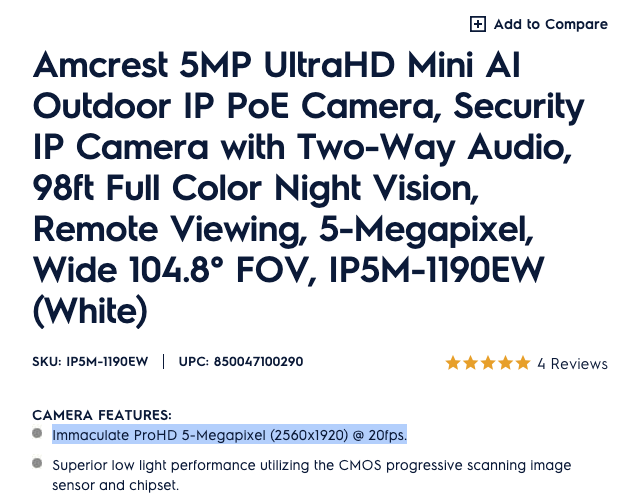
I am curious why reducing the streaming bitrate from 8 Mbps to 4 Mbps allows it to work normally. The official specification lists it can work with 2560 × 1920 @ 20 fps which should around 6 Mbps, with H.265 it should be even lower than 3 Mbps.
Hi @NA9D For the reboot issue, we have two possible causes, one is that the camera itself may have a scheduled daily reboot every morning.
Second, the camera seems restarting automatically due to system overload, the increased bitrate might be the trigger. We will reach out to AMCREST to confirm this behavior.
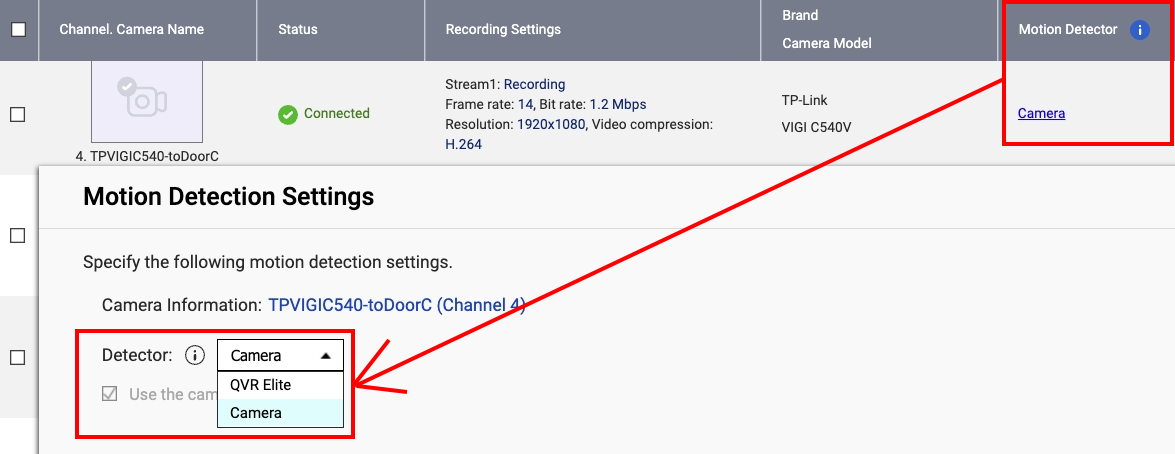
For the motion detection issue, since the camera is configured under the ONVIF Profile S+T standard, motion detection must be enabled directly on the camera in order for QVR Pro to receive the event.
We found that the motion detection option was disabled on your camera, which explains why it was not triggering. We have turned it on for you, please let us know if motion detection events are being captured successfully.
So the reason might be that the Motion Detector was set to Camera, but the Motion Detection on the Camera was disabled, thus preventing any motion detection from being triggered.
Anyway, I am glad to hear that everything is working correctly after switching the Motion Detector back to QVR Server. Please let us know if you encounter any other issues.
It’s not cool if you have a problem where you spell out that QVR Pro was detecting motion but now it is not, to have support come and basically change your configuration to Camera as the motion detector and then say, “OK. It works.”
That does not solve my issue and frankly makes me unhappy. That is not good support.
I would like to have my problem fixed with the way I had it set up originally and the way it was working for months until last weekend.
Maybe it’s a QVR Pro problem itself. I think there was a new release recently. I need to check.