We have received your ticket and will continue to assist you through it. Also, just a friendly reminder to ensure your data is backed up if possible. Thanks!
So they ned to accept your ticket. I would try enabling remote support again and make sure your ticket number is correct. If it isn’t, it won’t work.
You could see if there is something in Notification Center. Not sure.
I need to say thanks. This has been somewhat stressful and I appreciate the help you’ve all provided me on this forum. I may have gotten ahead of myself and made a minor issue into a big one.
I’m spinning up my last backup all-be-it I’ll still loose some data if I abandon the messed up RAID array. I was able to get remote help from Qnap to work. They are diligently working to see if anything can be done from their end. I must say I’ve been VERY impressed with Qnap support.
I learned something from them. The RAID array was doing some really weird stuff. I should have done a hard reset on the RAID; power it down, unplug it, press power button for 20 seconds or so (to discharge any held logic), plugged it back in and restart. They advised me to do that and some of the weird behavior cleared up.
Second, inserting the cloned drives in the array was a bad idea. The array got really confused when I did that. It’s better to use those clones in a separate complete copy of the raid array, never to be mixed with the original array IMO.
Yeah, I had a feeling the clones were not going to be a good idea. I’m guessing the RAID uses the hard drive serial numbers as some sort of cataloging for the array and knowing what drive is what. Just because you cloned the data, doesn’t mean it’s going to work because it’s a different piece of hardware and the NAS sees that and gets confused…
The clones may have been an even worse idea than was it seems on the face. I used two brand new drives for them. I then installed them into the system and tried to let the RAID array do it’s own thing. It messed up and flagged non-issue drives with read errors now.
I cannot seem to clear those read errors. I tried formatting the drives and starting from scratch but they just keep bringing back the errors and the entire NAS is doing really weird things. One minute it detects a drive and a while later it says the bay is empty. I really don’t understand whats happened.
I’m trying to do scans of the flagged (empty) disks now. I have no clue how to reset these drives or if the NAS has burnt these error flags directly into the controller card on the drives themselves? Or if it’s stuck in the NAS OS somewhere.
I’m currently trying to low level format the drives and see what happens.
So did you ever open a ticket with QNAP?
Customer support walked me through quite a bit… Then I realized the LED was flickering on the power adapter. They advised a new adapter ($125). I took it apart and saw two of the caps were visually bad. One was so bad it had came free of the solder. I happened to have those caps in my parts bin, replaced them and NAS works perfectly now. I may still buy a new power adapter. This thing is well build but fairly simple (rebuildable). it’s a few caps and what looks like a couple MOSFETs. There’s a some inductors here too.
Sadly I lost all my data (since a backup a year or so ago). Also it may have damaged the drives… When the machine wasn’t powering correctly it did weird things to the drives. They didn’t want to power up or if they did they reported errors.
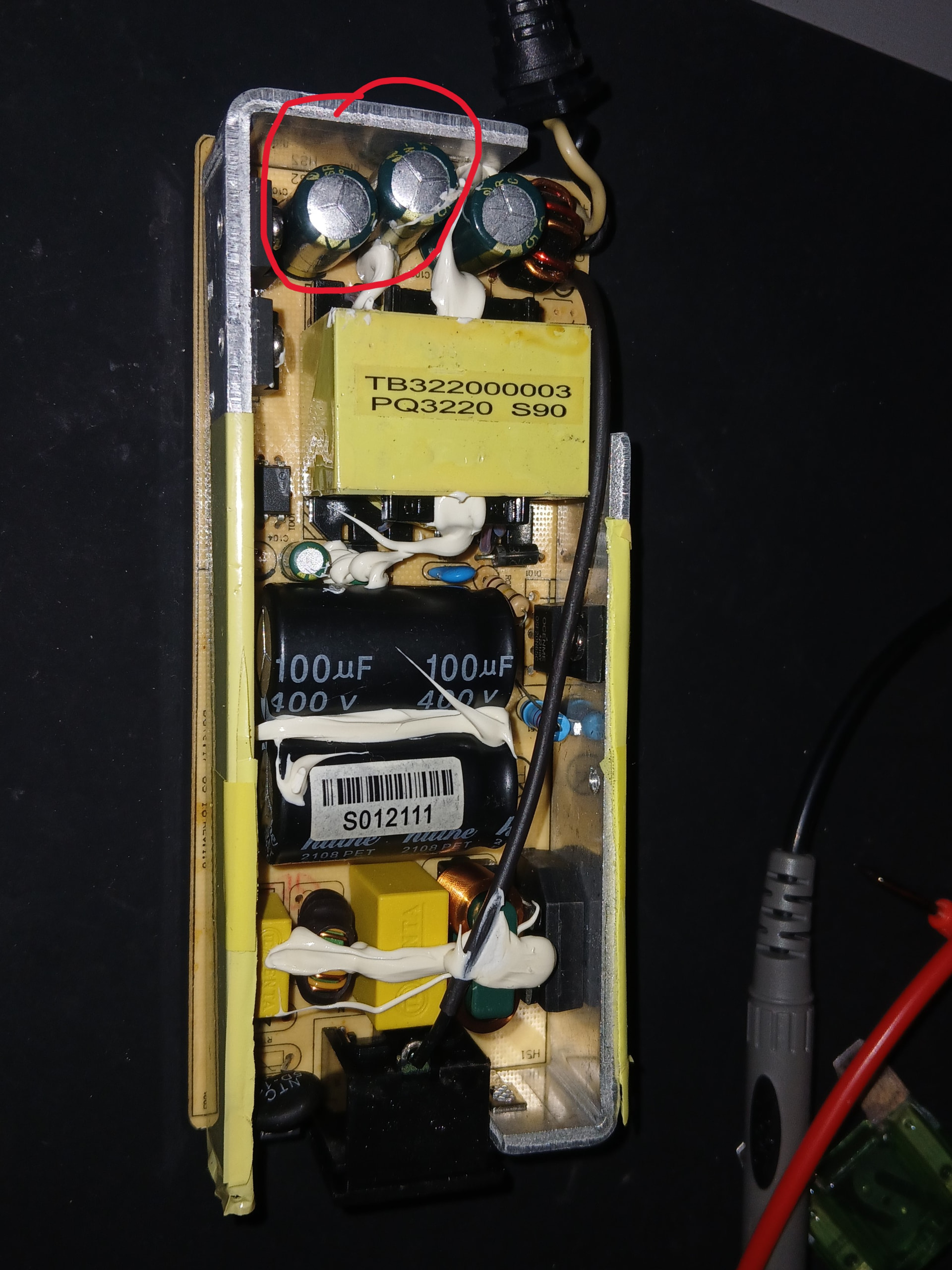
Well, that’s good. I think you have learned some lessons here.
- Backup, backup, backup.
- If an LED is flashing/flickering/etc. make sure you check what LED it actually is…
Crazy on your power supply module. The cap should never have come free of the solder. That was bad manufacturing - you had a cold solder joint that weakened over the years due to thermal cycling and eventually broke.
There’s more to your power supply than just caps and inductors. That’s a typical AC-DC flyback switching power supply. On the other side of the board, there’s likely several ICs - a primary side regulator/controller and a secondary side regulator as well.
Switch mode power supplies are actually pretty complex beasts. I sold the ICs as part of my job prior to retiring back in early June.
Oh wow, that’s pretty cool. I’ve fiddled around with some power supply design nothing to exciting. It’s been a long time though. I’d enjoy designing one if I had the time.
AMEN, I need to program into my calendar to backup more frequently. That really bit me.
I should have also thought to check the power supply sooner. Thank God it had an LED on it otherwise I’d likely have never suspected it. I did probe it out and it was at 12V w/o a load though but obviously couldn’t handle having a load hooked up.
Thanks for the help!
So if you use a program like Hybrid Backup Sync, you can schedule backups. I do nightly backups from my main NAS to my backup NAS. I also do nightly snapshot vaults. I also backup some critical files nightly to my QNAP file space online.
Three times a week, I back up to my iDrive account.
Weekly, I backup my TimeMachine files to a USB drive.
Excellent advice. I just need to get in habit of something. I have a 14tb HDD I sometimes power up and mirror the NAS to. Unfortunately, I’d not done that for a year. I typically do it before replacing drives, which I do as preventative maintenance. Somehow I missed the one with 2800 days on it. Oddly, the drive works great, seem errors were more of an issue with the power supply dropping out. Regardless that drive is now gone and replaced with a new one. I’m a little disappointed to see how expensive drives have gotten lately so hopefully these last for a while!
I’m sorry but backing up once a year is not a solid strategy. So many things can happen in a 365 day period that a once a year backup is worthless. Everything from drive failure, to NAS failure, to fire, flood, etc.
I would HIGHLY encourage you to back up far more often.
A RAID is NOT a backup!
Generally speaking I would agree, however is does depend on the dataset. I have numerous static backups that haven’t changed in a decade.
Of course, if your dataset hasn’t changed and you have a backup, then additional backups are not needed. But in general, most people’s data changes almost daily…