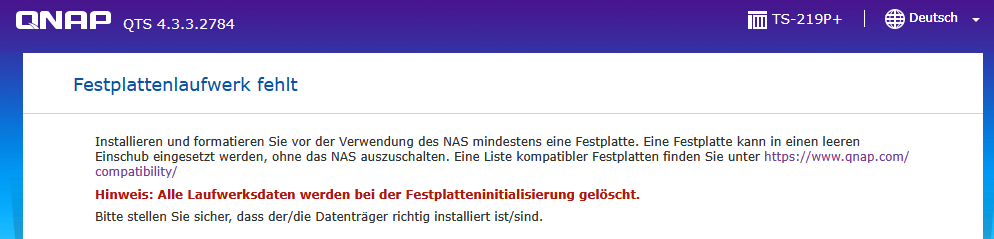
I have a QNAP TS-219P+ updated to QTS 4.3.3.2784 and replaced the HDDs with two clean Samsung HD204UI 2 TB drives. Both drives are physically detected by the Linux kernel, but QTS does not recognize them as available disks and does not create the expected partitions.
Relevant diagnostics:
/proc/scsi/scsi shows both drives correctly:
SATA port 1 / SCSI host 0: Samsung HD204UI, Rev. 1AQ1
SATA port 2 / SCSI host 1: Samsung HD204UI, Rev. 1AQ1
Kernel block devices:
SATA1 → /dev/sdya, 3,907,029,168 sectors
SATA2 → /dev/sdza, 3,907,029,168 sectors
Both drives are currently completely unpartitioned.
/proc/partitions only contains the whole disks, no partitions.
QNAP configuration still expects the traditional device names:
Drive 1 = sda
Drive 2 = sdb
/etc/storage.conf still contains old entries for /dev/sda3 and /dev/sdb3, both with status -5.
/etc/raidtab is empty.
/etc/config/md_brief.conf is empty.
/sbin/disk_reorder --patch does not resolve the problem and reports:
The raid count in raidtab is 0
Disk 1 not found
Disk 2 not found
/sbin/storage_boot_init 2 reports:
Single-disk 1 doesn't exist!
Single-disk 2 doesn't exist!
The system has only /sys/block/sdya and /sys/block/sdza; both map correctly to SATA ports 1 and 2.
get_sg_info confirms the drives when called with /dev/sdya and /dev/sdza.
The SCSI generic devices exist in sysfs (sg650 and sg676), although the corresponding /dev nodes are not normally created.
The main question is:
What is the correct QNAP procedure or utility to initialize these two detected HDDs and create the standard QNAP partitions/mapping (sda/sdb) so that QTS recognizes them as available disks?
I would like to have the two HDDs as single volumes available for further use.
I do not want to manually partition the disks unless this is explicitly the recommended QNAP recovery procedure.
The HDDs are old, but they’ve probably spent most of their time in a cupboard. SMART is perfect, so I want to use them as a backup device for my (also old) TS-219P+.
The HDDs are clean (diskpart clean), the problem is that the QTS web interface only reports “Disk drive missing” and offers no options. Qfinder also doesn’t offer a setup mode, but simply starts the web interface with the error message. Via SSH, I can see that the Linux base system is running properly, the HDDs are accessible, and I can create a filesystem on them, save files, etc. So everything seems fine from that perspective. It’s just that QTS refuses to reinitialize and mount the HDDs.
Sorry, I am quite new here. I posted in English, but it got translated - magic.
I started the empty NAS, but never get any chance to initialize. Qfinder opens just the web interface which comes up telling “no HDD available” and not offering any options. It does not change after inserting one or two HDDs.
/dev/sdya, /dev/sdza, is really weired, which means there are hundreds of sata drives before your two Samsung HDD being detected by the system. It could be somthing wrong on the system. And what dolbyman mentioned is worth to try.