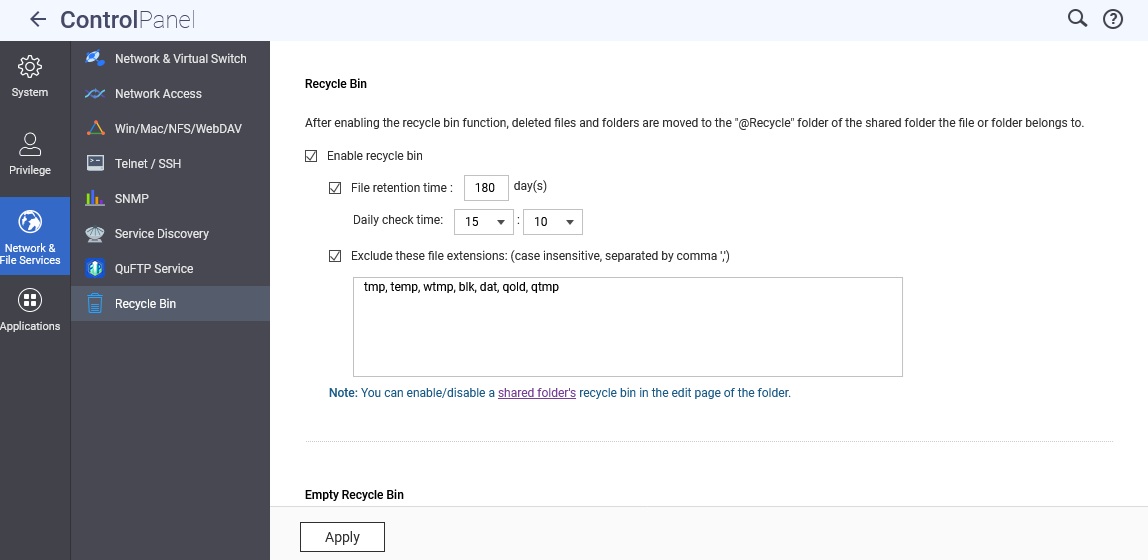
I’m new to this. That said my PC’s back ups to folders on QNAP but looks like also puts copy in @recycle/backup/named folder. How do I turn that off or limit and or auto delete backup files?
This link should get you started, but you might want to state your firmware version too.
https://docs.qnap.com/operating-system/qts/5.0.x/en-us/configuring-the-network-recycle-bin-505038D0.html
Hi @Woodchuck,
Thank you for sharing the details.
Could you please let us know which backup software you are currently using for your PC backup to the NAS?
Since files only appear in the @Recycle folder when they are deleted, you may also check the File Access Log to see if there are any delete records.
For reference, please see this FAQ:
 How do I check if my files/folders have been accessed?
Thank you for your cooperation.
Best regards,
QNAP Team
I use Acronis current version. Since original post I backed up 3 PC’s
network Earth-cloud public/backup/ PC-1/ named backup file
network Earth-cloud public/backup/ PC-2/ named backup file
network Earth-cloud public/backup/PC-3/ named backup file
Files were copied into @recycle with same folder structure and none of the files were deleted from backup or @recycle folders. a.k.a files were duplicated in both places.
We suspect this behavior is caused by Acronis.
When the Automatic Cleanup feature is enabled in Acronis, it deletes backup versions older than the set number of days. If your NAS also has the Recycle Bin enabled, the deleted files will go there, named according to Acronis’ definitions.
You just replace both 8TB drives and do a capacity expansions