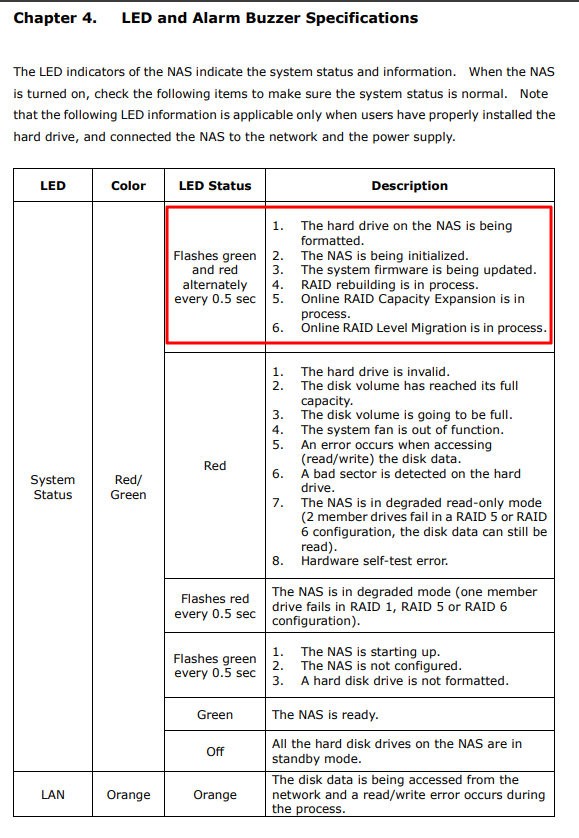
Red / Green flashing status light

I have a TS-212 enclosure with 2 drives configured as RAID 1. Unit has flashing red / green status light (for 24 hours now.) I cannot log in to the QTS software, so I really can’t off my head provide more detail. Unit was working perfectly until a day ago; no idea what initiated status. I’ve rebooted a couple of times, although only way I can is with the power button.

Is there any way in this case to determine whether the error is indicating a drive failure, or an enclosure failure?

TIA

Cold eject both hdd (do not take them out, so you do not mix them up) then boot up the NAS and see if it boots into web setup.

You have backups?

Thanks for suggestion, didn’t know you can acccess interface without drives connected. Will try that in a bit. So logic says that if I CAN open web interface, then it’s a drive failure. Correct?

Yes, I have backup.

Only setup will be accessible (as said)

If the QNAP boots into setup, it at least shows the QNAP itself is OK

With drives removed, entering IP address in browser takes me to the QTS login page. Entering credentials shows “Login in…” but never completes.

QFinder lists the NAS; selecting Configuration indicates no drives installed. Prompts to install a drive.

So does this indicate that the enclosure is OK?

Did you cold eject the drives and booted the NAS up from cold without disks?

If by “cold eject” you mean power off the unit, then remove the drives, then yes, I did.

Then powered back up without drives.

Should also mention that in this state, powered up with no drives, the status light is flashing green.

Without drives the NAS should only go into setup, if that does not happen, your bootloader seems corrupt

Thanks for all the info. I’ll see what I can do from here.

If you are still experiencing issues, please feel free to open a support ticket for us. Our Support Team will be happy to assist you.

Found https://download.qnap.com/TechnicalDocument/130418-QNAP_Turbo_NAS_Hardware_Manual_ENG.pdf
It might be helpful.

Still not really able to tell where the failure was. I came across an unused 6TB drive in my parts stash, and figured what the heck, I’ll try it. Installed this drive and used QFinder to configure it. Currently copying files from backup to new drive. So far, so good.

This single drive setup will be fine for my current needs, just file storage. I’ll continue to do weekly backups to an external drive.

Hoping to get some more time out of the TS-212, while I consider finally upgrading to a more modern NAS.
Thanks again for all assistance.