Hello, I have a QNAP TS-464 with QTS 5.2.8 and 3 x 4TB hdd.
Does not have any Raid configurations, instead have a Storage Pool for each individual hdd.
One of those drives begin to have SMART Reading Test Failures but still operating OK.
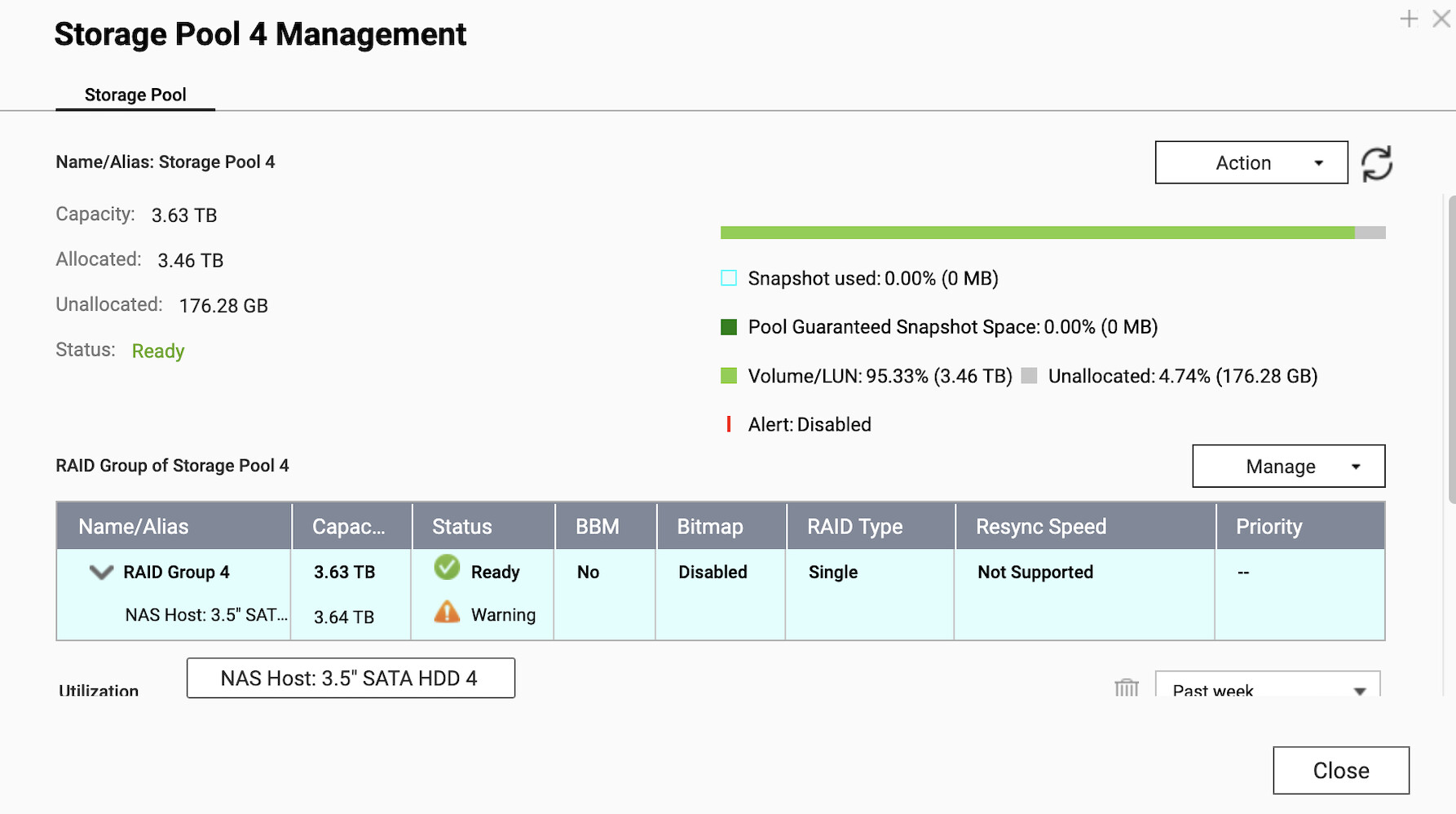
Got a new 8TB hdd and make to replace it and made the following steps:
0.- Backup of the data of Storage Pool and backup /mnt/HDA_ROOT/.config/raid.conf file
1.- Expand the Storage Pool 4 with the New 8TB to RAID1 y wait RAID SYNC
[/mnt/HDA_ROOT/.config] # mdadm --query --detail /dev/md4
/dev/md4:
Version : 1.0
Creation Time : Sat Dec 9 18:27:53 2017
Raid Level : raid1
Array Size : 3897063616 (3716.53 GiB 3990.59 GB)
Used Dev Size : 3897063616 (3716.53 GiB 3990.59 GB)
Raid Devices : 2
Total Devices : 2
Persistence : Superblock is persistent
Update Time : Sat Jan 24 00:37:28 2026
      State : clean, degraded, recovering
Active Devices : 1
Working Devices : 2
Failed Devices : 0
Spare Devices : 1

Rebuild Status : 84% complete
       Name : 4
       UUID : 402f5267:ef7841b7:da5e95e1:ada6659a
     Events : 7674

Number   Major   Minor   RaidDevice State
   2       8       19        0      active sync   /dev/sdb3		BAD 4TB
   1       8        3        1      spare rebuilding   /dev/sda3	NEW 8TB
2.- After expansion and RAID Sync OK, force Fail the 4TB hdd
mdadm /dev/md4 --fail /dev/sdb3
mdadm /dev/md4 --remove /dev/sdb3
[/mnt/HDA_ROOT/.config] # mdadm /dev/md4 --fail /dev/sdb3
mdadm: set /dev/sdb3 faulty in /dev/md4

[/mnt/HDA_ROOT/.config] # mdadm /dev/md4 --remove /dev/sdb3
mdadm: hot removed /dev/sdb3 from /dev/md4

[/mnt/HDA_ROOT/.config] # mdadm --query --detail /dev/md4
/dev/md4:
Version : 1.0
Creation Time : Sat Dec  9 18:27:53 2017
Raid Level : raid1
Array Size : 3897063616 (3716.53 GiB 3990.59 GB)
Used Dev Size : 3897063616 (3716.53 GiB 3990.59 GB)
Raid Devices : 2
Total Devices : 1
Persistence : Superblock is persistent

Update Time : Sat Jan 24 20:47:18 2026
      State : clean, degraded

Active Devices : 1
Working Devices : 1
Failed Devices : 0
Spare Devices : 0

       Name : 4
       UUID : 402f5267:ef7841b7:da5e95e1:ada6659a
     Events : 7700

Number   Major   Minor   RaidDevice State
   0       0        0        0      removed
   1       8        3        1      active sync   /dev/sda3
3.- Expanded the RAID size to 8TB
/mnt/HDA_ROOT/.config] # mdadm --query --detail /dev/md4
/dev/md4:
Version : 1.0
Creation Time : Sat Dec  9 18:27:53 2017
Raid Level : raid1
Array Size : 3897063616 (3716.53 GiB 3990.59 GB)	<<<<< RAID SIZE
Used Dev Size : 3897063616 (3716.53 GiB 3990.59 GB)
Raid Devices : 2
Total Devices : 1
Persistence : Superblock is persistent

Update Time : Sat Jan 24 20:47:18 2026
      State : clean, degraded

Active Devices : 1
Working Devices : 1
Failed Devices : 0
Spare Devices : 0

       Name : 4
       UUID : 402f5267:ef7841b7:da5e95e1:ada6659a
     Events : 7700

Number   Major   Minor   RaidDevice State
   0       0        0        0      removed
   1       8        3        1      active sync   /dev/sda3

[/mnt/HDA_ROOT/.config] # mdadm -E /dev/sda3
/dev/sda3:
Magic : a92b4efc
Version : 1.0
Feature Map : 0x0
Array UUID : 402f5267:ef7841b7:da5e95e1:ada6659a
Name : 4
Creation Time : Sat Dec  9 18:27:53 2017
Raid Level : raid1
Raid Devices : 2

Avail Dev Size : 15608143592 (7442.54 GiB 7991.37 GB)	<<<<< DISK SIZE <<<<< (*1)
Array Size : 3897063616 (3716.53 GiB 3990.59 GB)	<<<<< RAID SIZE
Used Dev Size : 7794127232 (3716.53 GiB 3990.59 GB)
Super Offset : 15608143856 sectors
Unused Space : before=0 sectors, after=7814016624 sectors
State : clean
Device UUID : 7bf44b7f:395b58fa:c732229c:d377cec2

Update Time : Sat Jan 24 20:47:18 2026
   Checksum : f52604fb - correct
     Events : 7700

Device Role : Active device 1
Array State : .A (‘A’ == active, ‘.’ == missing, ‘R’ == replacing)
NEW RAID SIZE = 7442.54 GiB(*1) por 1.000.000
7442.54 GiB x 1.000.000 = 7442540000
mdadm --grow /dev/md4 --size=7442540000
[/mnt/HDA_ROOT/.config] # mdadm --grow /dev/md4 --size=7442540000
mdadm: component size of /dev/md4 has been set to 7442540000K
4.- Now the RAID size is 8TB
[/mnt/HDA_ROOT/.config] # mdadm --query --detail /dev/md4
/dev/md4:
Version : 1.0
Creation Time : Sat Dec 9 18:27:53 2017
Raid Level : raid1
Array Size : 7442540000 (7097.76 GiB 7621.16 GB)
Used Dev Size : 7442540000 (7097.76 GiB 7621.16 GB)
Raid Devices : 2
Total Devices : 1
Persistence : Superblock is persistent
Update Time : Sat Jan 24 21:08:53 2026
      State : clean, degraded
Active Devices : 1
Working Devices : 1
Failed Devices : 0
Spare Devices : 0
       Name : 4
       UUID : 402f5267:ef7841b7:da5e95e1:ada6659a
     Events : 7703

Number   Major   Minor   RaidDevice State
   0       0        0        0      removed
   1       8        3        1      active sync   /dev/sda3
5.- Increase the PVSize to the new Disk
[/mnt/HDA_ROOT/.config] # pvdisplay

WARNING: duplicate PV L0khUDWnb5y7IVDuV2cawm9IrQnNLccT is being used from both devices /dev/drbd4 and /dev/md4
Found duplicate PV L0khUDWnb5y7IVDuV2cawm9IrQnNLccT: using existing dev /dev/drbd4
— Physical volume —
PV Name               /dev/drbd4
VG Name               vg4
PV Size               3.63 TiB / not usable 1.15 MiB
Allocatable           yes (but full)
PE Size               4.00 MiB
Total PE              951431
Free PE               0
Allocated PE          951431
PV UUID               L0khUD-Wnb5-y7IV-DuV2-cawm-9IrQ-nNLccT
[/mnt/HDA_ROOT/.config] # pvresize /dev/md4

WARNING: duplicate PV L0khUDWnb5y7IVDuV2cawm9IrQnNLccT is being used from both devices /dev/drbd4 and /dev/md4
Found duplicate PV L0khUDWnb5y7IVDuV2cawm9IrQnNLccT: using existing dev /dev/drbd4
Physical volume “/dev/drbd4” changed
1 physical volume(s) resized / 0 physical volume(s) not resized
[/mnt/HDA_ROOT/.config] # pvdisplay

— Physical volume —
PV Name               /dev/drbd4
VG Name               vg4
PV Size               6.93 TiB / not usable 2.43 MiB
Allocatable           yes
PE Size               4.00 MiB
Total PE              1817025
Free PE               865594
Allocated PE          951431
PV UUID               L0khUD-Wnb5-y7IV-DuV2-cawm-9IrQ-nNLccT
6.- Reduce the RAID1 member on the Storage Pool to 1 (the new disk)
mdadm --grow /dev/md4 --raid-devices=1 --force
7.- Modify the file /mnt/HDA_ROOT/.config/raid.conf to update the serial number of the HDD in RAID 4 entry
8.- TurnOFF QNAP and replace 4TB hdd (put in failed before) with the 8TB hdd
9.- TurnON QNAP
At this point, I have access to Storage Pool, but the extra space from the new 8TB hdd is maked ad Unutilized:
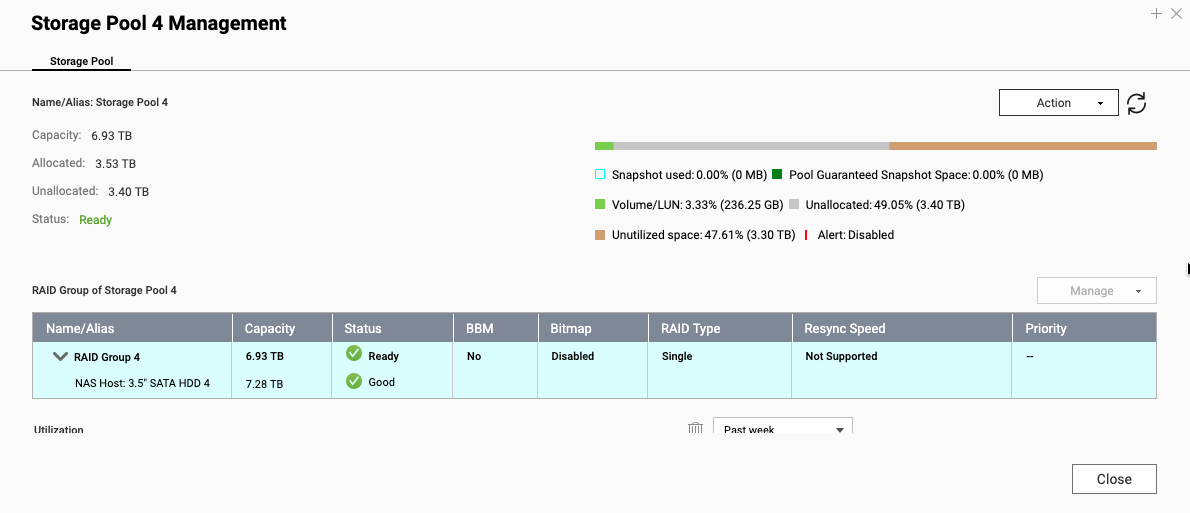
Try to expand Storage Pool 4 and cannot find the way. The GUI Expand option expects an aditional hdd.
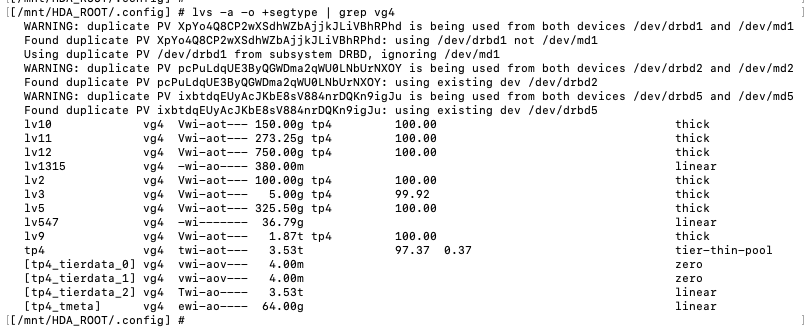
By command line, i found that the tier-thin-pool asosiated to the VG4 still in 4TB and I an unable to expand it:
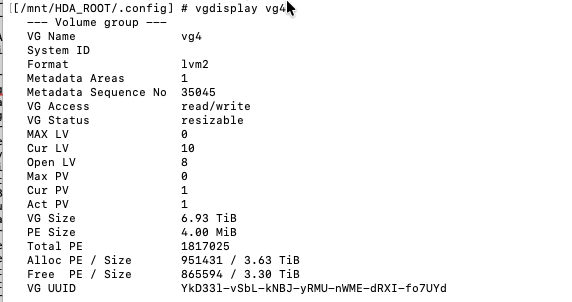
[/mnt/HDA_ROOT/.config] # vgdisplay vg4
— Volume group —
VG Name vg4
System ID
Format lvm2
Metadata Areas 1
Metadata Sequence No 35045
VG Access read/write
VG Status resizable
MAX LV 0
Cur LV 10
Open LV 8
Max PV 0
Cur PV 1
Act PV 1
VG Size 6.93 TiB
PE Size 4.00 MiB
Total PE 1817025
Alloc PE / Size 951431 / 3.63 TiB
Free PE / Size 865594 / 3.30 TiB
VG UUID YkD33l-vSbL-kNBJ-yRMU-nWME-dRXI-fo7UYd
[/mnt/HDA_ROOT/.config] # lvs -a -o +segtype | grep vg4
WARNING: duplicate PV XpYo4Q8CP2wXSdhWZbAjjkJLiVBhRPhd is being used from both devices /dev/drbd1 and /dev/md1
Found duplicate PV XpYo4Q8CP2wXSdhWZbAjjkJLiVBhRPhd: using /dev/drbd1 not /dev/md1
Using duplicate PV /dev/drbd1 from subsystem DRBD, ignoring /dev/md1
WARNING: duplicate PV pcPuLdqUE3ByQGWDma2qWU0LNbUrNXOY is being used from both devices /dev/drbd2 and /dev/md2
Found duplicate PV pcPuLdqUE3ByQGWDma2qWU0LNbUrNXOY: using existing dev /dev/drbd2
WARNING: duplicate PV ixbtdqEUyAcJKbE8sV884nrDQKn9igJu is being used from both devices /dev/drbd5 and /dev/md5
Found duplicate PV ixbtdqEUyAcJKbE8sV884nrDQKn9igJu: using existing dev /dev/drbd5
lv10 vg4 Vwi-aot— 150.00g tp4 100.00 thick
lv11 vg4 Vwi-aot— 273.25g tp4 100.00 thick
lv12 vg4 Vwi-aot— 750.00g tp4 100.00 thick
lv1315 vg4 -wi-ao---- 380.00m linear
lv2 vg4 Vwi-aot— 100.00g tp4 100.00 thick
lv3 vg4 Vwi-aot— 5.00g tp4 99.92 thick
lv5 vg4 Vwi-aot— 325.50g tp4 100.00 thick
lv547 vg4 -wi------- 36.79g linear
lv9 vg4 Vwi-aot— 1.87t tp4 100.00 thick
tp4 vg4 twi-aot— 3.53t 97.37 0.37 tier-thin-pool
[tp4_tierdata_0] vg4 vwi-aov— 4.00m zero
[tp4_tierdata_1] vg4 vwi-aov— 4.00m zero
[tp4_tierdata_2] vg4 Twi-ao---- 3.53t linear
[tp4_tmeta] vg4 ewi-ao---- 64.00g linear
[/mnt/HDA_ROOT/.config] # lvextend -l +100%FREE --use-policies /dev/vg4/tp4
Please specify the target tier to extend
Run `lvextend --help’ for more information.
[/mnt/HDA_ROOT/.config] # lvextend -l +100%FREE /dev/vg4/tp4_tierdata_2
Can’t resize internal logical volume tp4_tierdata_2
Run `lvextend --help’ for more information.
Has any of you tried replacing a disk with a larger one without backing up to an external USB disk and recreating the storage pool from scratch?
I understand that if the storage pool had two disks in RAID1, I would have the option to Replace Disk One by One, but in this case I want to keep only one disk with expanded capacity.
Thank you in advance for any help you can give me, and sorry for the long post 
Regards
LM