I am not particularly tech savvy, so apologies if this is a stupid question!
I have a QNAP 12 bay (TS-1277, though I only use the 8 HDD bays) configured as RAID 6, a QNAP 4 bay (TS-453 Pro) configured as JBOD and a Synology 4 bay (DS 916) also configured with no RAID. All firmware is on the latest versions.
The TS-1277 is my “working” unit (i.e. that is the one I read from and write to day-to-day) and this is set to sync with the TS-453 in real time using HBS 3. This then backs up key folders to the Synology once per week, again using HBS 3.
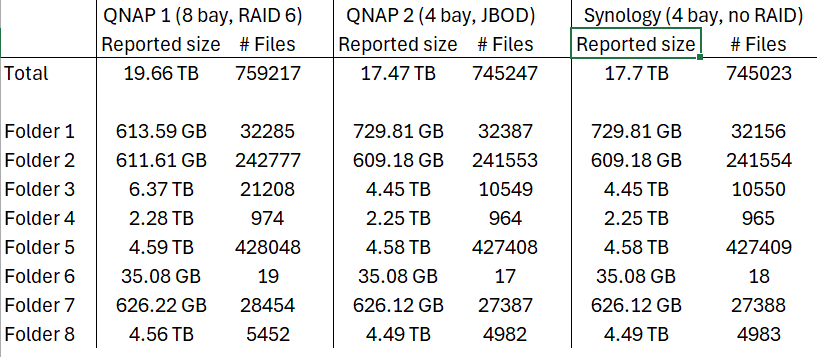
The sync/backups seem to be working, but there is a sometimes significant difference between the number of files and reported total size of those files and I can’t figure out why. The table below shows the number of files and reported total sizes across the three units.
I understand that there may be differences in rounding out the numbers but in one case there is the best part of a 2 TB difference between folders that should be identical (Folder 3 in the table).
Can anyone explain (in simple terms, preferably!) what may be causing this, is it something I should be worried about (I set the system up this way because I have suffered a catastrophic data loss in the past and do not want to experience that again) and what do I need to do to fix it?
Are you using single disk? Most people use JBOD to describe single disks (not linear spanning JBOD volumes) if you use single disks, how do you split the data up to several volumes during backup?
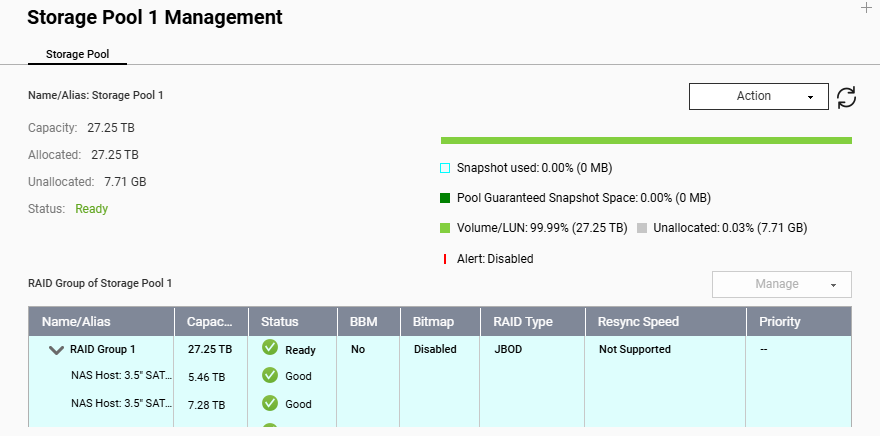
Both the QNAP devices are configured with all their HDDs as a single volume on a single pool. The primary unit is RAID 6 but the 453 is not - device describes this as JBOD. Apologies if I have got this wrong - as mentioned in my post I am not a tech person
Since the reported size and file count differences are quite large, we would like to better understand the environment and compare a smaller sample first.
Could you please help provide the following information?
The firmware version of each QNAP NAS.
The HBS 3 version used on the QNAP NAS.
The HBS 3 job type and settings, for example whether it is a sync job or backup job, and whether any filters or exclusions are enabled.
The completion message or result shown by HBS 3 after the job finishes, including any warning or error messages.
To help narrow down the difference, we also suggest selecting a smaller folder first and comparing it between the source and destination. For example, you may use a file comparison tool such as WinMerge on a smaller directory instead of comparing the entire dataset at once.
This can help confirm whether the difference is caused by specific files, excluded folders, permission-related items, or other job settings.
Please make sure to mask any sensitive information before sharing screenshots publicly, such as NAS names, IP addresses, usernames, full folder paths, or any private file names.