How can I restrict access to shared folders or set a specific folder for syncing on the server qnap (hbs rsync)? I’ve set up rsync, and everything works fine. But! All shared folders are visible from any computer (device non qnap) when connected to Rsync server on qnap! That’s a security breach! How can I pre-authorize access to just one shared folder for Rsync? (I’m currently using a Delta server on my PC. It has a pre-defined folder where I can create individual images. The server can’t see anything outside of that folder. it’s safe)
You set up sharing permissions for the folders. You can restrict access to whatever folders you want.
More details please. How can I exclude a shared folder (or volume) from the app? Or how can I exclude a shared folder from the rsync-server? I didn’t find such items in the settings. I can’t use local user account in rsync!
I’m a little confused by your request. You first asked how to prevent a folder being used to store backup data from being accessed by all users.
Now you are asking how to exclude folders from the backup?
Let’s do this. Please explain more what you are doing and want to do.
- Are you backing up from one NAS to another using rsync?
- Are you backing up from a PC to a NAS using rsync?
You set up access to shared folders in the control panel and select to edit shared folder properties. Click the permissions button for the folder you want and you see a window like below. You can choose what groups or users get access to that folder.
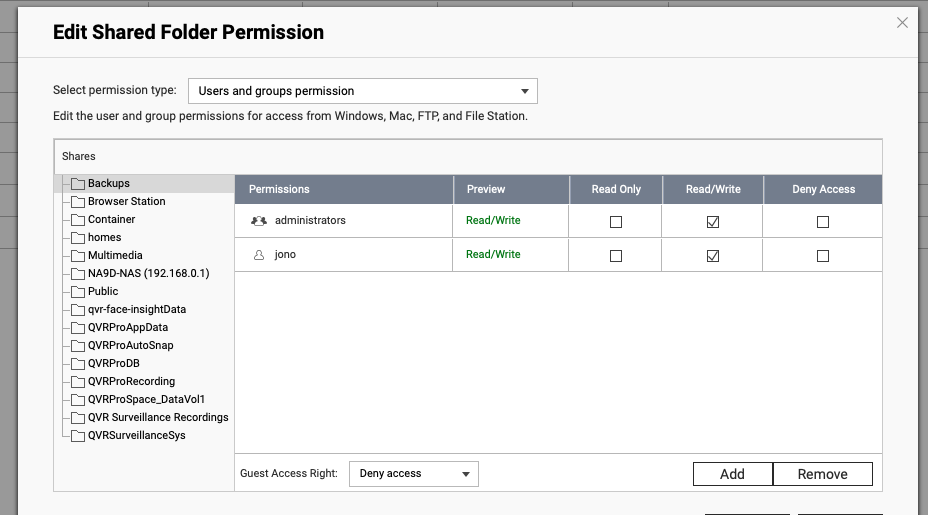
Now, to exclude a folder from a backup set, that’s done in HBS or whatever backup client you are using. You select what folders you want in your backup set.
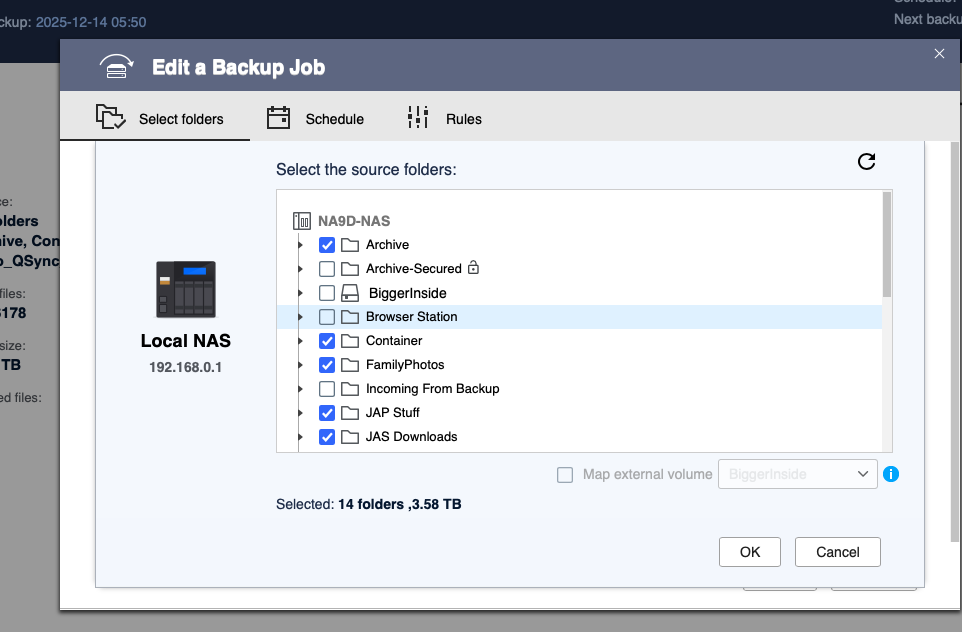
All this is clear, but that is absolutely not what I am talking about. Once again from the beginning. I have 10 shared folders on my QNAP, each for a different purpose (for example, N7 - for all backups ). The rsync-server is deployed on the QNAP. When I connect to rsync-server externally, I see all 10 folders. This is bad. I should only see the one designated for backup (seventh). The screenshot indicates that connecting using a user profile is not possible if the connection is made from a non-QNAP device. I enabled this option, and unfortunately, it’s still true..
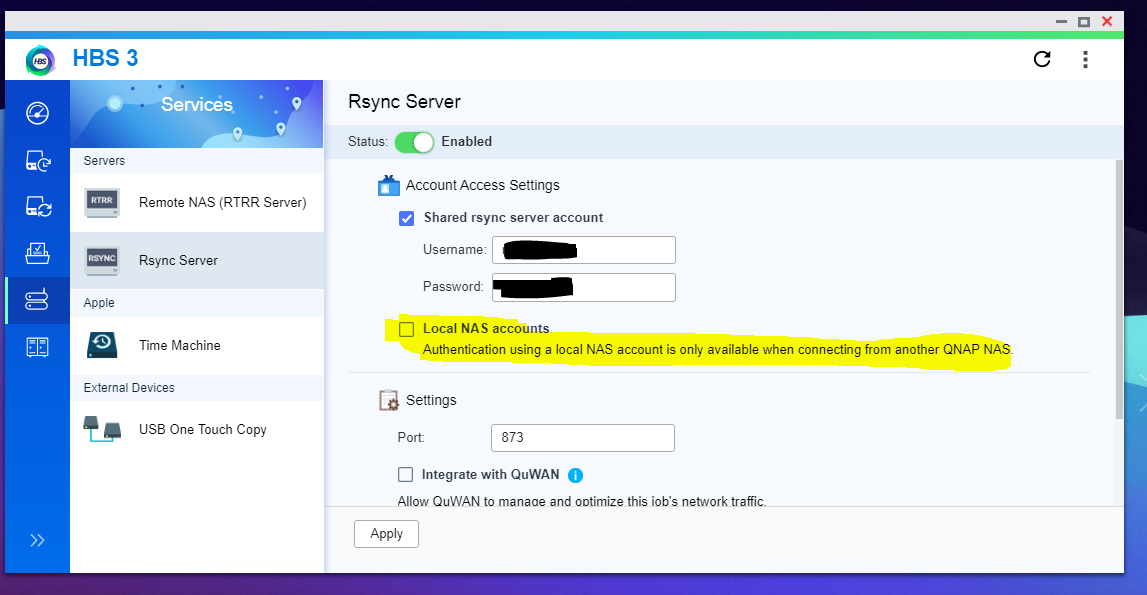
How then can I configure the sync profile (the separate one, pictured above) so that it only sees one shared folder? This only needs to be done once, not every time you set up backups on an external device. Viewing all shared folders at once is not secure.
I think it’s not possible.
The rsync server runs internally as root and has access to everything. It also has no privilege mechanism, so if you need to restrict accesss to certain folders you cannot use rsync
As far as I know, the mechanism of rsync operates as dolbyman mentioned. To manage permissions, you would need to use NAS user accounts.
However, I will report this requirement internally and let the development team evaluate if there is any possible way to achieve what you are looking for.
Thanks!
Well since the OP was not entirely clear, it sounded to me like he was concerned that other users could see the results of rsync on the NAS. That should be fixable.
rsync should absolutely run as root. That way it has access to everything you want it to back up.
thanks! I briefly formulated my proposal and introduced it into the “feature”
I’m still somewhat confused about what you want to do.
If you are running the “server” end on the NAS, then you absolutely want that “user” for the server to be root level and have access anywhere on the NAS. What you choose to sync to the NAS can have access permissions. And because you have a specific user/password that you need to use, only an admin user who knows that password can connect to the server via rsync. That’s the whole point of the account.
I’m still not certain if there is a problem here.
If you really want to use rsync in this way, which is not typical, you could run a standalone instance in a container as it may give you the flexibility you are looking for. Typically, one rsync account is enough as it is a system process, not usually a user front end, so an admin user would have access.
This sounds more like standard samba shares, not something that rsync was ever envisioned to do. Are you sure this is how it works on your other system?
YES, I’m sure, I’ve been using it for years. Look at this Deltacopy server, DeltaCopy - Rsync for Windows
I’m using it on Windows now.
Look at this article.
How can I back up data from a Synology NAS to a QNAP NAS via rsync? | QNAP
I just repeated it. Everything works perfectly. It’s the same as mine, but not on Deltacopy(Windows), but on HBS3(QNAP).
Have you used rsync option on the hbs3 QNAP server yourself ? If so, you know that when you connect to server, only shared folders are visible. But all shared folders! It’s bad!!!
If QNAP device has three different servers - file storage, music storage, and a third-party backup storage. Why would someone using the backup server see the folders where the photos and music are stored? These are three DIFFERENT servers on device; they shouldn’t overlap!
Yes, every day across multiple NAS boxes and brands for the past 15 years  both with rsync client/server directly and through HBS3.
I use it as an admin function only and expect that the rsync server on the target has full authority over the destination. I personally have no use for a user based rsync server or client. I have other backup mechanisms that use simple samba shares and have access based on userid / password.
I have automation that backs up multiple raspberry pi devices and D-Link NAS boxes via rsync, but again, only as an admin so the QNAP NAS has an admin based rsync.
I guess I can see the use case where a user could use it to backup their own data, but I don’t think it was originally envisioned for that.
I only use HBS3 rsync between QNAP NAS devices
That’s exactly why you don’t understand me. This works completely differently in HBS3 with authorization not from QNAP than you imagine. Please take a look and you’ll be surprised.
I do understand you. I just don’t use it the way you do, or more correctly, I don’t care that the rsync server has full access, as that is what I want 
If this weren’t intended by the developers, this option wouldn’t exist. Or it would apply to all files and folders, not just shared folders. But right now, it just looks like a bug or lack of thought. If I have a device like QNAP with a bunch of gui-apps, I want them to work universally. Otherwise, I’ll just have to use the ssh. But that’s not what I want.
I agree that there is potential for more capabilities, and I understand your use case and need. However, the basic function of rsync behind HBS3 I would argue, and I have no control over its behaviour, is to provide a system backup feature. There are many areas of HBS3 that could be enhanced, IMO. This rsync implementation is restricted to functionality exposed by HBS3 and it works well from a system admin perspective.
If you are not happy with the functionality of a system process burried behind an app, then I would suggest:
- running a container, any linux distro I would expect should have, or be capable of running a standalone rsync that you can customize to your hearts content.
- or; enter a bug/enhancement request to QNAP via a support ticket.
I think you’re wrong. if you use gui and rsync hbs3 with a separate password option, you can’t back up the system, since you only have access to shared folders, not everything (If you’re talking about the qnap on which the hbs server itself is installed). In any case, my goal is different and not to create a backup copy of the system QNAP.
I already wrote the request-offer, which I mentioned above.
I was very surprised by the absence of this setting, which is present on other servers. That’s why I raised this issue. I thought I was missing something. Thanks, this thread is closed; there’s no ready-made solution.