S.M.A.R.T. "fatal or unknown error"

This may not strictly be a QNAP issue, but I’m sure there are people here who can assist.

Device: TS-453Be running QTS 5.2.10.3577 in RAID 5

Twice now in its scheduled monthly S.M.A.R.T. testing one of the disks (WD Red) has failed instantly with the scary-sounding message “fatal or unknown error”. The first time, I initiated the test manually and it completed without problems.

The next month the same drive failed again with the same message. This time it took four or five attempts to start the test manually.

How worried do I need to be? The disk is almost eight years old so I guess I’ve had my money’s worth out of it.

Edit: “Disk health” otherwise shows as OK, and on the DA Drive Analyzer it shows as “healthy”.

Depends on how robust and current your backup strategy is.

Personally, I would pull the drive and run analysis with the WD utilities on a PC to verify.

Agreed.

When this kind of situation comes up, our general recommendation — from a data safety standpoint — is to consider replacing the drive with a new one to avoid any risk. A warning like this usually points to an underlying issue.

And of course, please make sure your backups are in place!

The confusing thing is that the NAS’s own diagnostics and the DA Drive Analyzer all tell me that everything is OK. But I have ordered a new drive and will swap it out. Then I will take dosborne’s advice and analyse the drive offline. If it passes I will keep it as an emergency spare. Thanks all for your advice.
I’m completely unconvinced by DA Drive Analyzer as I had a WD Red Plus Drive (or possibly a Red from back when they were CMR, so what is called “Plus” now) that failed Scrubbing with a Bad Block. I aimed DA Drive Analyzer at it and it said it was fine. But the Bad Block was still there. I ended up just replacing the drive while you can still buy drives for less than Ferraris.

I would agree swapping your drive is the correct approach.

Do note a rebuild can go wrong (I’ve never had an issue) so a backup is a very good idea…

Some questions:

When you say “SMART Testing” do you mean Scrubbing or something else?

If you Scrub the drives, plus if so what does the Log entry say?

What do any other relevant Log entries say?

Can you paste the SMART numbers?

Good luck!

Thanks. I can’t paste the SMART numbers for the old drive because I already pulled it and the replacement is rebuilding. But everything was green.

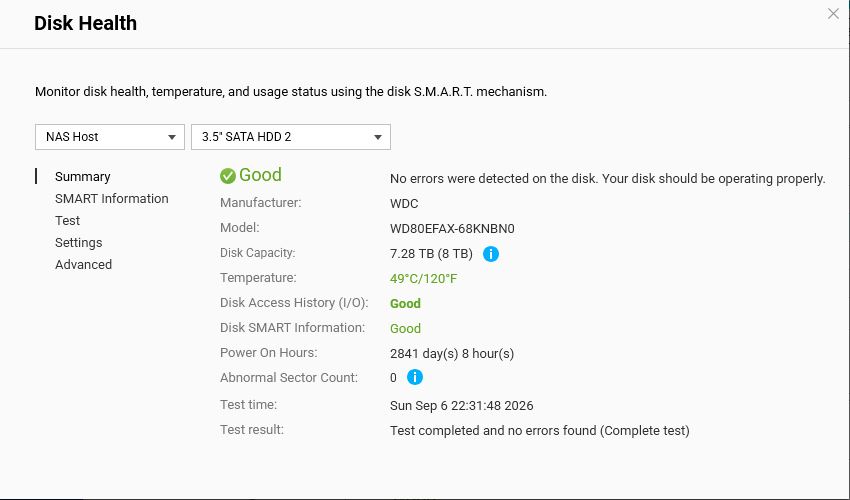
I think the error message was caused by the scheduled RAID scrubbing, but this is what I got from the NAS:

And I did a “map bad blocks” or whatever it is called and as far as I can see it didn’t flag any problems.

I’m sorry, that doesn’t convey anything meaningful to me, but hopefully the new drive will be great :slight_smile:

I assume nothing is getting too hot?

The SMART test summary quoted earlier says that the old drive was running at 49 Celsius (in green, so I assume that’s OK). Anyway, swap and rebuild is complete now, Thanks again.

Actually, I just noticed that the new disk (WD EFPX) is running about 10 degrees C cooler after 24 hours than the other three (1 x EFBX and 2 x EFAX). Why would this be? Is the EFPX designed to run cooler, or do drives run hotter when they get older? So many rabbit holes to go down.