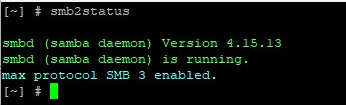
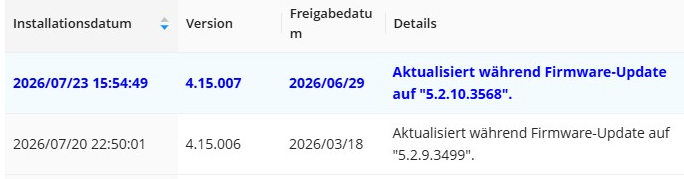
Can someone check the SAMBA version in QTS 5.1.3? (to get it: SSH (PUTTY) into the OS and command “smb2status”)
I need SAMBA 4.17 or higher on a QNAP TS-133 NAS (currently I do not own it).
If QTS 5.1.3 fails can someone tell me which is the minimum QTS version that is set up with SAMBA 4.17 or higher, and applicable to the QNAP TS-133 NAS?
I need SAMBA 4.17+ as this is the version that introduced the feature of changeable SMB volume serial number in smb.conf.
My first thought would be to upgrade your NAS to 5.2.10. Why run a much older version that has security issues that have been fixed in newer version, etc. 5.2.10 is using Samba 4.15.13.
I know you don’t own the NAS, but obviously you are supporting it somehow so first step in support is upgrading the OS to the latest…
Thank you. I wrote wrong, I actually need SAMBA 4.17+ (I updated the text above). Are you sure if QTS 5.2.10 is using SAMBA 4.15? QTS 5.2.10 is the most recent version that was released in July 2026. SAMBA 4.17 is released in 2022.It is very confusing that QNAP still uses SAMBA 4.15. The most recent SAMBA version is 4.24
I see in QTS 5.2.0 Release Notes that SMB service is now a standalone application that can be updated independently in App Center. Could you (or anyone) please check in App Center what is the latest SAMBA version that the device can be updated to. Thanks in advance.
NA9D is right — running an older release leaves you exposed to issues that have already been fixed upstream, so moving off 5.1.3 is worth doing regardless of the Samba question. QTS 5.1 reached end of support in November 2024, so for stability and security we’d recommend moving to a current, supported release. (You can cross-check the lifecycle status for any release on QNAP’s Product Support Status page: Product Support Status | QNAP)
On the Samba version specifically, here’s the honest picture so you can plan around it:
QTS 5.1.x and QTS 5.2.x both run on the Samba 4.15 line. What 5.2 adds is our maintenance approach: when a CVE or a Samba security fix appears, we back-port it onto that stable 4.15 branch rather than jumping the whole package, so it stays aligned with the surrounding toolchain and libraries. That gets you the security fixes, but it stays on 4.15 — so upgrading 5.1 to 5.2 won’t get you to 4.17.
The newer Samba release (4.20, comfortably above the 4.17 you’re after) ships with the QTS 6.0 line, which also moves to kernel 6 and a refreshed toolchain / rootfs / glibc.
On your specific model: we’re confirming with our development team, and the current plan is for the TS-133 to pick up Samba 4.20 through the QTS 6 release targeted for Q4.
In the meantime, one thing that would genuinely help: you mentioned needing the changeable SMB volume serial number in smb.conf. Could you tell us a bit more about what depends on it in your setup — the software or workflow that keys off that serial number? That helps when we take this request back to the team.
how good news for me. Thank you. I work at a university where there is a software installed on 20+ lab computers using some SMB resources. We cannot move this share, as it relies on the SMB volume serial number, and the clients show the resources invalid, when moved. We cannot ask for a hotfix as the developer company disappeared during COVID-times. We use a QNAP TS-231 NAS with QTS 4.2.3. We even cannot update it to its latest QTS 4.3.6, as it changes the volume serial number. So this is a “senior” NAS with an extremely obsolete OS. I checked with a PC-based software NAS (OpenMediaVault) that replicating the volume serial number to that of the TS-231, the shared resources become movable. That’s why I would like to purchase a new NAS that lets me modify the SMB volume serial number. I would like to remain at QNAP brand. This application does not need RAID features, therefore a cheap single bay NAS would be enough. The optimal solution would be releasing QTS 6 for the good old TS-231, however I do not suppose this will happen, therefore we will get new a TS-133.