Hello QNAP Community,
I’m looking for advice on achieving the most efficient camera-side motion detection integration for a specific Hanwha camera model on my QVR Pro server. While the system is technically functional, my current configuration appears to be causing excessive continuous recording and unnecessary load, and I need to tune it for true motion-only recording.
Goal
My primary goal is to use only the camera’s internal motion detection engine to trigger recording in QVR Pro, ensuring the server only stores clips when the camera signals an event, and remains completely idle otherwise.
Setup Details (Single Channel Focus)
- QVR Pro Server: TS-h1887XU-RP (QuTS hero h5.2.7.3297, QVR Pro 2.7.3.1377)
- Camera Model: Hanwha QND-8080R (Using the recommended specific model profile)
The Configuration Challenge
When I configure the channel for Motion Recording Only using the “Camera-side Motion Detection” source, I observe the following: - Continuous Recording: The channel appears to be generating continuous video files, even during periods of absolute stillness. This suggests QVR Pro might be recording the entire main stream and then relying on the camera’s signal just to flag the timeline, rather than truly recording only upon event trigger.
- Excessive Alerts: QVR Pro logs frequent ‘Motion Detected’ events, even when the image is static. This happens despite verifying the camera’s native web UI shows no motion alerts during the same period.
What I’ve Examined (Ruling out Variables)
To isolate the problem, I have performed extensive testing: - Camera Validation: I have tested the exact same camera model (Hanwha QND-8080R) with an Axxon NVR, and the motion events work perfectly, recording only on motion. This definitively confirms the camera’s hardware, firmware, and event triggers are functional outside of QVR Pro.
- Profile Testing: Tested both the recommended specific camera model profile and the generic ONVIF profile—no change in the continuous recording behavior.
- Codec Check: I have changed the camera compression from H.265 to H.264, and the continuous recording issue persists, ruling out codec incompatibility.
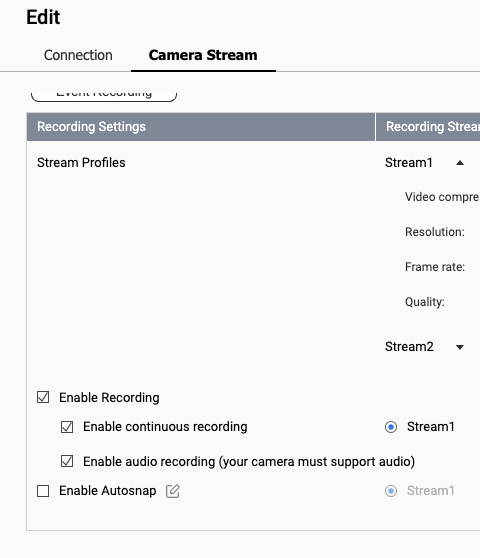
- Maximum Recording Disabling: As an extreme test, I even removed all recording schedules, disabled all event triggers, and unchecked “Enable Recording” for the channel, yet continuous recording still occurs.
Question for the Community
Given that the Hanwha QND-8080R works flawlessly with another VMS (Axxon), the issue appears specific to the QVR Pro integration.
Is there a specific Stream Source or an advanced configuration option in QVR Pro to guarantee that the server only pulls and saves data when the Hanwha QND-8080R explicitly sends a motion event? Could this be a known bug with the current QVR Pro version that forces a continuous stream pull regardless of the recording schedule for certain Hanwha profiles?
Any tips on optimizing this specific integration would be greatly appreciated!