這正是我需要做的!我快被逼瘋了,因為為了升級我的 SimpleHelp 伺服器,我必須能夠存取預設情況下無法進入的程式存放位置。不然我就得重建整個容器!我只是還沒時間把所有教學都看完,或者學會 compose(Compose)……
這就是我在暗示的限制之一。CS(Container Station)把你照顧得太好了,讓你很容易卡住自己,或者變得懶惰。
試著在 /share/Container/ 裡面找找看,你應該會有 /share/Container/<application name>/。
所以也許是 /share/Container/SimpleHelp/<appdata/config/configuration/data/SOMETHING HERE>,然後把那個資料夾 mv 到其他地方,再用 bind mount 掛回來。
我相信你的安裝文件會告訴你需要哪些資料夾(config+cache+tmp 或其他)。一旦是 bind mount,你就可以隨意重建/銷毀 container 了。
如果你從來沒命名過任何東西,現在就得跟匿名卷(anonymous volumes)玩捉迷藏了。
docker inspect --type container -f '{{range $i, $v := .Mounts }}{{printf "%v\n" $v}}{{end}}' <container name or ID>
這指令應該會輸出一些有用的東西。
我只有幾個 container 不需要保存狀態,所以不太確定你需要找什麼,但……
[admin@TheVault arcane]# ls -al /share/ZFS530_DATA/.qpkg/container-station/docker/volumes/
drwx-----x    3 root     root             5 Sep 22 11:06 .
drwx--x---   13 root     root            14 Sep 18 22:41 ..
drwx-----x    3 root     root             3 Sep 11 08:58 3a12c9a67706cd7e7b3bdd16df83391521e4e60d1d4024707b87a7a2325f6eea
brw-------    1 root     root        0,  57 Sep 18 22:41 backingFsBlockDev
-rw-------    1 root     root         65536 Sep 22 11:06 metadata.db
[admin@TheVault arcane]# ls -al /share/ZFS530_DATA/.qpkg/container-station/docker/volumes/3a12c9a67706cd7e7b3bdd16df83391521e4e60d1d4024707b87a7a2325f6eea/
drwx-----x    3 root     root             3 Sep 11 08:58 .
drwx-----x    3 root     root             5 Sep 22 11:06 ..
drwxr-xr-x    2 root     root             2 Sep 11 08:58 _data
這是我其中一個匿名卷。現在我可以把東西 mv 出去了。
我的 container 裡面沒有任何重要的東西。所以我隨時都可以砍掉或重設任何東西。
[admin@TheVault arcane]# grep -R '/share/' /share/docker/stacks/
/share/docker/stacks/jellyfin/compose.yaml:      - /share/docker/appdata/jellyfin/cache:/cache
/share/docker/stacks/jellyfin/compose.yaml:      - /share/docker/appdata/jellyfin/config:/config
/share/docker/stacks/jellyfin/compose.yaml:      - /share/Media Library:/mnt/mediaShare:ro
/share/docker/stacks/jellyfin/compose.yaml:      - /usr/share/fonts/:/usr/local/share/fonts/custom:ro

/share/docker/stacks/uptime-kuma/compose.yaml:      - /share/docker/appdata/kuma/data:/app/data

/share/docker/stacks/qbittorrent/compose.yaml:      - /share/docker/appdata/qbittorrent/cache:/cache
/share/docker/stacks/qbittorrent/compose.yaml:      - /share/docker/appdata/qbittorrent/config:/config
/share/docker/stacks/qbittorrent/compose.yaml:      - /share/Public/qBittorrent:/systemSSD
/share/docker/stacks/qbittorrent/compose.yaml:      - /share/Scratch/qBittorrent:/raidHDD

/share/docker/stacks/arcane/compose.yaml:      - /share/docker/appdata/arcane/config:/app/data
/share/docker/stacks/arcane/compose.yaml:      - /share/docker/compose:/app/data/templates
/share/docker/stacks/arcane/compose.yaml:      - /share/docker/stacks:/app/data/projects

/share/docker/stacks/portainer-ce/compose.yaml:      - /share/Container/portainer-ce/data:/data:rw
小小例外是我原本的 Portainer 安裝,等 Arcane 再成熟一點我就會把它砍掉。我在學習過程中重裝過幾次 CS,所以你可以,也可能會砍掉 /share/Container/,這就是我不用它的原因。
因為所有東西都在 /share/docker/(還有 ZFS),我可以對整個 docker 環境做很棒的快照。
是的,share/Container 裡面的資料沒有用。這就是我所說的 CS 使用的檔案格式,而不只是你資料夾的分享內容。
我找到了 container-station/docker/volumes 目錄,但雖然我的其中一個應用程式在那裡,SimpleHelp 卻沒有。你知道還可能在哪裡嗎?
好,我們回到前面。
你是怎麼用 CS 來建立這個容器的?
我想如果你一開始用應用程式(application)來做,我們應該不會遇到這麼多問題。你是從容器(container)標籤頁裡用 + Create 按鈕建立的嗎?
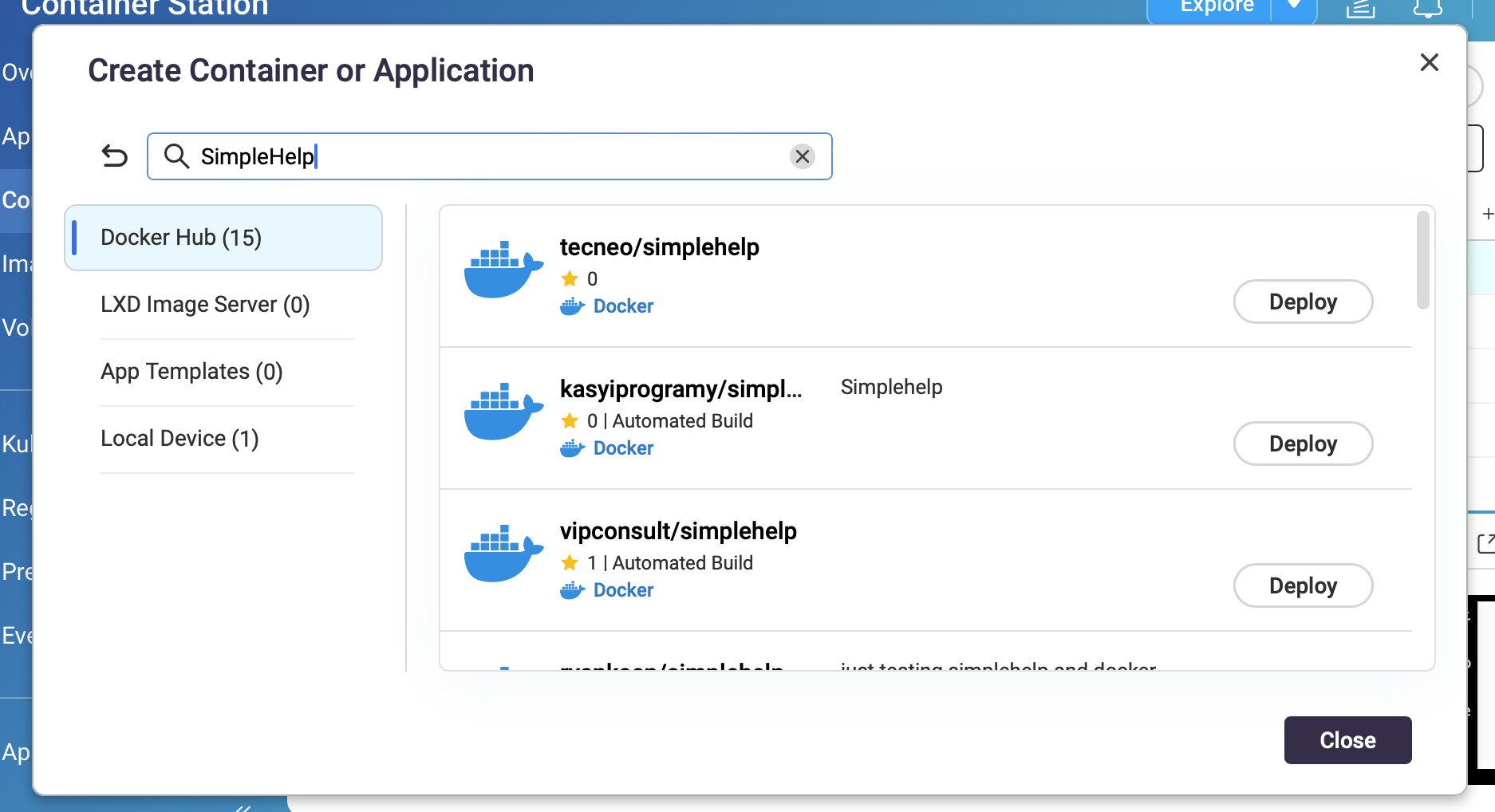
好的。我想我找到我的檔案了。那麼,怎麼把那個目錄移到一個我可以更容易存取的地方呢?
哦天啊,CS/docker 在 zfs 上真的會把東西藏起來。
好,你需要在目前容器運行時嘗試以下步驟。
首先,再啟動一個 SimpleHelp 實例「作為應用程式」運行,
這樣你就可以使用 compose.yaml。暫時需要選擇其他埠。記得要綁定掛載存儲。
    volumes:
      - /etc/localtime:/etc/localtime:ro
      - /share/something/somewhere/simpleHelp/config:/opt/SimpleHelp/configuration
去看看 /share/something/somewhere/simpleHelp/config,SimpleHelp 有把資料寫進去嗎?
/opt/SimpleHelp/configuration/
drwxr-xr-x   16 root     root            18 Sep 29 21:52 .
drwxr-xr-x    9 root     root            19 Sep 29 22:21 ..
drwxr-xr-x    2 root     root             3 Sep 29 21:52 alertsdb
drwxr-xr-x    3 root     root             3 Sep 29 21:52 backups
drwxr-xr-x    2 root     root             2 Sep 29 21:52 branding
drwxr-xr-x    3 root     root             4 Sep 29 21:52 history
drwxr-xr-x    5 root     root             6 Jun  2  2020 html
drwxr-xr-x    2 root     root             2 Sep 29 21:52 notifications
drwxr-xr-x    2 root     root             2 Sep 29 21:52 recordings
drwxr-xr-x    2 root     root             2 Sep 29 21:52 remotework
drwxr-xr-x    2 root     root             2 Sep 29 21:52 secmsg
-rw-r--r--    1 root     root          2284 Sep 29 21:52 serverconfig.xml
-rw-r--r--    1 root     root            86 Sep 29 21:52 simplehelpdisclaimer.txt
drwxr-xr-x    2 root     root             7 Sep 29 22:21 sslconfig
drwxr-xr-x    2 root     root             2 Sep 29 21:52 techprefs
drwxr-xr-x    2 root     root             3 Jun  2  2020 templates
drwxr-xr-x    2 root     root             2 Sep 29 21:52 toolbox
drwxr-xr-x    2 root     root             3 Jun  2  2020 translations
停止你新的容器。
在舊容器運行時,ssh 進入 NAS 並執行
stat /share/ZFS*DATA/.qpkg/container-station/docker/zfs/graph/*/opt/SimpleHelp/configuration/simplehelpdisclaimer.txt
我找到的資料集在 530。
  File: '/share/ZFS530_DATA/.qpkg/container-station/docker/zfs/graph/b408809b4fa4d0eaf26237d3accb4052d75f57c95895848036a52d129b870323/opt/SimpleHelp/configuration/simplehelpdisclaimer.txt'
  Size: 86              Blocks: 9          IO Block: 512    regular file
Device: b7h/183d        Inode: 8211        Links: 1
Access: (0644/-rw-r--r--)  Uid: (    0/    root)   Gid: (    0/    root)
Access: 2025-09-29 21:53:02.788096554 -0400
Modify: 2025-09-29 21:52:46.781974390 -0400
Change: 2025-09-29 21:52:46.781974390 -0400
將你運行中的容器鏡像到新容器的 config 目錄
/usr/bin/rsync -avpX --delete-before /share/ZFS530_DATA/.qpkg/container-station/docker/zfs/graph/b408809b4fa4d0eaf26237d3accb4052d75f57c95895848036a52d129b870323/opt/SimpleHelp/configuration/ /share/something/somewhere/simpleHelp/config/
停止你的舊容器,調整新容器的埠(調整應用程式時一定要「重新建立」),然後啟動新容器。
祝你好運。
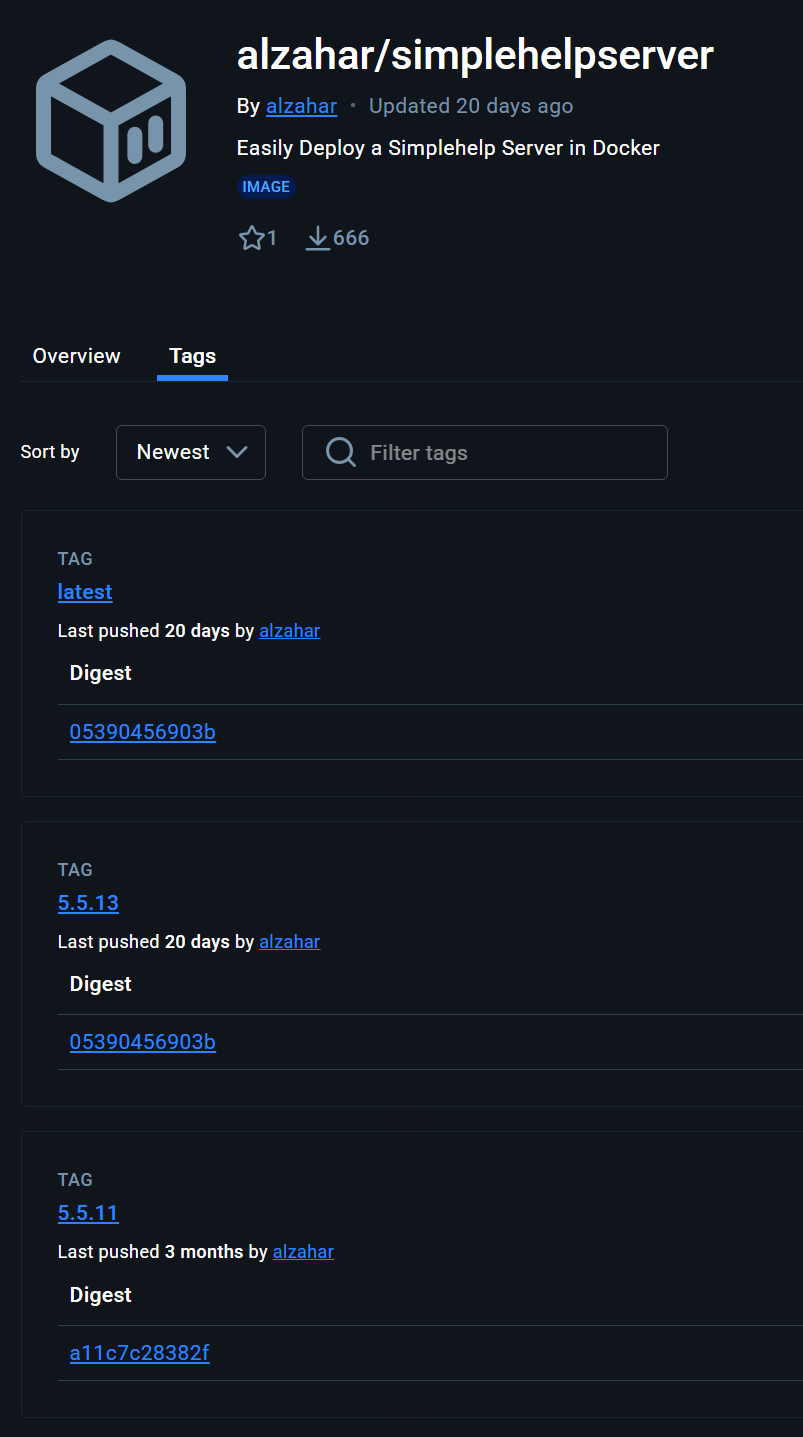
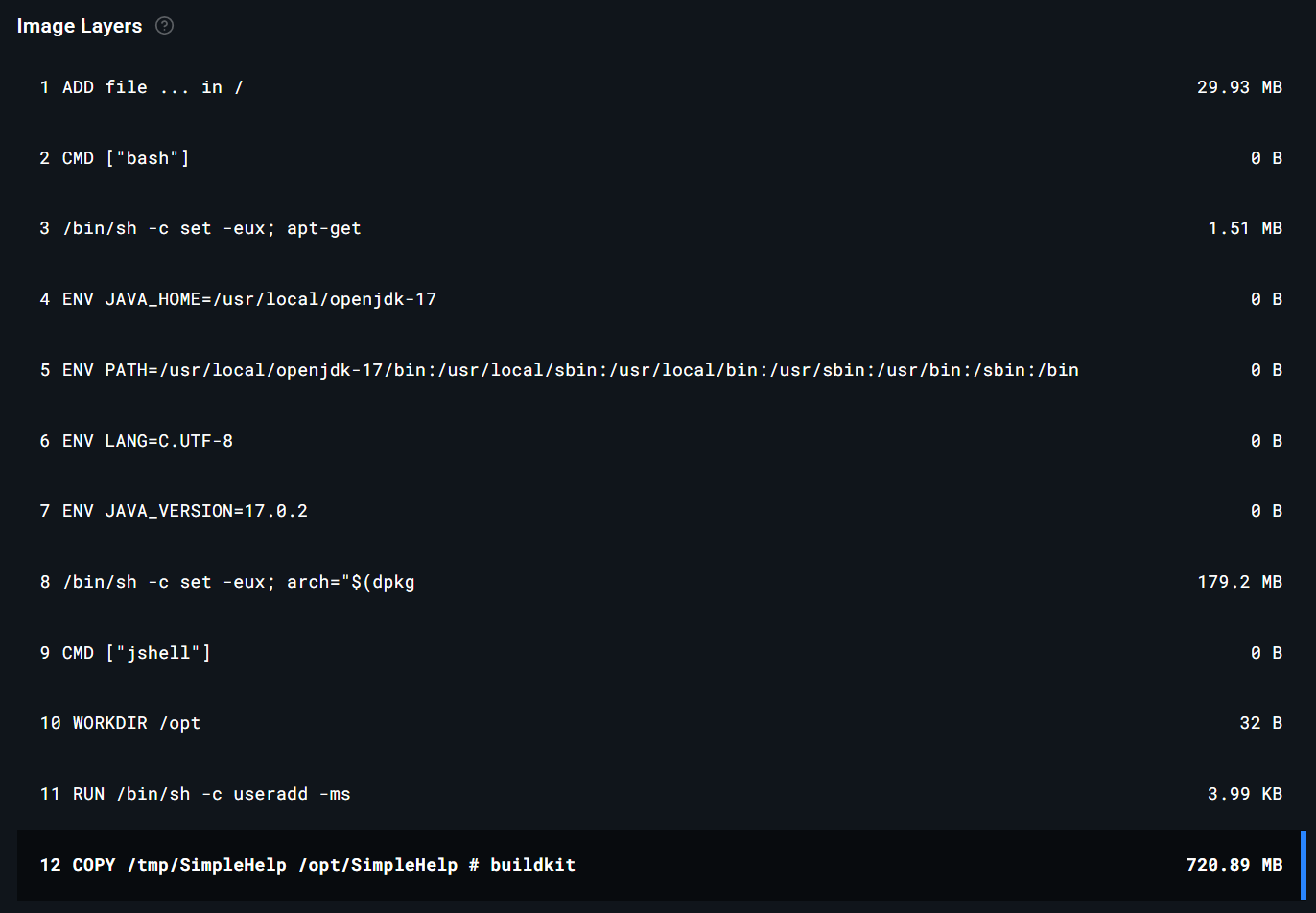
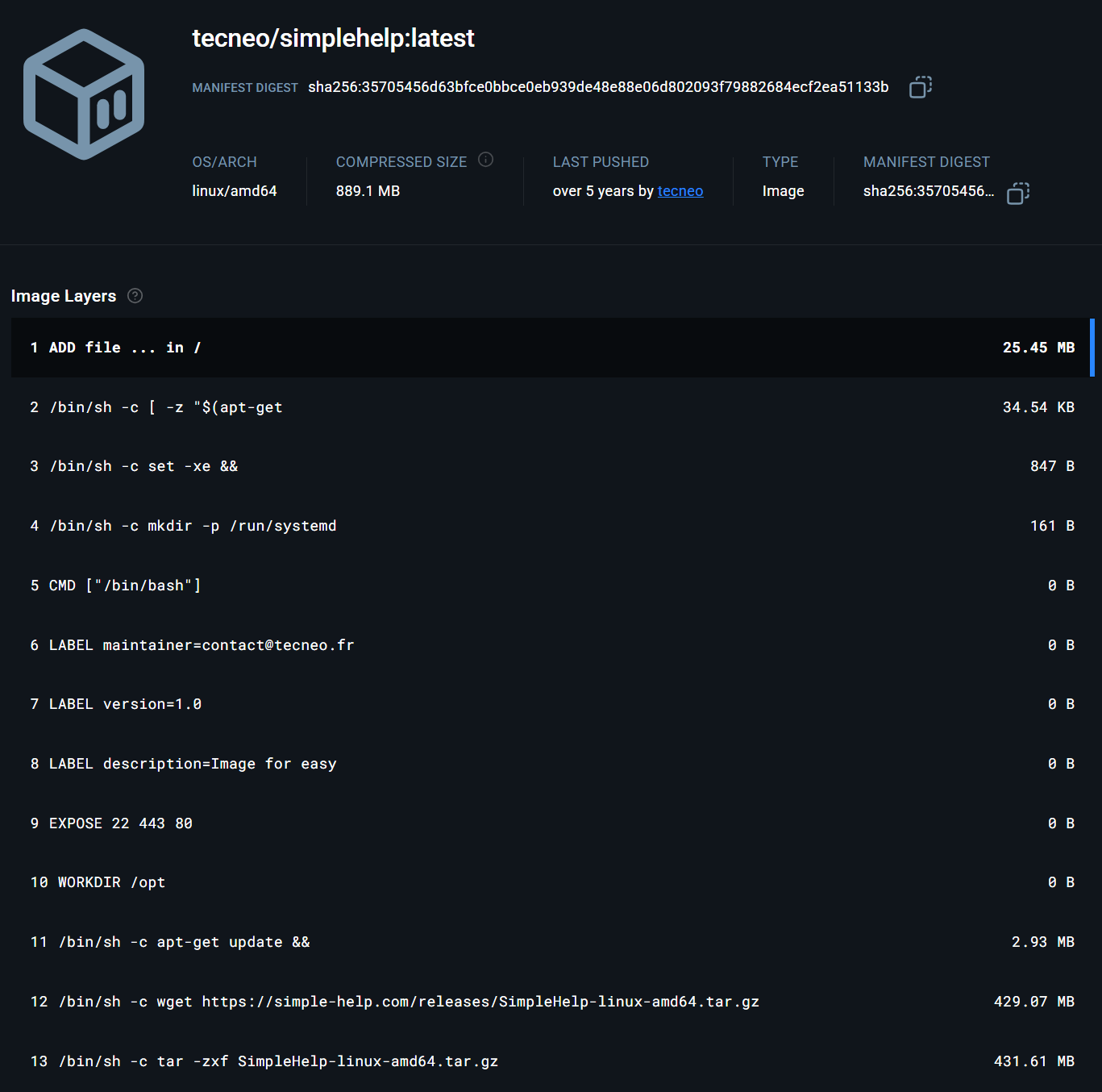
我從你上面展示的 alhazar 套件獲得了我的原始套件。
我不太確定要如何把它設置成一個應用程式。這方面我真的很不懂。而且我也不太明白你說的 bind mount storage(綁定掛載存儲)是什麼意思。
volumes:
      - /etc/localtime:/etc/localtime:ro
      - /share/something/somewhere/simpleHelp/config:/opt/SimpleHelp/configuration
什麼是 /etc/localtime?我不明白這個。
SimpleHelp 目錄位於這裡:
/share/ZFS2_DATA/.qpkg/container-station/docker/zfs/graph/ae6c730f350f0edc71392752f1d67c9874b3dda9903540c21a75c0e7a6e4a1ce/opt/SimpleHelp
config 裡面有東西:
[/share/ZFS2_DATA/.qpkg/container-station/docker/zfs/graph/ae6c730f350f0edc71392752f1d67c9874b3dda9903540c21a75c0e7a6e4a1ce/opt/SimpleHelp] # ls -la configuration
total 1775
drwxrwxr-x 22 Jono 1000      30 2025-09-04 19:38 .
drwxr-xr-x 10 Jono 1000      16 2025-04-10 09:03 ..
drwxr-xr-x  2 Jono 1000       3 2025-09-30 08:27 accessdb
drwxr-xr-x  2 Jono 1000       3 2025-04-10 08:33 alertsdb
drwxr-xr-x  4 Jono 1000       4 2025-04-10 19:33 backups
drwxr-xr-x  2 Jono 1000       7 2025-04-10 21:44 branding
-rw-r--r--  1 Jono 1000      30 2025-05-26 10:47 config.configurable
drwxr-xr-x  4 Jono 1000       5 2025-04-11 10:06 history
-rw-r--r--  1 Jono 1000    1934 2025-05-10 00:30 hostkey.ser
drwxrwxr-x  5 Jono 1000       6 2025-03-12 12:52 html
drwxr-xr-x  2 Jono 1000       2 2025-04-26 08:51 invitations
-rw-r--r--  1 Jono 1000 1555470 2025-04-18 13:26 lastbackup.dat
-rw-r--r--  1 Jono 1000      19 2025-08-30 19:38 latestversion
drwxr-xr-x  2 Jono 1000       3 2025-09-28 19:25 notifications
drwxr-xr-x  2 Jono 1000       3 2025-04-10 09:04 peers
drwxr-xr-x  2 Jono 1000       2 2025-04-10 08:33 recordings
drwxr-xr-x  2 Jono 1000       2 2025-04-10 08:33 remotework
drwxr-xr-x  2 Jono 1000      14 2025-09-30 06:17 secmsg
-rw-r--r--  1 Jono 1000    6531 2025-09-04 19:38 serverconfig.xml
-rw-r--r--  1 Jono 1000    1572 2025-04-10 08:35 serverkeys.dat
-rw-r--r--  1 Jono 1000    2646 2025-04-10 09:02 shlicense.txt
-rw-r--r--  1 Jono 1000     357 2025-09-04 19:38 simplehelpdisclaimer.txt
drwxr-xr-x  2 Jono 1000       2 2025-04-10 08:36 simulations
drwxr-xr-x  2 Jono 1000      10 2025-09-25 16:25 sslconfig
drwxr-xr-x  3 Jono 1000       3 2025-04-10 22:24 technicians
drwxr-xr-x  2 Jono 1000       5 2025-09-29 18:26 techprefs
drwxrwxr-x  2 Jono 1000       3 2025-03-12 12:52 templates
drwxr-xr-x  2 Jono 1000       3 2025-04-10 22:19 toolbox
drwxr-xr-x  2 Jono 1000       2 2025-04-10 08:33 toolbox-resources
drwxrwxr-x  2 Jono 1000       3 2025-03-12 12:52 translations
我迷失的地方是如何把它設置成一個新的應用程式。我之前嘗試過修改 YAML 腳本,想把應用程式存放在其他地方,但我沒辦法讓它運作起來。
嘗試:
services:
  simplehelp:
    image: tecneo/simplehelp:latest
    container_name: simplehelpnew
    ports:
      - "8680:80"
      - "8681:80/udp"
      - "8643:443"
      - "8643:443/udp"
    volumes:
      - /etc/localtime:/etc/localtime:ro
      - /share/stuffz/simpleHelp/config:/opt/SimpleHelp/configuration
    restart: always
1個讚
砰!你真是個天才,我的朋友!讓我請你喝一杯你喜歡的虛擬成年飲品吧!
這看起來正是我想要的!
首先 @dolbyman —— 你可以把我這段關於 Docker/CS 的問題分到新主題嗎?這已經偏離原本主題太多了。
好,以上的設定對我來說有幾個原因行不通:
1.) 它只遠端掛載了伺服器的 configuration 部分,但為了升級伺服器軟體,我需要能存取整個 SimpleHelp 目錄
2.) 它就是無法運作。我的意思是,它的確有啟動,但當我嘗試登入時,首先管理員帳號的密碼無法被識別,其次用我的帳號登入時會出現錯誤。這是在我已經把原本運行中的 container 的 configuration 資料夾備份複製過去之後發生的。看起來有東西沒有正確被讀取。
所以我沒有用上面的 YAML,而是用了這個:
services:
  simplehelp:
    image: tecneo/simplehelp:latest
    container_name: simplehelpnew
    ports:
      - "80:80"
      - "80:80/udp"
      - "443:443"
      - "443:443/udp"
    volumes:
      - /etc/localtime:/etc/localtime:ro
      - /share/Container/SimpleHelp:/opt/SimpleHelp
    restart: always
這跟我之前試過的很像。但首先,安裝過程完全沒有在 /share/Container/SimpleHelp 資料夾裡安裝任何東西,其次,我把從 SimpleHelp 網站下載的 server package 複製進去。當嘗試啟動 container 時出現錯誤:
sh: 0: Can't open serverstart.sh
這個錯誤會一直重複出現,因為它不斷嘗試啟動伺服器。我已經對 /share/Container/SimpleHelp 目錄執行過 chmod -r 777,但還是沒有用。
所以我還是卡住了。
但我發現了一件關於 CS 很有趣的事……
你知道我找到了程式目錄的路徑:
/share/ZFS2_DATA/.qpkg/container-station/docker/zfs/graph/ae6c730f350f0edc71392752f1d67c9874b3dda9903540c21a75c0e7a6e4a1ce/opt/SimpleHelp
你猜怎麼著,當你停止 container 時,這個路徑就消失了!沒錯
/share/ZFS2_DATA/.qpkg/container-station/docker/zfs/graph/
還在,但後面的全部都消失了。container 重新啟動時又會出現。
所以我懷疑這跟我無法用指定路徑啟動伺服器有關。我也不確定。又卡住了。好像快成功又差那麼一點……
已完成
1個讚
是的,這就是 docker 的運作方式。
你接著會在 Application → 重新建立它。每次你用 tecneo/simplehelp 這個映像檔建立容器時,都會執行 wget 並在建置時下載伺服器。
你應該將設定資料與軟體映像檔分開。
綁定掛載(bind mounts)是在啟動容器前的最後一步。所以你會有一個完整的 /opt/SimpleHelp 來自容器建置,然後你又掛載了一個空資料夾在上面。
你有在 rsync 輸出中看到錯誤嗎?
SimpleHelp 本身有內建備份和還原功能嗎?
對啊,匿名掛載之類的鬼東西。
如果你深入研究一下,因為我們在跑 zfs,docker 其實會建立一個資料集(QNAP「共用資料夾」那種,但又不完全一樣),然後掛載到 graph/ 裡。
我對 ZFS 沒有那麼熟,不過理論上我們可以自己掛載那個資料集,然後把資料移出來,或是把內容合併到 /share/CS/SH/。
其實那些資料都還在你的硬碟上,只是被卸載掉了。
我在建立時沒有遇到任何錯誤。如果執行重建(recreate)總是會拉取最新版本,那這樣應該沒問題。但我在嘗試登入 SimpleHelp 時一直出現錯誤。
SimpleHelp 的設定備份會以 zip 檔案下載。它會下載整個設定資料夾。
當你從乾淨的 /share/Container/SimpleHelp/config 開始,然後把 zip 檔解壓到那裡,還是無法載入你的舊設定嗎?
那現在聽起來像是 SimpleHelp 的問題了。
這次升級幅度大嗎?還是只是像從 1.2.3.4 到 1.2.3.7 這樣的小幅升級?
容器日誌裡有顯示任何訊息嗎?
嗯,這很有趣……我一直在用這個套件安裝東西。你說它應該會從 SimpleHelp 網站取得最新版本。但實際上並沒有。最新版本是 5.5.13,但我建置時出現的是 5.2.1。這可能解釋了為什麼我在讀取我的設定檔時遇到一些問題。看起來 wget 並沒有「抓到」。
嗯……好吧。為什麼這個沒有更新呢?所以我的問題 100% 是因為我嘗試用較新的配置和客戶端軟體登入一個 5 年前的伺服器套件。我切換到 Alzahar/Latest,這讓我升級到 5.5.9,但根據你圖片裡的套件,最新版應該是 5.5.13。
這是我目前的 YAML 程式碼:
services:
  simplehelp:
    image: alzahar/simplehelpserver
    container_name: simplehelpserver
    networks:
      qnet-network:
        ipv4_address: 192.168.1.20
    volumes:
      - /etc/localtime:/etc/localtime:ro
      - /share/Container/SimpleHelp/configuration:/opt/SimpleHelp/configuration
    restart: always
networks:
  qnet-network:
    driver_opts:
      iface: eth3
    driver: qnet
    ipam:
      driver: qnet
      options:
        iface: eth3
      config:
        - subnet: 192.168.0.0/23
          gateway: 192.168.1.1
為什麼我沒有拉到最新版的套件?