Hey all,
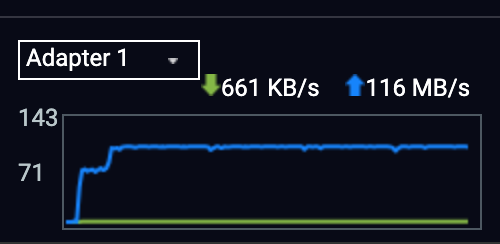
I’ve noticed something that doesn’t seem right. When I start copying a single large file (via SMB), the transfer begins very quickly, but this only lasts for around four to five minutes. After that, the speed drops sharply and eventually settles at around 600–700 kb/sec. This behaviour never used to occur – previously, file transfers remained fast throughout, and WebDAV connections held a steady, high data flow without any slowdown.
Setup:
-
NAS model: QNAP TS-262
-
NAS firmware: QTS 5.2.7.3297 (build 20251024)
-
NAS → router: 1 Gbps link
-
MacBook Pro M4 → router: 802.11ac 2×2 MIMO 5 GHz
-
MacBook Pro M4 → NAS: SMB 3.1.1
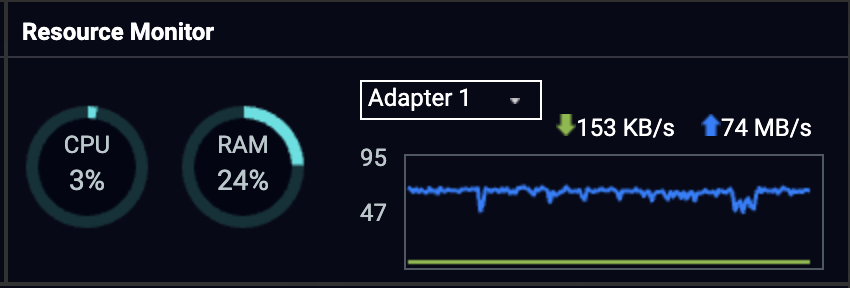
I’ve attached screenshots showing that the drive is healthy, along with the network graph that illustrates the initial high speeds, followed by a sudden drop, and then a further decline.
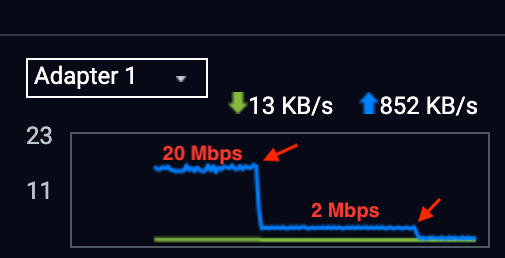

I’ve also observed the same behaviour when using WebDAV for streaming a file to an HTPC, following the same pattern of an initially high rate that quickly falls away rendering the play-black unplayable at that point.
Any help on this would be really appreciated.