Hi, all,
I’m using File Station 5 and able to create a SmartShare link to what I would like to share, but the SmartShare link does not work.
What should I check is working?
NAS model and firmware?
Is cloudlink connected ? (never forward ports from WAN to your NAS!)
You may refer to the tutorial below on creating share links in File Station. If the issue persists, could you create a new share link for a non-private, non-confidential file and send it to us via private message, along with screenshots of how you created it? Thanks!
Yes, this is how I am creating the share link. Whether it’s in File Station 5 or File Station 6, it doesn’t work. The creation of the link works, but the link never loads.
Model: TS-464
Firmware Version: QTS 5.2.10.3577
I had the same problem on my TS-464 with FW QTS 5.2.10.3577
A rollback to the previous version of myQNAPcloud solved the problem.
See:
https://www.qnap.com/en/how-to/faq/article/what-to-do-if-myqnapcloud-link-2-5-1-breaks-share-links
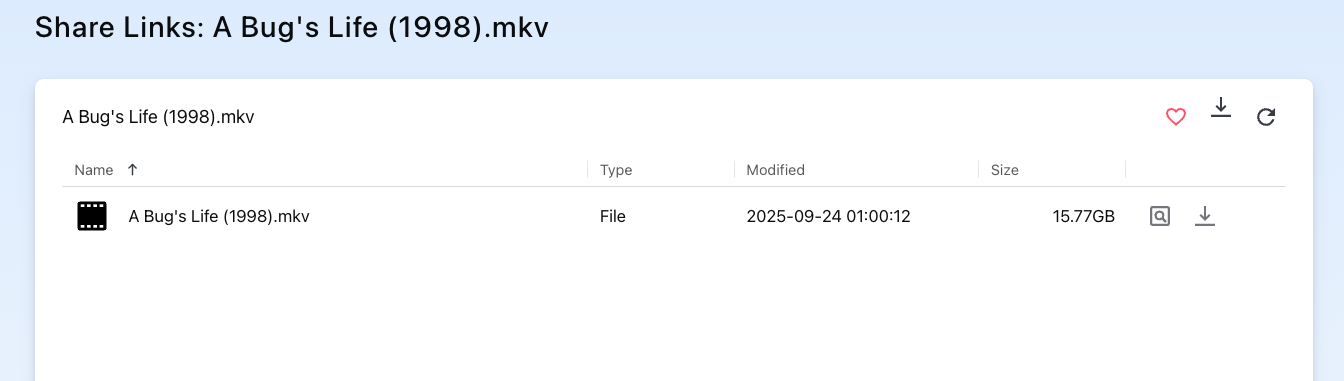
So I found out something interesting testing the download speeds via SmartShare that I have brought up earlier in another thread. This is the Smart Share screen that I tested out:
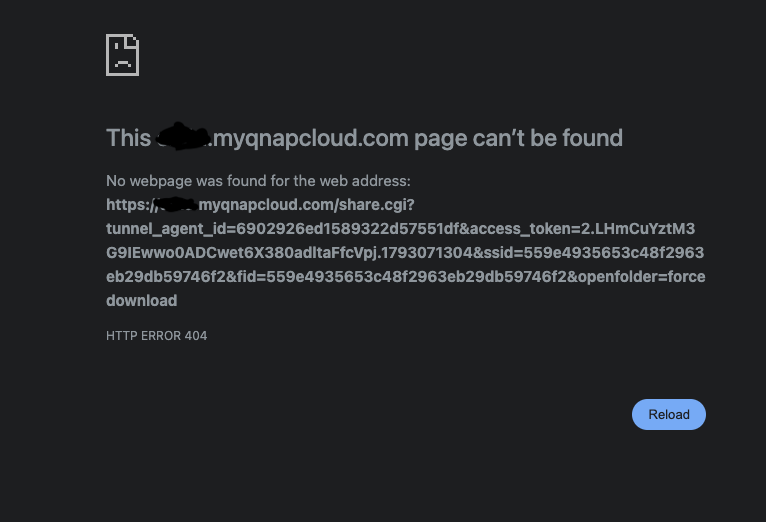
If you click the download button next to the magnifying glass in the same line as the title, you get an error:
However, if you click the download button next to the heart icon at the top of the page, the download works.
@SteveKo - your side should check this out. It’s certainly a bug in the web page.
Not sure if that’s what some of you are experiencing here, but it is a problem.
Are the links pointing to the same destination both buttons or is it some java script thing ?
I think it’s a javascript issue. When I hover over the button that doesn’t work, no link shows up. The attempted page is:
https://xxxxx.myqnapcloud.com/share.cgi?tunnel_agent_id=6902926ed1589322d57551df&access_token=2.LHmCuYztM3G9IEwwo0ADCwet6X380adltaFfcVpj.1793071304&ssid=559e4935653c48f2963eb29db59746f2&fid=559e4935653c48f2963eb29db59746f2&openfolder=forcedownload
The working button, is a link it is has this URL:
https://xxxxx.myqnapcloud.com/share.cgi?tunnel_agent_id=6902926ed1589322d57551df&access_token=2.LHmCuYztM3G9IEwwo0ADCwet6X380adltaFfcVpj.1793071304&ssid=559e4935653c48f2963eb29db59746f2&openfolder=forcedownload
The first link adds this extra text which is no bueno: &fid=559e4935653c48f2963eb29db59746f2
So the javascript is adding something that is not good.
This would break the attempt to share a folder with multiple files and someone wants to download just one of the files.
@NA9D Thanks for the report! This is a known issue with the Download button on single-file share links, and it has already been fixed in the latest File Station updates. Please update File Station to 5.5.7.5406, 6.0.5.8117, or 6.2.1.8250 (depending on your version) via App Center and try again.
@Shadius This fix may also resolve the issue with your SmartShare link. If it still doesn’t work after updating, feel free to let us know. Thanks!
Hi @SteveKo - I am running File Station 6.3.0.796 as part of the Hero 6.1 beta. And it’s still not fixed.
It gives the same error. And there’s a major problem with this as a security thing. The error window lists the MyQNAPCloud Link URL to get to my NAS. This begins with a hexadecimal entry of something like: https://a145.myqnapcloud.com. This is not the link to my NAS and hopefully no one else’s but anyone with any knowledge can then get to the login page for my NAS. Now they may need to have a MyQNAPCloud login but that’s easy enough to get.
So you guys need to fix this quickly. The URL to the NAS through your cloud servers should never be exposed any ANY message or trace back.
Try disabling force redirect ssl if you had enabled in general settings. There was some issues with that last week with several users.
Yeah, none of my links are SSL usually. It’s pretty rare if I do that.
Hi @NA9D,
Thank you for testing this and for the detailed follow-up — it’s very helpful, and we’re sorry the update didn’t resolve the issue in your environment.
Since you’re running QuTS hero h6.1 beta with File Station 6.3.0.796, which isn’t covered by the versions mentioned above, we’ve asked our QA team to verify the single-file Download button on SmartShare links in this exact setup. We’ve also passed your concern about the myQNAPcloud Link URL being shown in the error message to the relevant team for review.
We’ll update this thread once we have results. If we need a link to reproduce the issue, we’ll reach out to you via private message.
Thanks again for your patience!
Thank you for your patience. For share links that are created but never load, myQNAPcloud Link 2.5.4, which addresses the share link issue introduced in 2.5.1, is now available in App Center. Please update myQNAPcloud Link to 2.5.4 from App Center on your NAS and check whether your share links load as expected.
For reference, here is the related FAQ:
What to do if myQNAPcloud Link 2.5.1 breaks Share Links (Fixed in 2.5.4)
If the links still do not load after the update, please let us know here.
Thanks - Problem solved with version 2.5.4.
Regards,
Etienne