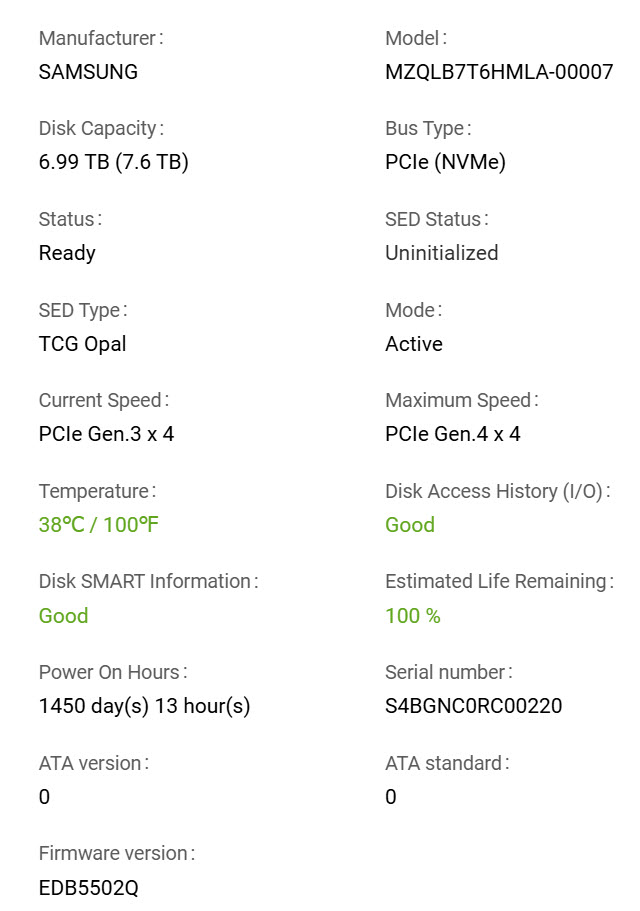
In my TS-H1290FX, I have populated the drive bays with Samsung 7.6TB NAS NVMe drives.
I am using QuTS hero with the latest version.
However, after 1,450 days, I am still showing 100% life remaining. If this is true, I will be exceptionally happy, but is it true? Is the NAS reporting an incorrect %?
Secondly, the memory seems to be operating slower than it could be.
Current Speed Maximum Speed
PCIe Gen.3 x 4 PCIe Gen.4 x 4
Thank you for the reassurance. My OS is: QuTS hero h6.0.2.3656.
I chose the drives that were on the QNAP compatibility matrix as they were the cheapest at £900 +VAT; they are much more now. I do recall non-NAS consumer drives were less than half that orice at the time.
I’ve no idea how many drive writes are taking place but the reads will be at least 20x the writes.
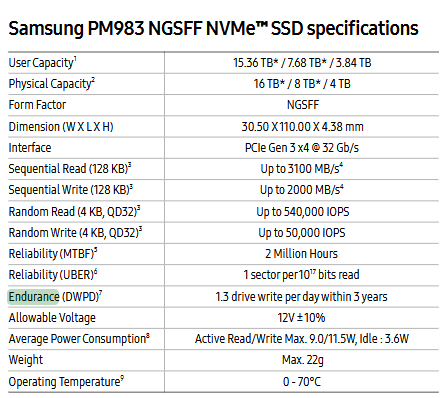
Thank you for the information. From your screenshot, the installed SSD is a Samsung PM983 7.68 TB (MZQLB7T6HMLA-00007), which is an enterprise/datacenter NVMe SSD with a PCIe Gen3 x4 interface.
Regarding the 100% Estimated Life Remaining, this is possible even after a long power-on time. SSD life is primarily determined by NAND write endurance and the amount of data written, rather than power-on hours alone. The PM983 is a high-endurance enterprise SSD, so if the workload has not generated significant writes, the reported remaining life can stay very high.
Your screenshot also shows Disk SMART Information: Good, so there is currently no indication of an SSD health problem.
Regarding the PCIe speed, PCIe Gen3 x4 is also normal for this SSD. The SSD itself supports PCIe Gen3 x4, while the NAS SSD bay supports up to PCIe Gen4 x4. Therefore, QTS shows:
Current Speed: PCIe Gen3 x4 → the speed negotiated with the installed PM983 SSD
Maximum Speed: PCIe Gen4 x4 → the maximum capability of the NAS SSD interface
A PCIe Gen4 x4 SSD would be required to establish a Gen4 x4 link, so the current Gen3 x4 display does not indicate an issue.