Qsirch is QNAP’s search app. It’s actually very, very good and fast. I find it to be an amazing search engine to find stuff on the NAS. BUT, it will index every single file on your NAS and with a pool size of 80 TB, that is going to take some time and a lot of resources.
So here’s what you do. First, if you don’t think you will need Qsirch, remove it. Second, if you want to keep it (I think it’s worth having as it is so powerful), just stop it during your RAID rebuild. Then you can start it up again after the rebuild is done.
Now if you keep it and start it up, I would highly recommend going into the app and adding folders that you don’t want or need searched to its exclude list. For example, I have a bunch of folders from an old computer that I need to just manually go through and select what I want to keep, etc. Much of it is backups of photo libraries, old virtual machine hard drives, etc. It’s stuff I really don’t need to search. So I exclude it. Here’s a picture of some of mine:

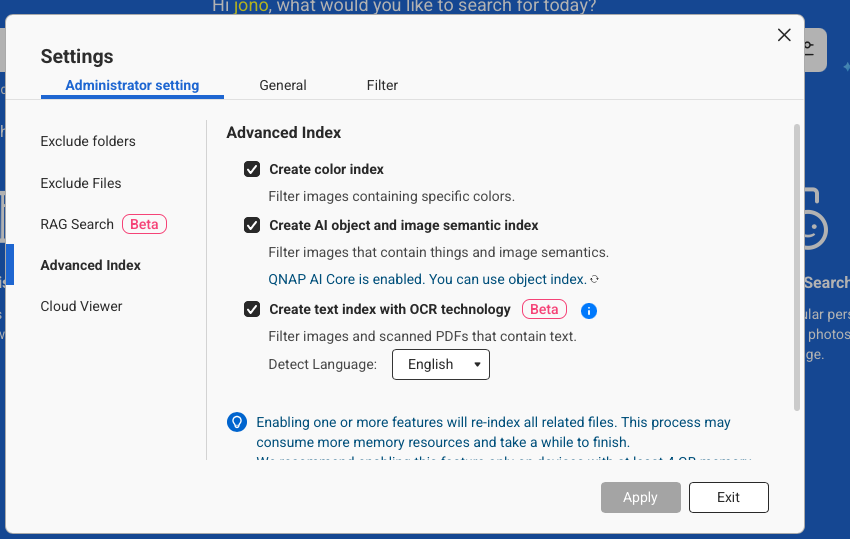
This will cut down on Qsirch’s scope of what it indexes. Now, you can do all sorts of advanced indexing and sorting with Qsirch. If you have these enabled, it will take quite a bit of additional time to index all these:
Once it is done with the indexing, then Qsirch settles down and doesn’t take so many resources. It will occasionally rear its head and do some maintenance stuff. The other day it started doing a bunch of stuff on me again but eventually settled down.
It’s not so bad when nothing else is going on with your NAS. But it’s annoying as heck when you are trying to do a RAID rebuild or similar!