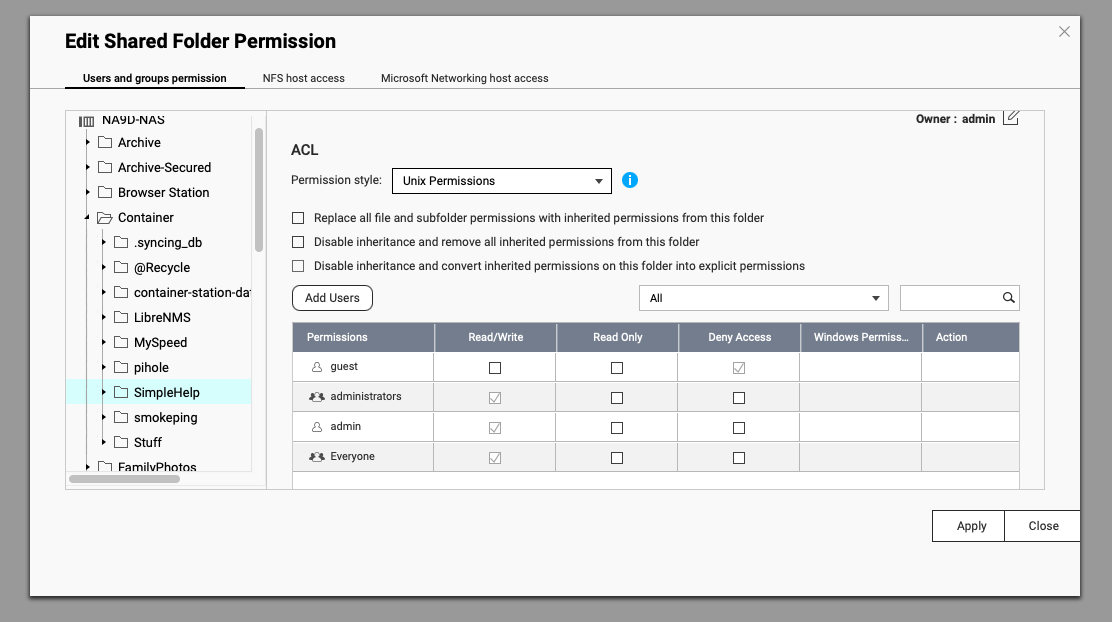
Hello, I’m having an issue with my newly purchased QNAP TS-h1886XU-RP-R2 running QuTS Hero 5.2.8.3321.
I’m unable to grant access permissions to my domain users at the subfolder level. This used to be very easy to do in earlier QTS versions.
I have a shared folder called “DataMain”, and there are several subfolders inside DataMain. However, I cannot assign subfolder-level permissions to domain users.
Folder A
Folder B
Folder C
I need to assign access permissions to users at the folder (subfolder) level, for example:
Folder A → User U1 → Read/Write
Folder B → User U2 → Read/Write
Folder C → User U3 → Read/Write, and read-only access to Folder A
However, the new QuTS Hero ACL system is very difficult to work with, and I’m unable to configure these permissions properly.
Hi @SunilNiar , May I know your configuration on the shared folder itself? There are 2 concepts on the access permission. One is protocol level, which is privilege of connection. One is folder/file level, the ACL, which is about access of the folder or file.
Here I can say it in this way, protocol permission is like a route permission, if it is blocked or read-only, you can NOT reach the gate(ACL) of the shared folder or further subfolder, even if the gate(ACL) is open(read/write).
user → [shared folder protocol permission → shared folder ACL permission] → subfolder ACL permission.
Option1: On the UI to set permission of the shared folder, you shall see a checkbox of “Individual permissions“, check it you can see the protocol permission to be set for that user, make it as read/write, and ACL for the shared folder you can either make it as read/write or read-only for shared folder. Then you set the ACL for subfolder read/write. (Set connectable first, then set the gate.)
Option 2: If “Individual permissions“ is unchecked, meaning it combines protocol connection and ACL permission for that “shared folder“. Make sure you grand read/write for the specific user on the shared folder, because you need the combined protocol permission to be read/write, so that the user can CONNECT to shared folder, and to the gate (ACL) to check thereafter.
At the same time, we would also like to understand your comment that “the new QuTS Hero ACL system is very difficult to work with.”
Could you elaborate on which specific parts you found problematic or difficult? This feedback would be very helpful for us to improve the software quality. Thank you!