I’m Long time Synology user (last 16 years) and recently they are making all kind of “shady” moves/decision (to not use different word :)) that i’m slowly fed-up with that and seeking for newer NAS soon.
Currently, i user three Synology NASes (5 , 8, 8 Bays) and i’m looking to go with 12 or 16 bay but Synology is locked down HDDs to their own models (rebranded Seagate and Toshiba) drives so i don’t have plan to go that route any by their overpriced HDDs since i have plenty of Seagate IronWolf/IronWolf Pro, Segate Exos X16/X18 Toshiba 7200rpm and WD Red/Gold drives ranging from 10-22TB.
So now on to my question finally and what i need/want from my possible future NAS.
Thanks for bearing with me so far :).
Rack Mount 12 to 16, 3.5" bays NAS
QuTShero support (from my research that gives me ZFS/bigger volumes possibility and other benefits of ZFS (I plan to use 2 drives parity) ).
16-16GB RAM (for some docker stuff, nothing big but i like option to have to upgrade).
Support for native Camera recording software/app (I have 2*4K cameras, possibly 4 in future) - licences for cameras paid separately or there are some free ones with device like on DSM ?
Native support for PLEX and EMBY (just file server I don’t need transcoding)
Backup software for snapshots (like Synology Active Backup for Business) which can do PCs backups automatically and full bare-bones backup/snapshots/recovery.
Option for 25Gbit SFP+ (I have 25Gbit switch in my core setup of network). For a start Single/Dual 10G copper is fine, but I’d like 1-2 PCIE slots for expansion cards/possible NVMe drives for caching if needed ?
Automated app for Backup for Phones/images, remote access for those photos from each user phone (like Synology Photos maybe?)?
Remote access option (i suppose that works same as Synology QuickAcess ?)
Does Every QuTShero listed model support QuTShero 6.0 also or some are stuck at 5.x?
I apologize for so much mention of Synology, but I’m drawn in their ecosystem for last 16 years (I had 7 different models and 3 still using) so I got used to their terminology.
Please if you have any suggestions of QNAP NAS that fits my needs/criteria post the name of model (I’ve looked on products page and filtered 12/14/16 bay models, but I’m not yet familiar with QNAP model marking (and online reviews/youtube videos it very, very sparse or non-existent for some models :/) so i can’t determine what year is what model released, and I’d not like to buy 5+ years old model now but something newer date release, preferably 2024—>
1.) Rack Mount - yes there are rack mount QNAP NAS units if you want to go that route. I think they tend to be more expensive for the same capability (there are some ARM based units but stay away from those particularly if you want to run QuTS Hero.
2.) QuTS Hero does give you larger drive space but only if you need to the PB range! I’ve only seen a couple commercial users on the forum here talk about needing that much space. If you are doing a say 50 TB array then QTS is fine. Hero adds a lot of good stuff though.
3.) You want more than 16 GB RAM especially if you are running Hero. The ARC cache isn’t even available unless you are at 16 GB minimum. I would get at least 32 if not 64 GB. Memory is expensive these days for sure but I would say 32 GB minimum. QNAP will tell you that you need to use their memory. Exceptionally overpriced. Use a high quality 3rd party memory like Kingston and you’ll be fine. Don’t use cheap memory like TimeTech. I had trouble with them. Right now my units use Corsair and Crucial. I have zero memory problems. QNAP ships new NAS units with Kingston memory which is how I know their “you must buy our memory” stance is garbage.
4.) QTS Surveillance supports many models of cameras and you get 8 cameras in the license and it is all free.
5.) There’s a native PLEX app available.
6.) Snapshots are built into the OS for the NAS itself. There’s a number of PC backup software packages available. I think the main QNAP one is HDP. I don’t use it as I am mainly a Mac guy but there’s a number of people on here who do use it. Plus there’s Qsync available as well.
7.) This may depend on the NAS. Question is do you have a NAS with a powerful enough CPU and fast enough drives to get this data rate? I have 10 Gbit connections to both of my main NAS units and I never see close to that speed. But QNAP has a number of models with PCI slots. Don’t use NVMe drives for caching. It doesn’t work well on QNAP. Just use the NVMe drives as your “system” (not OS) drive.
8.) QFile supports automatic backup of images and files from mobile devices to the QNP.
9.) There a lots of remote access options. Best is to use a VPN, but QNAP also has access to your NAS (if enabled) through MyQNAPCloud.
10.) I’m pretty sure every Hero model supports Hero 6.
One thing about Hero 6 - it’s brand new. A number of us have not yet upgraded as we are waiting for bugs still in the OS to be ironed out. Maybe sometime, but Hero 5 is still working for me at least.
Welcome to the world of QNAP. Bring your own drives!
Yeah it has to be rack mount since I use 42U rack for my network/server gear (I know there is “Rack TAX” but it’ll keep my OCD at least controlled, so all is nice and tidy in rack:)).
As for me thinking of ZFS / QuTS hero vs regular QuTS is because ZFS should be better at Snapshots/self-healing etc. etc… than regular EXT4 (i use BTRFS on Synology, but ZFS seems better) and also right now I have volume “cap” on Synology at 108TB (and i have it maxed out on my 8 bay NAS) so I do want to have 200+TB volume options in future, especially when there is HDD brand “Freedom” so I could end up (one day future when 28-30TB HDD won’t any more cost like small car ;)) with 12 or 16*30TB HDDs..
I have a lot of data so yes sadly I need a lot of HDDs in these worst times (price) :/.
Thanks again for your time and if you have any specific model to recommend please do.
Yep, then I would recommend QuTS Hero for you with the amount of data. Let me look through the current NAS offerings and come back with a model for you…
So it’s actually really hard for me to recommend a model to you. First I don’t know your budget. Second, I don’t really know what you need/want to do on the NAS - how much CPU power do you need. Rack mount units are available in everything from an Intel Atom to the latest Ryzen Pro CPUs. I would go as high in CPU power as you can afford.
But here’s a search I put together showing you the options…
Better to use ECC ram with QuTS and the larger the size of your storage pools, the more ram ZFS wants. I would say min of 64gb. I moved a TVS-h1688x from QTS to QuTS; same apps went from 6-8% of 128gb to 26% ram usage when no VM’s running.
QuTShero support (from my research that gives me ZFS/bigger volumes possibility and other benefits of ZFS (I plan to use 2 drives parity) ).
16-16GB RAM (for some docker stuff, nothing big but i like option to have to upgrade).
I will recommend TS-h1277AXU-RP (12-bay) and TS-h1677AXU-RP (16-bay). Both are AMD Ryzen 7000 with DDR5, and listed for QNAP support through 2030.
Support for native Camera recording software/app (I have 2*4K cameras, possibly 4 in future) - licences for cameras paid separately or there are some free ones with device like on DSM ?
Other users have already mentioned that QVR Surveillance has a built-in free 8 channel quota, and you can purchase additional channel quota either buyout or through a subscription, depending on your needs or preferences, we support both.
Native support for PLEX and EMBY (just file server I don’t need transcoding)
Plex is in QNAP App Center as a native package, and Emby runs via Container Station or its own package.
Automated app for Backup for Phones/images, remote access for those photos from each user phone (like Synology Photos maybe?)?
QuMagie is the closest match to Synology Photos. The QuMagie Mobile app does automatic upload of new photos and videos, with AI albums by people / things / places, and remote browsing.
Remote access option (i suppose that works same as Synology QuickAcess ?)
myQNAPcloud is the QuickConnect equivalent for easy remote access, and you can put a VPN in front if you’d rather not expose services directly. NA9D’s VPN-first advice is sound.
Does Every QuTShero listed model support QuTShero 6.0 also or some are stuck at 5.x?
As I know all the QuTS hero model should support QuTS hero h6.0. One thing worth knowing up front, from h6.0 onward firmware downgrade is blocked for security reasons, so you can’t roll back once you move up.
WOW, thank you so much guys for overwhelming support/comments :).
Nice to see there is still forums with nice reception of “newcomers”
I probably should have mention earlier but my NAS usage is not so much CPU intensive. My current Synology RS1221+ has Ryzen V1500V with 20GB ECC Ram (4+16) and executing my tasks pretty well with 20-30% usage and occasional peaks in 60-70% CPU usage (once Active Backup for Bussines kicks in making snapshot son workstations) and RAM usually sits in 40-60% range usage (PLEX using most and i think it has memory leak since when i stop the app and restart app then RAM usage drops back to 15% and then gradually through days/weeks rises slowly to 60% usage) so i kinda think (hoped :)) QNAP with 32GB should be adequate for my usage of apps but since it has slots for expansion eventually when RAM prices drop (hopefully) i could add another 32GB support but for a star ti tin 32GB is max i need for 200TB ZFS partition/volume..
Can i mix different drives in ZFS and then combine 2 pools in 1 Volume ?
I have 4*14TB and 4*18TB drives in my old Synology DS 1817+ (That has Intel Atom C2538 2.4Ghz CPU) which I plan to phase out first.
My Main usage along Camera/Photos/Plex for file server is saving 3D renders in EXR format while I have 4 PCs connected (10Gbit) rendering frames which can vary in size for single frame of 100-250MB per frame/image. And occasionally i do Video editing directly from the NAS.
My current Synology (main) has 25Gbit NIC and Link Aggregation mode so theoretically I have 50Gbit throughput to the NAS (no that i believe that Ryzen V1500B could sustain 50Gbit anyway but hey i had cables (SFP28 2m long) laying down in my drawer so why not connect :)).
So i don’t think i need Enterprise solutions (beefier CPUs that use more power/require bigger cooling/make more noise). That’s another thing i haven’t seen on QNAP spec sheets. No NA si checked shows what’s the noise level in dB ? Since i use NAS in Rack which is directly siting in my office i wouldn’t like it to be noisy as helicopter :). Heck i even replaced fans in my current Synology with Noctua fans to make it less loud :).
As for Support of devices i hoped support for software upgrades/patches would go longer than “just” 2030 (if i buy device this year that would mean only 3.5 years of support for device that has 5 years warranty, kinda low support years number since my Synology even model form 2017 still has support for newest patches/DSM upgrade), Hence me asking is there some device which is released in 2024/2025 maybe with 7+ years of support or better to wait full 2026 line up release and go with most current?
Also, i see most of QNAPs in range i’m looking for have Dual PSUs? I wonder can it work fine if just one PSU is attached to power or both cables have to be plugged in to be able to operate?
As for price I hoped I could get 12Bay up to 3,5k EUR and 16Bay up to 5k EUR but of course cheaper the better considering HDDs will cost a fortune if buying new now :)..
I can get Synology RS3622xs+ (2022y, 12Bay, Xeon CPU) for around 3600EUR or new 2026 model RS3626xs for 4700EUR, but then there is Synology drives lockout problem that i want to avoid :).
Thank you very much again.
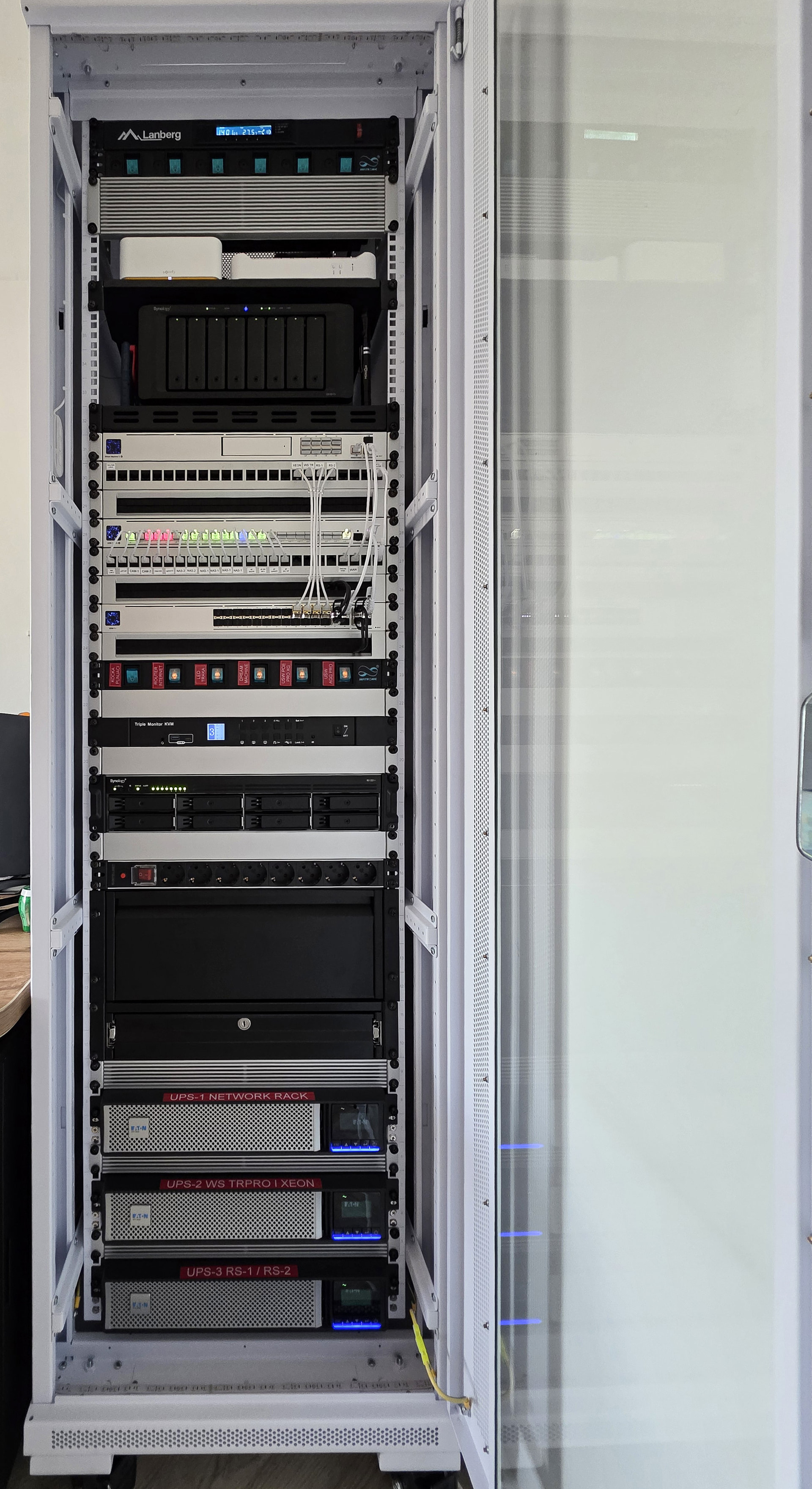
P.S. this is my current RACK setup and i’d like to replace that TOP Synology DS1817+ with QNAP and eventually even that RS1221+ if QNAP proves to be replacing all my Synology usage gradually.
I have the TS-873A with the V1500B. It works fine but to me it’s sluggish sometimes. I have a TVS-672XT that I have upgraded to an I7-8700T. The difference in performance between the two is very significant.
A couple of comments:
1.) Lifetime: Just because QNAP is offering models with lifetimes until 2030, that does not mean there won’t be support after that. Many of us are running very old models (like my TS-451) that still get software updates, etc. QNAP tends to have a very long lifespan of support. I think the 2030 comment means that they are going to be manufacturing that unit until 2030.
2.) Check out the SMB NAS models then if you don’t need the enterprise grade CPUs. The link I provided to you earlier has those models there as well.
3.) You should be able to mix and match drive types. Keep in mind for best performance in a RAID array, all your drives should be the same make and model. But you could have multiple storage pools where one pool is one drive type and another pool a different drive type. I have that on my TS-873A.
4.) Generally in systems with dual PSUs, one is redundant and is sitting there idle in case the first one fails. Crucial in Enterprise situations. Do you need it? Maybe not. You should not need to power up both.
5.) As for noise - rack mount systems are always noisier than desktop/tower systems. The reduced volume requires more airflow. Generally rack mount systems are in data closets with many other fan cooled devices so noise is not considered an issue.
In addition, buy a NAS for what it does NOW, not what it may do in the future. My 15+ years old NAS boxes perform just as well today as they did when I bought them. Compared to a new model, they are pathetic, but they serve the same purpose so perform what I expect from them. Firmware updates only fix issues (generally nothing too exciting), provide security updates (not required if protected INSIDE your network) or provide new functionality (which I don’t care about).
Thanks for help guys, I was then wrongly understand what does “support” means here then, in Synology land “support” means how long it’ll get new Software updates (Disk Station Manager) and it’s usually around 8 years so now they phase out models from 2017/18. Of course NAS still work but if not getting at least security patches it’s basically “unsupported” :).
Thanks, I think now I have few models what i’ll examine more closely.
Right now I’m looking at these models
12-bay
1.TS-1273AU-RP-8G
2.TS-h1277AXU-RP-R5-16G
16-bay
1.TS-1673AU-RP-16G
2.TS-h1677AXU-RP-R7-32G
From what I could find all those models are released around year 2022 ?
Sure those 77 models are much more powerful CPUs but I’m still not sure is it necessary for me to have it, and it’ll have more power draw also so i must decide on my own on that of course.
Do i need ECC Ram for ZFS volume 200TB+ ,and is 32GB enough to make it work properly?
I’m pretty sure you don’t need ECC RAM. 32GB is enough to start. You may find you want more but it should be OK. If RAM wasn’t so dang expensive right now, I would tell you to get 64GB.
You have a big range in prices there. My opinion. Get the TS-h1277AXU-RP-R7-32G. You get the 32 Gig of memory, plus a more powerful CPU.
Even the FAQ recommend to use the same HDD, but mix different drives if OK, my 6 Bays NAS uses two hard drives from three different brands, to diversify the risks of a single brand.
For combine 2 pools in 1 Volume, the answer is NO. 2 pools cannot be merged into 1 logical space, so there is no supported path to span a single volume across pool A and pool B.
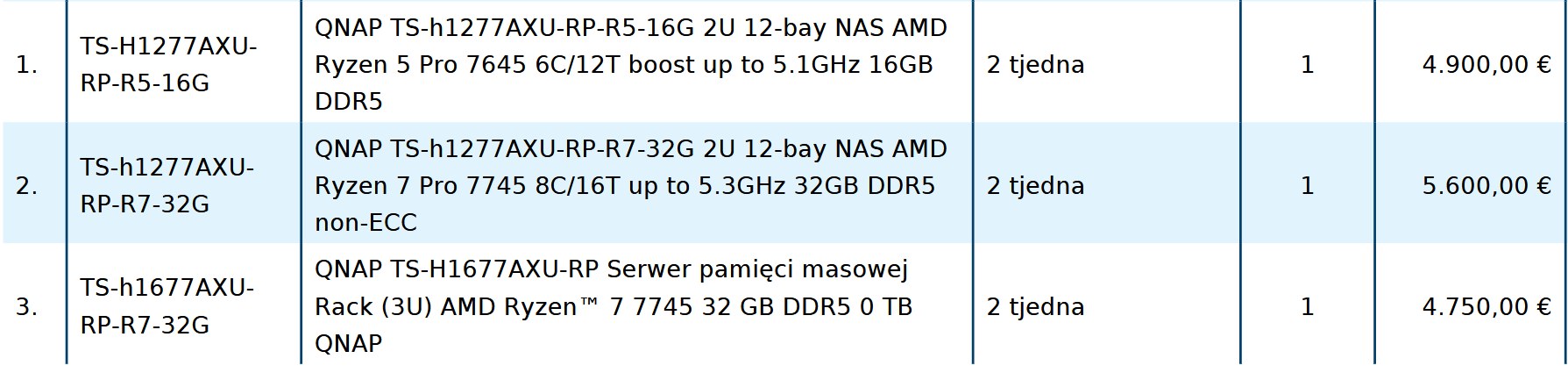
I got an offer/Quote from one local store and i’m a bit confused. I must be missing something.
I’m not that familiar (yet) with QNAP naming scheme but is there reason why would ITEM 2 (12-Bay 32GB) be more expensive than Item 3 (16-bay/32GB) on this offer/quote if they both have AMD 7745 CPU and 32GB?
Thanks and sorry if i’ve missed something obvious.
Our EU store net prices are 5,299 € for the TS-h1277-R7-32G and 6,099 € for the TS-h1677-R7-32G, which makes item 2 (5,600 €) look normal but item 3 (4,750 €) unusually low — about 1,350 € under our own price, and below even the weaker R5 unit in item 1.
I think need confirm with the local store that the line is a new sealed TS-h1677AXU-RP-R7-32G with full warranty and the price is honored.
Yeah, that confused me as well, option 3 for that price (if NEW) seem like no-brainer :).
BTW those are prices without TAX (ones i posted). We have big tax here so it’s pretty expensive at end :/. I really hoped QNAP is a bit lower on price than Synology :).
EDIT: They confirmed me that all 3 units are new/5 year warranty.
Funny enough I’ve also looked at amazon.de and there also 16-bay unit is cheaper than 12-bay unit. Or maybe we should say 12-bay is way to expensive than it should be.
Just getting back here to thank QNAP community and all participants that helped me to pick. Eventually I’ve ended up buying TS-h2477AXU-RP-R7-32G.
So now when it arrives I’ll probably have more questions for you guys so please be easy on me since I’ll probably have the lot of questions how to replicate/replace some Synology functionality (16 years of usage DSM) in QNAP world :).