Using QTS 5.2.8 (now updated to 5.2.8.3332) and MacOS Tahoe (26 and 26.1).
Since one month now, TimeMachine is not able to complete backups and claims it loses the SMB connection.
I’ve noted also that my regular synchronization between my two NASes fail because of loss of connections.
Have you been able to verify that this isn’t a real issue within your network and not something within the app?
Does your router or switch reboot either on a schedule or due to some other failure? Can you run a diagnostic utility at the same time as your backup to verify connectivity?
Hello,
Yes, I’ve tested with a wired connection to eliminate wifi issues, and the disconnections are random, there no logic behind the timing of the timemachine failures
I made a test this morning using a SSD volume to backup my Mac through TimeMachine : no disconnections.
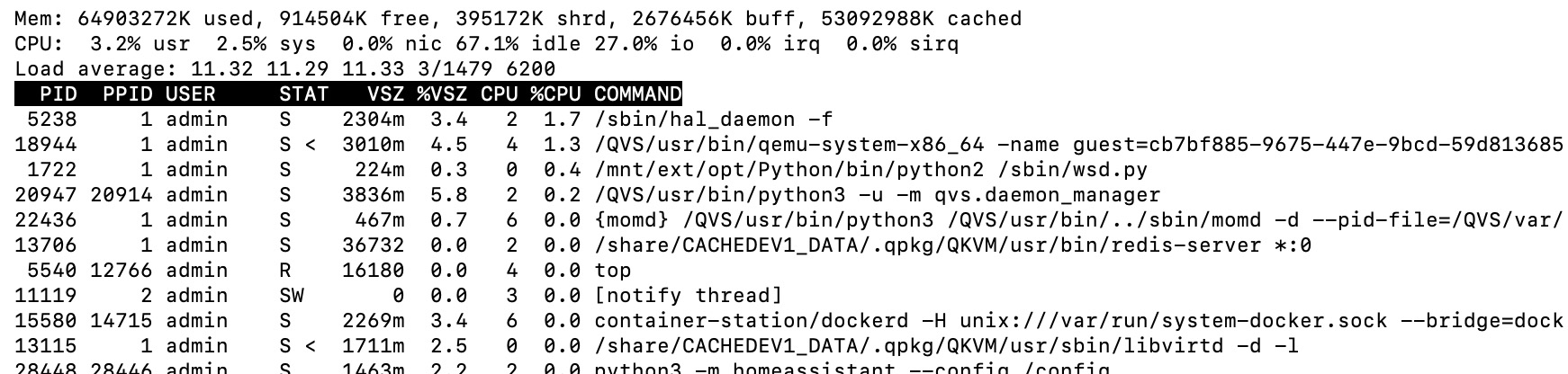
Seems that it disconnects regularly when using volumes on SATA disks (I have very high IO waits on CPU when backing up on SATA, even using SSD cache on it). This is very recent, but I changed both my SATA drivers in the last month as they both failed (fortunately not at the same moment !).
Maybe this is because of high IO delays…
OK, first of all, disable your SSD cache. It actually slows things down. 99 times out of 100 it is not needed.
Second, you should not have high I/O wait times. If you do, then something is not right. I backup 3 Macs to two different NAS units and do not have this problem. I am not running Tahoe FYI.
First thing I would do is see if something is gobbling up CPU time on your NAS. SSH into the NAS and run the “top” command. This will tell you CPU loading and what apps are taking the most. It will also show you the IO% as well.
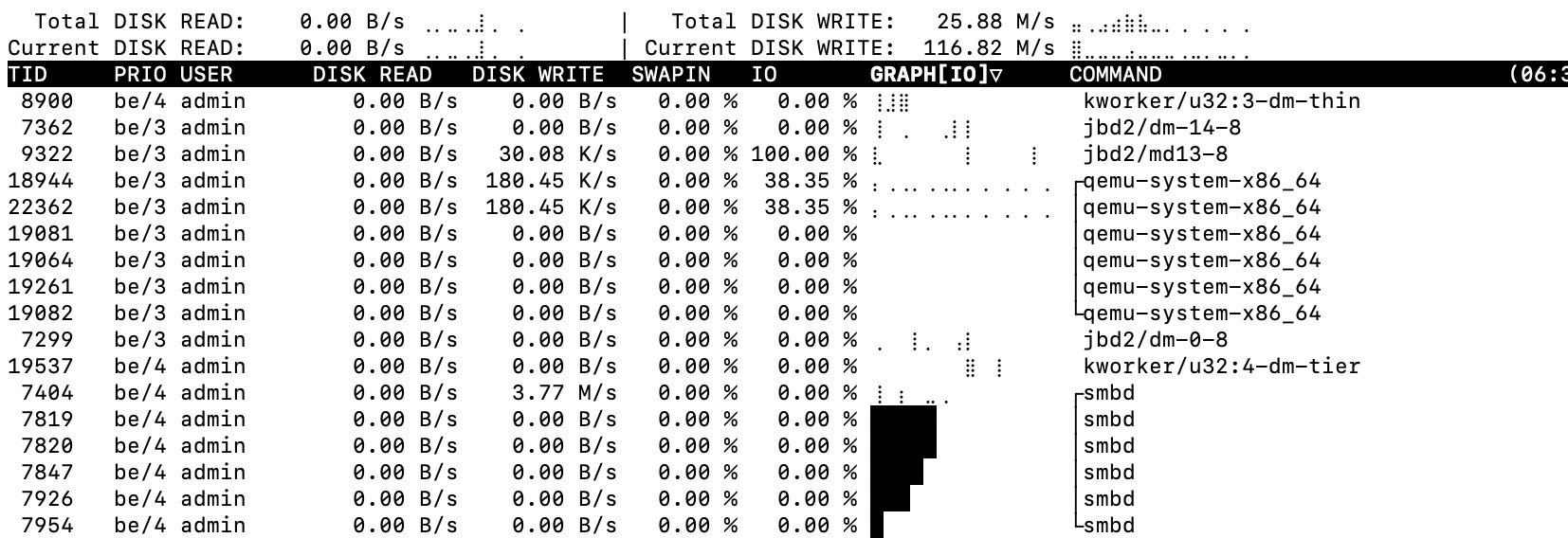
If the CPU load and all is low but IO% high, there’s another app I can direct you to called IOTOP which shows you what apps are taking up the IO.
I had extremely high IO usage on one of my NAS units. A reboot cured it.
OK. Can you show me a little more here of your TOP output? And what NAS is this?
I’m asking because I see your Load average is running at 13. Unless you have 13 cores in your NAS, you will be bottlenecking and this could cause some of your issues. Something is chewing up a lot of cycles. Doesn’t matter that your CPU usage time is mostly idle. Let’s take an expanded look at your first few processes.
It looks like process jbd2 is taking a bunch of the IO time:
The jbd2 process in Linux is part of the journaling system used by filesystems like ext4. It helps maintain the integrity of the filesystem by logging changes before they are committed, allowing recovery in case of a crash.
Are you doing some scrubbing or a RAID rebuild or anything?
If not, I would check the health of my disks. That process is taking a lot of IO time doing something…
OK. So did you replace both disks at the same time? How big are the drives? It’s possible that the RAID is still building. That will take a lot of IO until it is complete.
nope, disks died one at a time : first (HDD2) has been changed then rebuilt (completely), the the second one (HDD1). This has been done 1 month ago, and reconstruction is finished of course.
But it’s true that performance issues started around the same timeframe… interesting…
OK. And you are sure the RAID has rebuilt? I would think that a month would be more than enough time!
So the problems started AFTER HDD1 was installed?
Also, do you have a non-Tahoe Mac? It would be good to understand if this is a Tahoe related issue or if it’s something else. Even one you could borrow from a friend and do a single TM backup.
problems started just before changing HDD1 (second change). HDD2 was changed around 2 months before.
from the GUI (storage&xnapshot app), the RAID was fully rebuilt (near 1 week of reconstruction for 8 TB Raid-1 disks)
So problems started outside of a reconstruction.
Is there a way to check the Raid ?
Will try with another Mac with an older version (but same here, my upgrade to Tahoe was several weeks before the issue) as soon as I am available at home.