If there is a way to check permissions (who can view) for folders all at once, please let me know. (Since there are many folders, I cannot check the users who can view each folder one by one.)
1 Like
Even if you export, since it’s a bin file, I think it’s difficult to view it as a list.
Honestly, I feel it’s quicker to check from the command line here.
After accessing via ssd, if you’re using smb access, you can run the “testparm” command and get a display like the one below.
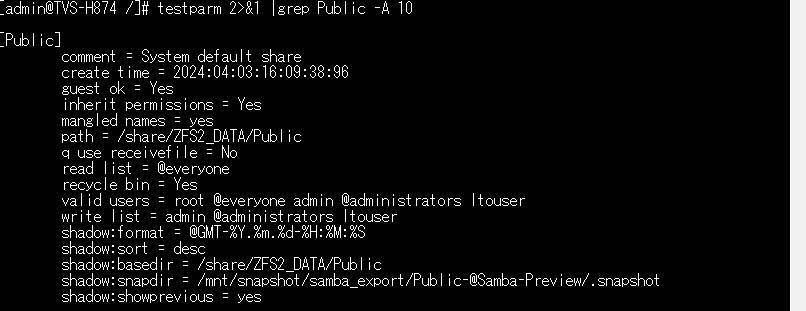
What you should look at is:
read list: read-only groups/users
write list: read/write groups/users
valid users: users who can access (= groups/users who can at least read)
I think these are the main points.
(Groups have @ at the beginning)
If you’re using Windows ACL, it’s a bit more complicated, but I suspect it’s difficult to output a list in this case, so maybe it’s only possible at the shared folder level.
If you’re using ftp or nfs, you might need a slightly different method—how does that sound?