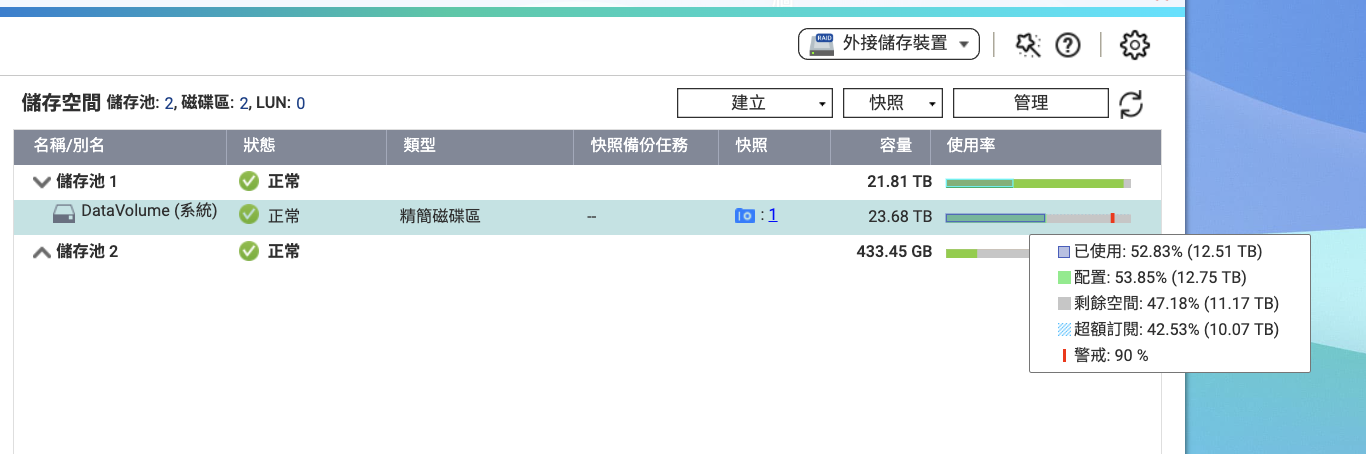
My NAS - TS364 is equipped with three 12TB hard drives. The available space shows 23.6TB, with 12.5TB used, 12.75TB allocated, 11.2TB remaining, and an over-provisioning of 10.07TB.
When I try to create snapshots, I often get a notification about insufficient space. How should I properly configure my NAS storage space?
Hello,
According to your image, Storage Pool 1 is already 90% full.
Snapshots and volumes also occupy space in Storage Pool 1. If you want to free up more space in the storage pool, you can reduce the space reserved for snapshots.
What is my total capacity? If I set up RAID 5 with 3 x 12TB drives, shouldn’t I have about 20TB available? It feels like it fills up after using just 12TB.
I’ve deleted all the snapshots, but it still shows 7.7TB used. Is there anything else I can delete?
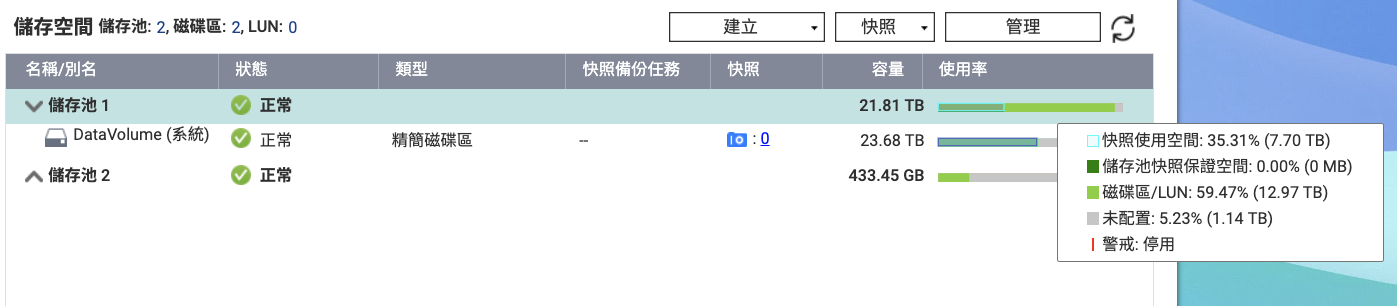
Hello, we may need to further understand your settings in order to proceed with analysis and assistance.
Would it be convenient for you to open a ticket for us via the help desk or forum?

Additionally, we have some snapshot-related FAQs for your reference:
Frequently Asked Questions about Snapshots | QNAP
How to Limit the Space Used by Snapshots? | QNAP
Thank you!

Hello, please try refreshing the page.
You can also contact Customer Service - QNAP, or submit a ticket via the Helpdesk on your NAS (How to submit a technical support request via QNAP? | QNAP).
Thank you!