お世話になります。
TS-h977XU-RPを使用し、
クォータを設定、使用量が高いユーザをコンソールからCSV出力することはできました。
その後、ユーザ毎に保有するファイル一覧を取得したいと考えています。
サポートに確認したところ、UIでの対応は現在ないとことでした。
sshコマンドで、一覧を出力する方法をご教示頂けませんでしょか?
よろしくお願いいたします。
お世話になります。
TS-h977XU-RPを使用し、
クォータを設定、使用量が高いユーザをコンソールからCSV出力することはできました。
その後、ユーザ毎に保有するファイル一覧を取得したいと考えています。
サポートに確認したところ、UIでの対応は現在ないとことでした。
sshコマンドで、一覧を出力する方法をご教示頂けませんでしょか?
よろしくお願いいたします。
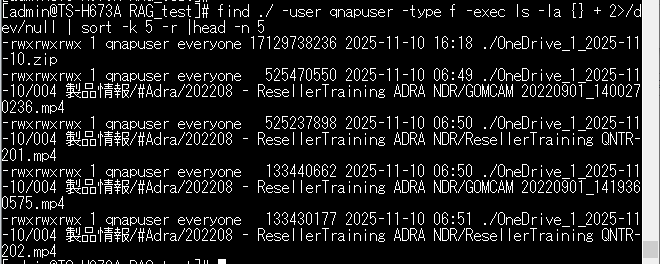
After moving to the shared folder you want to check via SSH, I think you can retrieve files for each user with the following command. Please give it a try.
find ./ -user qnapuser -type f -exec ls -la {} + 2>/dev/null | sort -k 5 -r | head -n 5
Please replace the username after -user with the user you want to retrieve.
The “| head -n 5” part at the end lists the top 5 files with the largest size. If you want to list “all” files, please remove this part.
Thank you.
Thank you for your reply.
The necessary list has been output.
I look forward to your continued support.
I’m glad to hear that the issue has been resolved.
If you have any other questions, please feel free to contact us.
Thank you for your continued support.